Find the Best Local AI Model for Your Device
ModelFit is a free tool that tells you which local AI models run on your hardware. Tell us your hardware and get the single best local LLM it can actually run, sized to your exact memory. Honest speed and quality estimates for Apple Silicon, iPhone, NVIDIA, and AMD.
How fast is your machine, really?
One command shows your real tok/s, then a card to post on X and your rank on the leaderboard. It asks before it sends anything.
No Node? brew tap modelfit-io/tap, brew trust modelfit-io/tap, brew install modelfit, then modelfit bench. The first run downloads 3 to 17 GB.
- Models tracked
- 203
- Run locally
- 159
- Devices and GPUs
- 71
~ $ npx @modelfit/cli@latest bench
  run 1/3: 132.6 tok/s
  run 2/3: 155.3 tok/s
  run 3/3: 150.0 tok/s
  150.0 tok/s on Qwen3.8 27B, #1 of 16
  Your card, ready to post on X:
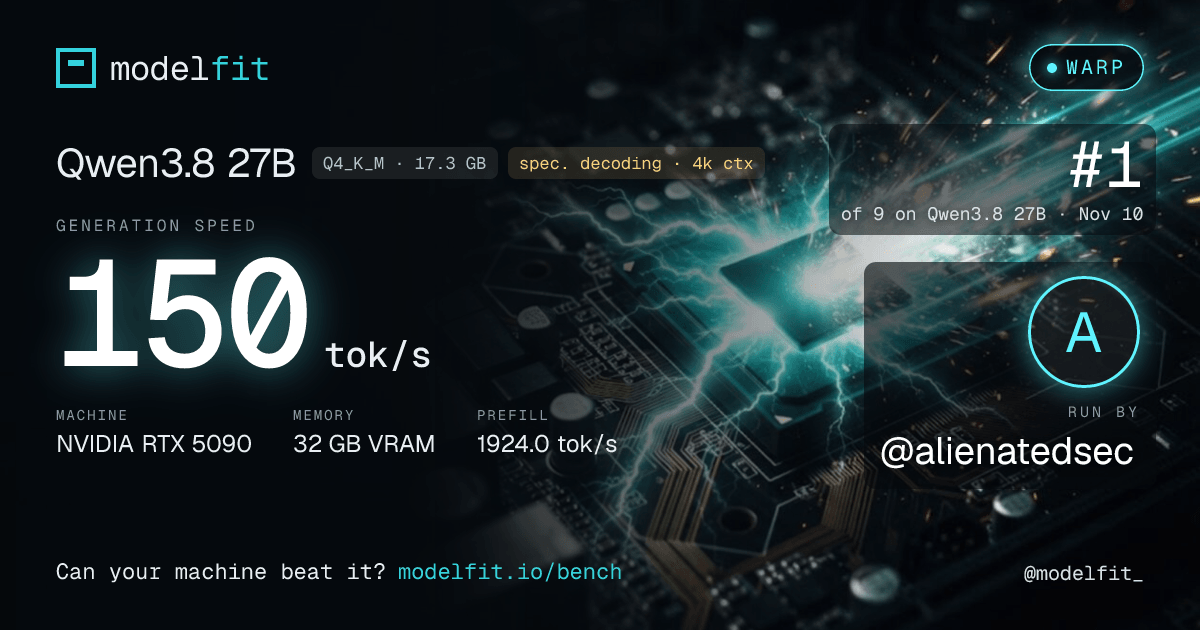
A real run from the leaderboard, Nov 10.
Choose your device
We match models to your exact memory and architecture.
Pick your model in one line, measure your machine in another
ModelFit's free, zero-dependency CLI detects your exact hardware, picks the single best local model it can run, and hands you the one-line Ollama command to install it. The second command times a model that fits your machine with Ollama and asks before adding your speed to the public leaderboard below. The dataset behind it is open (CC BY 4.0), and AI agents can query it live over MCP.
- 1 · Pick the best model$npx @modelfit/cli@latest
- 2 · Measure your real speed$npx @modelfit/cli@latest bench
Where does your machine land?
Full leaderboard →Every other speed on ModelFit is an estimate. These are real runs: readers time Qwen3.8 27B with the same prompts on their own Mac or GPU, so the bars compare. 21 runs from 16 machines so far.
Not on the board yet: M5, RTX 3090, M3, RTX 4060, M2, RTX 4070, M3 Pro, RTX 5080, M3 Max, RTX 5070. Own one? The second command above adds it. 8 more machines are on the full leaderboard.
Median of each machine's runs, generation speed as reported by Ollama. Needs Node and Ollama. The CLI asks before it sends anything: machine type, memory, Ollama version and timings (no name, no email, no files). New runs reach this chart at the next site update and the full leaderboard right away.
Latest from the blog
View all → Nov 26, 2026
Tencent WeMM-Video Weights Are Out: What Hardware Runs It?
Tencent's WeChat Vision team published WeMM-Video on Hugging Face: an omni-modal family for video understanding that takes text, images, audio and video, and answers in Chinese or English. Four open-w...
- Nov 25, 2026
Inkling 2 Mini cut our cloud tokens by 95% with this new tool (delegate)
At ModelFit, developer Wecko runs more than 40 AI bots around the clock on a single Mac mini through HermesBot, our open-source dispatch app: code maintenance, log audits, content operations and sched...
- Nov 24, 2026
Tencent WeMM-Ecom Weights Are Out: What Hardware Runs It?
Tencent's WeChat Vision team published WeMM-Ecom on Hugging Face: five open-weights e-commerce vision-language models, 0.8B, 2B, 4B and 9B dense plus a 35B-A3B MoE with about 3B active parameters, all...
- Nov 19, 2026
Microsoft Aion 1.0 Instruct 2.3B: What Hardware Runs It?
Microsoft published Aion 1.0 Instruct on Hugging Face on 18 November 2026: microsoft/Aion-1.0-Instruct-2.3B, from the Windows Applied Sciences Group, under the MIT license (microsoft/Aion-1.0-Instruct...
How much LLM fits your memory?
All stats →A local LLM needs roughly 0.6 GB per billion parameters at Q4. ModelFit sizes picks to ~70% of your unified memory on machines up to 32GB, scaling to ~85% at 128GB+, leaving room for the OS, context, and KV-cache. Here is what each tier comfortably runs today. The same math applies to GPU VRAM: for dedicated cards, see the per-card GPU guides.
| Unified memory | Runs up to (dense) | Top local pick | Models that fit |
|---|---|---|---|
| 8 GB | ~9B params | Qwen3.5 4B Instruct | 37 of 159 |
| 12 GB | ~12B params / 12.1B MoE | LFM2.5 8B-A1B | 58 of 159 |
| 16 GB | ~14B params | Qwen3.5 9B Instruct | 69 of 159 |
| 24 GB | ~29.3B params | LFM2 24B-A2B Instruct | 84 of 159 |
| 32 GB | ~33.1B params / 35.95B MoE | Qwen3.8 27B | 108 of 159 |
| 36 GB | ~33.1B params / 39.8B MoE | Qwen3.6 35B-A3B | 113 of 159 |
| 48 GB | ~33.1B params / 46.7B MoE | Qwen3.6 35B-A3B | 123 of 159 |
| 64 GB | ~70B params / 78.1B MoE | Nemotron 3.5 Lightning 30B-A3B | 132 of 159 |
| 72 GB | ~70B params / 80B MoE | Kolibri 1 (IQ4_XS) | 134 of 159 |
| 96 GB | ~123B params / 125.09B MoE | Kolibri 1 | 144 of 159 |
| 128 GB | ~123B params / 125.09B MoE | Qwen3.5 122B-A10B Instruct | 150 of 159 |
| 192 GB | ~123B params / 235B MoE | Qwen3.8-Flash-Next | 152 of 159 |
| 256 GB | ~123B params / 428B MoE | Qwen3.8-Flash-Next | 153 of 159 |
| 512 GB | ~123B params / 770B MoE | MiniMax M3.1 Flash | 159 of 159 |
Derived from ModelFit's own catalog of 203 models · dataset updated 2026-11-24 · full dataset (CC BY 4.0)
Run your own number: VRAM calculator, per-GPU answers, VRAM per model size, RAM vs VRAM or the full memory calculator.
Local vs cloud: how close are we?
Full benchmark →Open-weight models you can run at home keep narrowing the gap with the best closed APIs on coding. Here is where the line sits today on SWE-Bench Verified.
SWE-Bench Verified · third-party scores, each raw-confirmed against the model's primary source. Qwen3.8-27B runs locally on a 24GB Mac.
Browse the full index
All devices →Local LLM questions, answered
How much memory do I need to run a local LLM?
A local model needs roughly 0.6 GB of memory per billion parameters at Q4 quantization for the weights, closer to 0.8 GB per billion under 8B once runtime overhead is counted. ModelFit sizes its picks to about 70% of your device's unified memory (scaling to ~85% on 128GB+ machines), so an 8GB machine comfortably runs dense models up to ~9B and a 16GB machine up to ~14B parameters. Mixture-of-experts models fit larger total parameter counts because only a fraction is active per token.
What is the best local LLM for a 16GB Mac?
On a 16GB Mac, ModelFit's top pick is Qwen3.5 9B Instruct (Q4_K_M): it loads in about 7GB and ranks first on the engine's balance of quality, speed and memory headroom, the same pick as the calculator. 69 of ModelFit's 159 local models fit a 16GB device.
Can I run these models completely offline?
Yes. Every local model ModelFit recommends runs fully offline on your own hardware, through Ollama or, for builds without an Ollama tag, llama.cpp, LM Studio or MLX: no API keys, no subscription, and no data leaves your machine.
How many AI models does ModelFit cover?
ModelFit tracks 203 AI models across 42 families; 159 run locally on Apple Silicon, NVIDIA, or AMD hardware, 126 of them with a registry-verified Ollama tag.
How accurate are the speed estimates?
Tokens-per-second figures are ModelFit estimates derived from your chip or GPU's memory bandwidth and the model's size, not measured benchmarks. Real-world speed varies with quantization, context length, and thermal state.