At ModelFit, developer Wecko runs more than 40 AI bots around the clock on a single Mac mini through HermesBot, our open-source dispatch app: code maintenance, log audits, content operations and scheduled jobs. Until this month, a frontier cloud model handled every one of those tool calls, and it was burning millions of tokens on work that needs zero judgment.
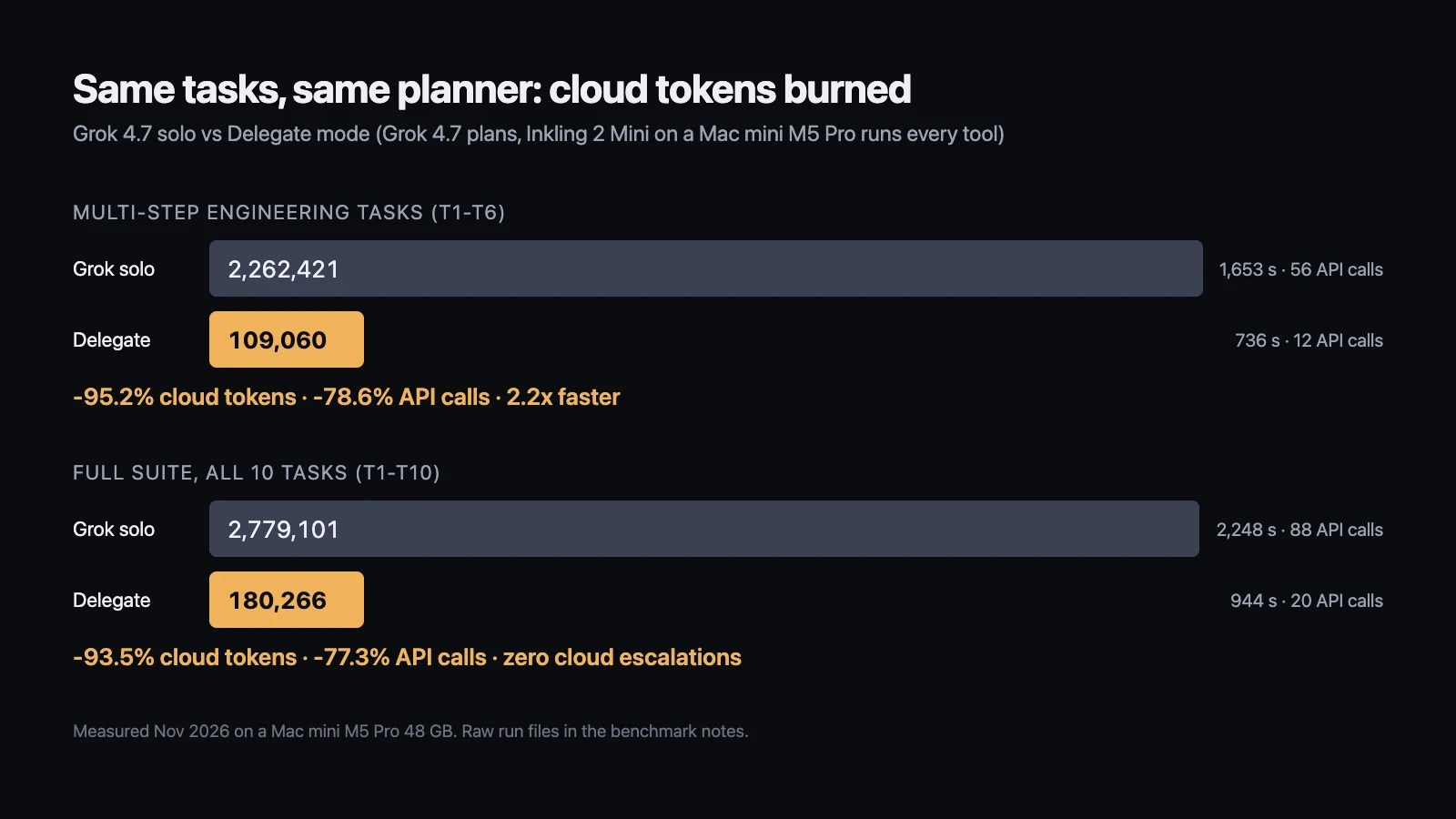
The fix was not a smaller cloud model. It was moving the tool calls themselves to a local model: Inkling 2 Mini, an open-weights model served by Splash on our Mac mini M5 Pro 48 GB. Measured over 10 real tasks, that change cut cloud token usage by 95.2% on multi-step work (93.5% across the full suite), cut API calls by 78.6%, and made the runs more than twice as fast. Every figure below comes from our own benchmark runs of November 2026 on that machine, with the exact Splash measurements in our public run record.
In short: a frontier model plans, Inkling 2 Mini on Splash executes every tool call, and the cloud bill drops by more than 90%.
What were we running before?
Each bot task used to work like this: the cloud model read files, ran shell commands, hit test failures, read tracebacks, and retried. By turn eight of a task, every API call was re-sending tens of thousands of tokens of raw stdout and file contents.
On a 6-task suite of our daily ops work, Grok 4.7 working alone burned 2,262,421 cloud tokens over 56 API calls in 1,653 seconds. The suite mirrors what our bots do every day: diffing 41 KB sitemaps, auditing a 196 KB access log, triaging task trackers, writing a parser with pytest. Across all 10 benchmark tasks, the solo run reached 2,779,101 cloud tokens and 88 calls. Multiply that by 40 bots running scheduled jobs every day and the bill stops making sense.
What does the local stack look like?
Three pieces, all on one machine:
- Splash, the Apple Silicon inference server from Inco, installed with
brew install incoai/tap/splash. It serves the model on 127.0.0.1 and handles idle memory release natively. - Inkling 2 Mini, the open-weights model from Thinking Machines (Apache 2.0), in the Unsloth UD-Q4_K_M GGUF build, 16.6 GB of weights.
- A dispatch layer (our own HermesBot app, open source, MIT) that gives the cloud model exactly one tool: assign a mission to the local worker. The cloud model plans and reviews; it never touches a file or a shell command.
The worker boots with a fresh, scoped context, does the task, and returns a compact summary instead of 50 KB of raw logs. If the local server is down, the session stops rather than silently falling back to cloud calls.
How much cloud did we actually cut?
Method: the same 10 tasks, the same cloud planner (Grok 4.7), the same machine, run in two configurations, once solo and once dispatching to the local worker. The tasks are real workloads pulled from our daily ops: diffing 41 KB sitemaps, auditing a 196 KB access log, fixing bugs against a failing pytest suite, adding a CLI flag with tests.
Here is what each configuration consumed:
| Setup | Cloud tokens | Cloud calls | Wall time |
|---|---|---|---|
| Grok 4.7 solo, tasks 1-6 | 2,262,421 | 56 | 1,653 s |
| Grok 4.7 + Inkling 2 Mini worker, tasks 1-6 | 109,060 | 12 | 736 s |
| Grok 4.7 solo, all 10 tasks | 2,779,101 | 88 | 2,248 s |
| Grok 4.7 + Inkling 2 Mini worker, all 10 tasks | 180,266 | 20 | 944 s |
Get told when a better model fits your MacBook Air M5 16 GB
One email when a new open-weight model is a better fit for your machine, plus the Thursday weekly.
For: MacBook Air M5 16 GB
You'll also get the weekly ModelFit email. By signing up you agree to our Privacy Policy. Unsubscribe from either email anytime, in one click.
On the 6 multi-step tasks that is 95.2% fewer cloud tokens and 78.6% fewer API calls. Across the full suite, including four short tasks where a 2-call dispatch wrapper is a bigger slice, the cut is 93.5%. In a zero-contention rerun the same 6 tasks finished in 430 seconds, 3.8 times faster than solo, with every real check passing.
The pattern that convinced us: on the full run, the cloud model made exactly 2 calls per task, one to delegate and one to deliver the final answer. The local model processed 523,078 input tokens and 24,649 output tokens on the Mac, with zero cloud escalations.
How fast is Inkling 2 Mini on a Mac mini M5 Pro?
On our M5 Pro 48 GB, Splash decodes Inkling 2 Mini at roughly 100 tokens per second in this workload (about 93 weighted and 107 median tokens per second in the zero-contention run, per the run record). That is fast enough that the dispatch overhead, not decode speed, dominates wall time.
For comparison, our earlier direct MLX-VLM measurements on the same machine gave about 27 tokens per second on short prompts, recorded in the November 21 run record. Splash is a different serving path with speculative decoding, which is where most of the speed difference comes from.
Why did a 17 GB model push the Mac to 92% RAM?
The weights are only about 17 GB, yet the Mac sat at 92% memory. The culprit was the KV cache, not the weights. The KV cache is the attention state a transformer keeps for every token it has seen, and it grows linearly with context length. Each token in Inkling 2 Mini's KV cache takes roughly 98 KB (48 layers, 8 KV heads, 128 dims, int8 K and V). At a 256K context window, Splash had pre-allocated about 25 GB on top of the weights. Wired memory reached about 37 GB.
Two fixes brought the footprint under control, and every value is detailed in the run record:
- Dropping the server to a 128K context window cut the KV cache to about 12-13 GB and wired memory to about 21 GB.
- Splash's
--idle-release 15mflag unloads everything after 15 idle minutes. That freed about 34 GB; system memory use dropped from 47 GB to 25 GB. A cold reload takes about 3.5 seconds.
One trap: a background memory-consolidation job was pinging the server every two minutes, so the idle timer could never trigger. If you use idle release, audit what talks to the port.
What broke during the rollout?
Three failure modes worth knowing if you build something similar.
Our first prototype was slower than the cloud model working alone: 2,520 seconds on the 6 tasks against 1,653 solo. The cause was a generic 420-second timeout on the executor tool. Long worker calls were killed mid-flight while the local model kept running, and the cloud planner, assuming failure, dispatched a duplicate behind the orphan. Fixing the deadline floor (queue wait plus mission budget) brought the same tasks to 781 seconds on oMLX and 430 on Splash.
We also tried a 9B local model for easy tasks. It decoded at about the same speed, looped more, needed 14 missions instead of 10, and tripled the cloud token overhead (309k versus 101k) because the planner kept cleaning up after it. Bigger, boring and reliable won.
The one easy win: short requests with no tools, like translating a paragraph, get answered directly by the cloud model without dispatching a mission. A social drafting task dropped from 122 seconds to 16.
How far is this from a Mac Studio 512 GB?
Not far at all, and that is the point. Inkling 2 Mini at UD-Q4_K_M weighs 16.6 GB; even with a 256K context its KV cache adds about 25 GB, for roughly 41 GB wired. A Mac Studio with 512 GB of unified memory could host a dozen isolated workers like ours on a fraction of its RAM, or serve this model to an entire team from one machine. Everything we describe here scales up with headroom to spare.
FAQ
Is Inkling 2 Mini free to run locally?
Yes. The weights are open under Apache 2.0 on Hugging Face, and the Unsloth GGUF build we use is a straight download. Splash, the server, is also open source.
How much RAM do I need for Inkling 2 Mini with Splash?
Plan for about 21 GB wired at a 128K context (16.6 GB of weights plus roughly 12-13 GB of KV cache) on a 48 GB Mac, per our run record. Thinking Machines lists 32 GB as the minimum for the model itself. Below that, use our Mac checker to see what fits your machine.
Can a local model replace a frontier model for coding agents?
Not for planning and hard reviews, in our experience. It replaces the tool-call grind: file reads, test runs, log audits. The split that works is a frontier model in the manager's chair and a local model doing the hands-on work.
Where are the raw measurements?
In two public files: the Splash run record (speed, KV cache, memory release) and the MLX run record (direct serving baseline), both measured on our Mac mini M5 Pro 48 GB.
Sources
Don't miss the next one for your MacBook Air M5 16 GB
This article covers one moment. Get one email when a newer open-weight model fits your machine better, plus the Thursday weekly with what changed.
For: MacBook Air M5 16 GB
You'll also get the weekly ModelFit email. By signing up you agree to our Privacy Policy. Unsubscribe from either email anytime, in one click.
Match this model to a machine that can run it: by RAM tier for Apple Silicon, or by VRAM for an NVIDIA GPU.
See how this changes your recommendation
Run the wizardHave questions? Reach out on X/Twitter