TL;DR: The MacBook Pro M5 Pro with 64GB is the sweet spot for serious local AI. Qwen3.6 27B at Q4 needs only ~18GB and runs at usable speeds, while 7B-class daily drivers hit 80-100 t/s (Apple). The headline win over M4 isn't token speed. It's 3.3-4x faster prompt processing, so long contexts feel instant.
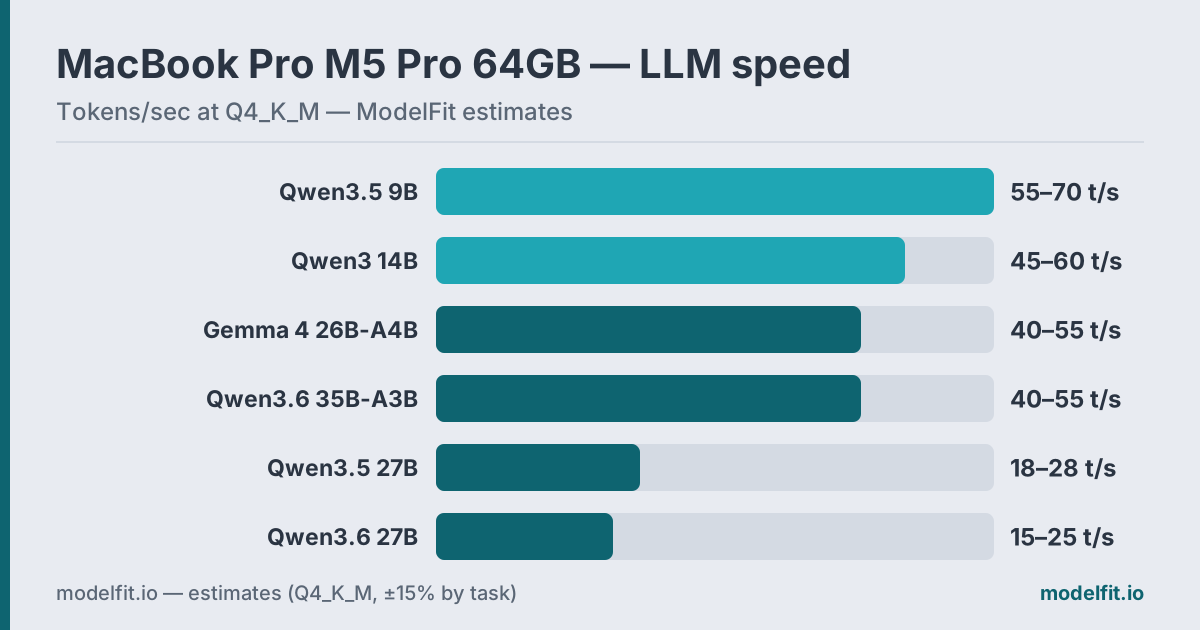 Estimated token generation on the MacBook Pro M5 Pro 64GB at Q4_K_M. ModelFit estimates.
The MacBook Pro M5 Pro is where local AI stops asking for compromises. With 307 GB/s memory bandwidth, up to 64GB of unified memory, and Apple's new Neural Accelerators embedded in every GPU core, this machine runs 27-35B models that used to demand a workstation. Active cooling keeps it at peak speed through hours of inference, and the $2,199 starting price puts it within reach of solo developers. Other configurations are covered on the MacBook Pro device page.
The real story is prompt processing. Token generation tracks bandwidth, so it improves modestly over M4. But time-to-first-token is 3.3-4x faster (Apple), the part you feel most. This guide covers which models fit 64GB, how fast they run, and what to skip. The M5 Pro ships March 11, 2026.
What Does the M5 Pro Actually Change for LLMs?
The M5 Pro splits its gains into two buckets, and only one is dramatic. Token generation tracks the 307 GB/s bandwidth, so it edges up over M4. But prompt processing runs 3.3-4x faster thanks to Neural Accelerators in every GPU core (Apple). That's the part you feel.
Here's why it matters. When you paste a long document, a full codebase, or a deep chat history, the model has to read all of it before answering. That fill phase is compute-bound, not bandwidth-bound, exactly what the Neural Accelerators target. A prompt that crawled on M4 now loads in seconds.
Most buyers fixate on tokens per second, but for long-context work the TTFT jump matters more. A 27B model on M5 Pro feels snappier in practice than a faster-generating 14B on M4 Pro, simply because you stop waiting at the start of every turn. Our full M5 Pro & M5 Max analysis breaks down the silicon in detail.
How Much RAM Do You Actually Have for Models?
On a 64GB M5 Pro, your real model budget is roughly 56-58GB, the most usable headroom of any MacBook Pro. macOS and background services take about 4GB. Browsers, editors, and chat apps claim another 2-4GB. That still leaves enough room for a 27-35B model and your entire workflow open at once.
| Allocation | Typical Size |
|---|---|
| macOS kernel + services | ~4 GB |
| Active apps (browser, editor, Slack) | ~2-4 GB |
| Available for LLM | ~56-58 GB |
The math is simple: Q4_K_M costs roughly 0.6 GB per billion parameters. Qwen3.6 27B needs ~18GB, it fits with room to spare. A 35B MoE needs ~22GB. A 70B Q4 model lands near ~40GB, which also fits in 64GB. But the M5 Pro's 307 GB/s makes 70B slower than it would be on the higher-bandwidth M5 Max.
The 64GB tier is where you stop closing apps to load a model. On 24GB you juggle; on 64GB you load a 27B model and forget it's running. That mental shift is the real upgrade.
How Fast Will Models Actually Run?
On M5 Pro 64GB, smaller models fly and large ones stay usable. Apple's figures put 7B-class models at 80-100 t/s fully cached and 14B models at 45-60 t/s with fast TTFT (Apple). 27-35B quantized models run at comfortable, usable speeds; we estimate ~15-28 t/s for dense, faster for MoE.
| Model | VRAM (Q4_K_M) | Speed | Best For |
|---|---|---|---|
| Qwen3.5 9B | ~7 GB | 55-70 t/s est. | Fast daily driver |
| Qwen3 14B | ~9.5 GB | 45-60 t/s | Proven all-rounder |
| Gemma 4 26B-A4B | ~16 GB | 40-55 t/s est. | Fast multimodal |
| Qwen3.5 27B | ~16 GB | 18-28 t/s est. | Balanced quality |
| Qwen3.6 27B | ~18 GB | 15-25 t/s est. | Best quality, coding |
| Qwen3.6 35B-A3B | ~22 GB | 40-55 t/s est. | Reasoning, agents |
Two rows deserve a second look. The MoE models (Gemma 4 26B-A4B and Qwen3.6 35B-A3B) store big-model weights but activate only 3-4B parameters per token, so they generate near small-model speed. And the TTFT advantage doesn't show in a tokens-per-second column at all: feed any of these a long prompt and it starts answering in seconds rather than after a long pause.
Which LLMs Are the Top Picks for M5 Pro 64GB?
The best models for M5 Pro 64GB span six roles, from a fast multimodal daily driver to a dense 27B flagship that fits in ~18GB. Each runs through Ollama with one command. With 56-58GB of headroom, every model below loads cleanly alongside your normal workflow.
1. Qwen3.5 9B: Fastest Daily Driver
Qwen3.5 9B is the model you keep loaded all day. At ~7GB it leaves nearly all your memory free, and at an estimated 55-70 t/s it responds faster than you can read. It takes images natively and carries a 262K context window: quick questions, drafting, summaries, and screenshots, one model.
ollama run qwen3.5:9bIts quality rivals previous-generation 30B-class models, which is absurd for a model this light. This is your default.
2. Qwen3 14B: Proven All-Rounder
When you want a second opinion with a different flavor, Qwen3 14B is the battle-tested pick. It runs at 45-60 t/s on M5 Pro with fast TTFT, fits in ~9.5GB, and its hybrid thinking mode toggles chain-of-thought with /think and /no_think.
ollama run qwen3:14bIt is no longer the headline; the Qwen3.5 and 3.6 generations have passed it. But its tooling support is everywhere and its speed on this chip is excellent. On 64GB you can keep it loaded permanently.
3. Gemma 4 26B-A4B: Fast Multimodal Workhorse
Google's Gemma 4 26B-A4B is a mixture-of-experts model: 26B parameters stored, ~4B active per token. That means 26B-class answers at an estimated 40-55 t/s, with native text-plus-image input for screenshots, charts, and photos.
ollama run gemma4:26bAt ~16GB it loads without a thought on this machine. For interactive work that needs both speed and substance (document Q&A, image analysis, fast drafting), this is the one to keep warm.
4. Qwen3.5 27B: Balanced Quality
Qwen3.5 27B is the dense middle path: stronger long-form coherence than anything above it in speed, faster than the 3.6 flagship below it. At ~16GB and an estimated 18-28 t/s, it suits complex multi-turn sessions and agent scenarios.
ollama run qwen3.5:27bOn 24GB hardware, a 27B model is a careful squeeze. On 64GB it's routine: you run it with your browser, IDE, and Slack all open. That's the difference 64GB buys.
5. Qwen3.6 27B: Best Quality and Coding
This is the model the 64GB tier exists for. Qwen3.6 27B is the current dense flagship of the open mid-size class, strongest on coding, 262K context extensible to 1M, ~18GB at Q4_K_M. The M5 Pro's fast prompt processing is the perfect partner: whole repositories load in seconds.
ollama run qwen3.6:27bWire it into Continue.dev or Cursor for inline suggestions, and see our coding on MacBook Pro tier list for how it compares to lighter options. At an estimated 15-25 t/s it is fast enough for real development sessions, and the output quality justifies the wait on hard problems.
6. Qwen3.6 35B-A3B: Reasoning and Agents at Speed
The MoE flagship: 35B parameters stored, ~3B active. Qwen3.6 35B-A3B generates at an estimated 40-55 t/s, faster than the dense 27B, while leading on reasoning and tool calling. Long thinking chains stop being tedious when the model writes them this fast.
ollama run qwen3.6:35b-a3bUse it for agent workflows, multi-step reasoning, and structured problem solving. At ~22GB it still leaves more than 30GB of headroom on this machine.
Should You Use MLX or Ollama on M5 Pro?
For maximum speed on M5 Pro, use MLX. Apple's MLX framework runs 20-30% faster than llama.cpp and up to 50% faster than Ollama on Apple Silicon (modelfit M5 analysis, 2026). Ollama stays the simplest entry point; our Ollama setup guide covers it end to end, but MLX squeezes real extra performance from the same chip.
The MLX ecosystem has matured. Most popular families (Qwen, Llama, Gemma, Phi) ship MLX-quantized versions on HuggingFace. LM Studio, which Apple demoed on stage, now includes an MLX backend, so you get the speed without managing Python tooling yourself.
Our advice: start with Ollama using the commands above. Once you settle on a daily model, try its MLX build in LM Studio. If you run a 27B model for hours, that 20-50% gain compounds into real time saved. For casual use, Ollama's simplicity wins.
What Should You Avoid on M5 Pro 64GB?
70B at this tier, if speed matters most. A 70B Q4 model fits in 64GB at ~40GB, but the M5 Pro's 307 GB/s makes it slower than the higher-bandwidth M5 Max. It's possible and usable; just know the M5 Max is the better 70B machine if that's your priority. The 35B-A3B MoE covers much of the same quality ground at several times the speed. Q8 quantization above 14B. Q8 of a 27B model lands near ~29GB. It fits on 64GB, but the quality gain over Q4_K_M is marginal while the speed cost is real. Stick to Q4_K_M or QAT builds for 27B+ models. Old-generation 13B models. Llama 2 13B, Vicuna, and similar 2023-era models are outclassed. Qwen3.5 9B runs faster and scores far higher on modern benchmarks. There's no reason to run dated architectures when current models win on every metric. Phi-4 (ollama run phi4) is another strong modern mid-size option.
Quick Reference Table
| Use Case | Recommended Model | Command |
|---|---|---|
| Max speed daily | Qwen3.5 9B | ollama run qwen3.5:9b |
| Proven all-rounder | Qwen3 14B | ollama run qwen3:14b |
| Fast multimodal | Gemma 4 26B-A4B | ollama run gemma4:26b |
| Balanced quality | Qwen3.5 27B | ollama run qwen3.5:27b |
| Best quality / coding | Qwen3.6 27B | ollama run qwen3.6:27b |
| Reasoning / agents | Qwen3.6 35B-A3B | ollama run qwen3.6:35b-a3b |
FAQ
What is the best LLM for MacBook Pro M5 Pro 64GB?
Qwen3.6 27B is the best quality pick. It fits in ~18GB and runs comfortably on 64GB, with class-leading coding ability. For everyday speed, Qwen3.5 9B at an estimated 55-70 t/s is the daily driver, and 7B-class models reach 80-100 t/s per Apple's disclosures. Qwen3.6 35B-A3B covers fast reasoning thanks to its MoE design.Can the M5 Pro 64GB run 27B and 35B models?
Yes, easily. Qwen3.6 27B at Q4_K_M uses ~18GB and the 35B-A3B MoE uses ~22GB, leaving 30GB+ of headroom on a 64GB machine. You can keep one loaded with your browser, editor, and chat apps all open. This is the tier where big models stop being a squeeze and become routine.
How much faster is the M5 Pro than M4 Pro for LLMs?
Token generation improves modestly, tracking the bandwidth bump. The big jump is prompt processing: 3.3-4x faster thanks to Neural Accelerators in every GPU core (Apple). For long-context and interactive work, that TTFT gain is what you feel most.
Can the M5 Pro 64GB run 70B models?
Yes, a 70B Q4 model fits at ~40GB. But the M5 Pro's 307 GB/s bandwidth makes it slower than the M5 Max. It works and stays usable, but if 70B is your main goal, the M5 Max with its higher bandwidth and 128GB option is the better machine.
Why run a 35B MoE instead of a dense 27B?
Speed. Qwen3.6 35B-A3B stores 35B parameters but activates only ~3B per token, so it generates at an estimated 40-55 t/s, roughly twice the dense 27B, while matching it on reasoning and tool calling. The dense 27B still wins on some long-form consistency, which is why both make the list.
Should I use Ollama or MLX on M5 Pro?
MLX is 20-30% faster than llama.cpp and up to 50% faster than Ollama on Apple Silicon (modelfit M5 analysis, 2026). Start with Ollama for simplicity, then try MLX through LM Studio's built-in backend if you run a model heavily and want the extra speed.
Does the M5 Pro thermal throttle during AI inference?
No. The MacBook Pro's active cooling sustains peak GPU throughput indefinitely. Unlike the fanless MacBook Air, it holds full speed through hours of continuous inference, important for batch processing, long document generation, and all-day coding sessions where consistent throughput matters.
Is 64GB enough for serious local AI work?
For most developers and power users, 64GB is the sweet spot. It runs every practical model below 40B comfortably, holds a 70B in a pinch, and keeps your whole workflow open alongside. The jump to 128GB matters mainly if 70B speed or running several large models at once is the priority.
How does the M5 Pro 64GB compare to the M4 Pro 24GB?
The M5 Pro 64GB unlocks 27-35B models as daily drivers, where M4 Pro 24GB tops out near 27B as a tight squeeze. Add 3.3-4x faster prompt processing and far more headroom, and the M5 Pro moves from "capable" to "effortless" for serious local AI.
Related Model Families:- Qwen Models: Home of the 3.5 and 3.6 generations that lead this tier
- Gemma Models: Google's fast MoE multimodal family
- DeepSeek Models: Reasoning-focused alternatives
Want the full silicon breakdown? Read our Apple M5 Pro & M5 Max local LLM guide, or see the best LLMs for any MacBook.
Where to Buy for Local AI
best configsRuns 30B models with headroom; active cooling sustains long inference without throttling.
Check price on AmazonMax headroomLoads 70B models locally, the most capable AI laptop config.
Check price on AmazonPrefer to buy direct? Buy from Apple (same price, no affiliate link).
Archive your model library off the internal drive. Quantized models run 5 to 40GB each, so 2TB holds dozens with room to spare.
Check price on Amazon40Gbps external storage fast enough to run models from. Pair it with an M.2 drive for a portable model vault.
Check price on AmazonThe fanless MacBook Air heat-soaks on long inference runs. An aluminum riser lifts the chassis so it sheds heat better off the desk.
Check price on AmazonMore ports for the external drives, displays and peripherals around a local-AI workstation.
Check price on AmazonModelFit may earn a commission on purchases through these links, at no extra cost to you.
Want a Model Bigger Than This Mac Runs? Rent a Cloud GPU
by the hour70B+ and frontier open-weight models that won't fit in unified memory run great on an hourly rented GPU, same open weights, same Ollama workflow, no subscription.
ModelFit may earn a commission on sign-ups made through these links, at no extra cost to you.
The weekly local-AI refresh
New open-weight models, real Apple Silicon benchmarks, and the one model worth running on your Mac this week. Free, one email a week, unsubscribe anytime.
By subscribing you agree to our Privacy Policy and to receive the weekly email. Unsubscribe anytime.
Have questions? Reach out on X/Twitter