Best AI Models for MacBook Air M1 (2026)
AI model recommendations for MacBook Air M1 with 8-16GB RAM. Best fits: 4B-7B models like Qwen3.5 4B. This configuration provides optimal performance for local AI models.
For a MacBook Air M1 with 16GB RAM, the best local LLM is Qwen3.5 9B Instruct at ~10 tok/s. It loads in ~7GB of unified memory, and 46 of ModelFit's 106 local models fit this device comfortably (ModelFit, 2026).
Sizing rule: a local model needs about 0.6 GB of unified memory per billion parameters at Q4, and ModelFit budgets roughly 70% of the 16GB here so the OS, context, and KV-cache keep headroom (rising toward 85% on 128GB-and-up machines). Strong alternatives: Qwen3 8B (~6.5GB) and Gemma 4 12B (~8GB). Qwen3.5 9B Instruct generates an estimated 10 tok/s here, fast enough for interactive chat. Longer contexts cost extra memory, so a model that fits at 8k context may not fit at 64k. What it will not run: Phi-4 14B (Q8) (14B) needs about 14.5GB, more than this device's comfortable budget; models that large stay on a cloud API or a higher-memory machine.
Speeds are ModelFit estimates from chip bandwidth and model size, not measured benchmarks.
Cite this page: ModelFit, Best AI Models for MacBook Air M1 (2026), https://modelfit.io/macbook-air/m1/, updated September 2026, CC BY 4.0.
Last updated: September 3, 2026 · Editor: ModelFit Team
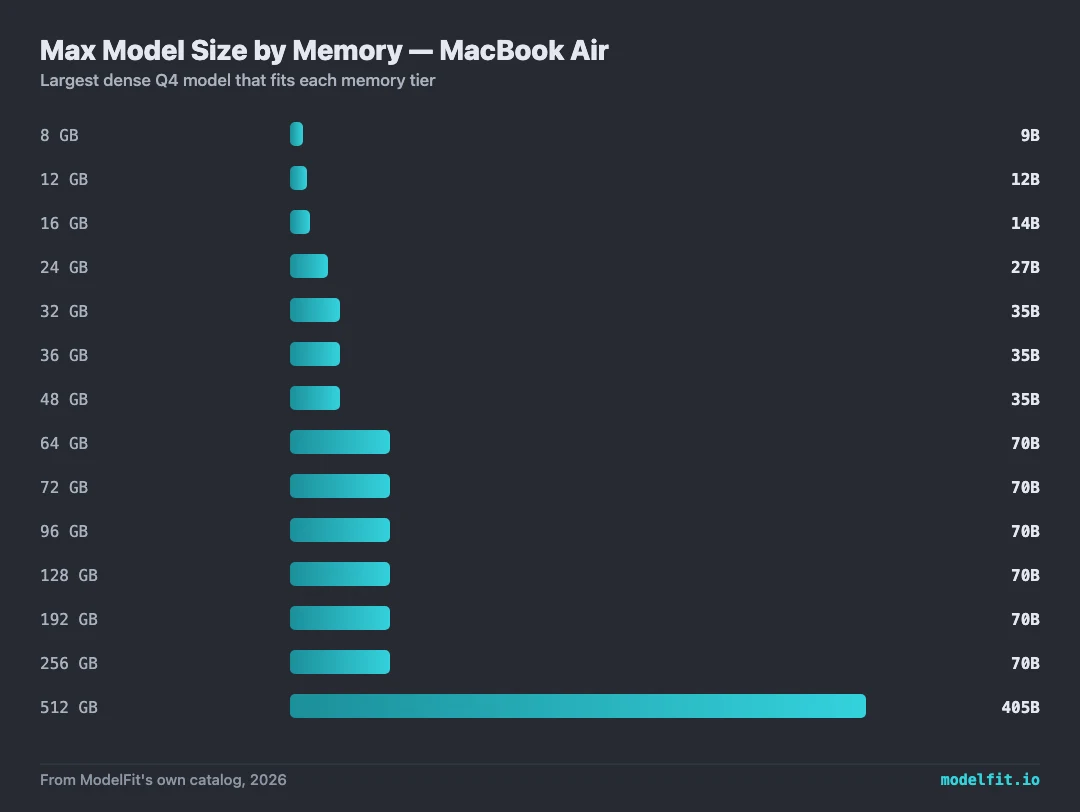
The M1 chip was Apple's first Silicon chip and delivers solid performance for small to medium AI models. With 8-16GB unified memory, the MacBook Air M1 handles 7B-class models comfortably. Efficient 2026 releases like Qwen3.5 4B are the sweet spot, while larger models hit memory pressure.
Based on our analysis, 8 out of 8 recommended models run excellently on this configuration. The sweet spot for MacBook Air with Apple M1 at 16GB is up to about 12B parameter models with Q4_K_M quantization, which provides the best trade-off between quality and inference speed. Higher-RAM configurations in the Apple M1 generation, including Pro and Max tiers where available, reach into the 7B and smaller parameter range.
Optimized for Apple M1
Best for quality, coding, reasoning. Strong fit for 16 GB RAM with balanced speed and quality.
Best for chat, coding. Strong fit for 16 GB RAM with balanced speed and quality.
Best for chat, coding, multimodal. Strong fit for 16 GB RAM with balanced speed and quality.
Best for agentic coding on small machines. Strong fit for 16 GB RAM with balanced speed and quality.
Best for vision, multimodal. Strong fit for 16 GB RAM with balanced speed and quality.
Best for chat, coding. Strong fit for 16 GB RAM with balanced speed and quality.
This model may feel memory-heavy on 16 GB RAM, but it is still listed for balanced speed and quality.
This model may feel memory-heavy on 16 GB RAM, but it is still listed for balanced speed and quality.
Context costs memory too. Qwen3.5 9B Instruct loads ~7 GB of weights; at 16k context the KV cache adds ~0.5 GB (still fits the ~11 GB usable RAM), and at 64k it adds ~2.0 GB (still fits).
KV-cache figures assume an fp16 cache, the llama.cpp/Ollama default. Standard GQA models use a size-class estimate (8 KV heads x 128 head dim class); hybrid linear-attention models (Qwen3.5/3.6, Qwen3-Next) use the exact per-token cost from their published config, since only their sparse full-attention layers cache KV. A q8_0 KV cache roughly halves either figure. Estimates, not measurements.
Where to Buy for Local AI
best configsPrefer to buy direct? Buy from Apple (same price, no affiliate link).
Archive your model library off the internal drive. Quantized models run 5 to 40GB each, so 2TB holds dozens with room to spare.
Check price on Amazon40Gbps external storage fast enough to run models from. Pair it with an M.2 drive for a portable model vault.
Check price on AmazonThe fanless MacBook Air heat-soaks on long inference runs. An aluminum riser lifts the chassis so it sheds heat better off the desk.
Check price on AmazonMore ports for the external drives, displays and peripherals around a local-AI workstation.
Check price on AmazonModelFit may earn a commission on purchases through these links, at no extra cost to you.
What is the best AI model for MacBook Air with Apple M1?
With 16GB RAM and the Apple M1 chip, we recommend Qwen3.5 9B Instruct for the best balance of speed and quality, handling models up to about 12B parameters at this RAM. Higher-RAM MacBook Air configurations in the Apple M1 generation, including Pro and Max tiers where available, reach into the 7B and smaller parameter range.
How much RAM do I need for AI on MacBook Air Apple M1?
MacBook Air with Apple M1 supports 8, 16GB configurations. For most AI workloads, 16GB provides good headroom. A 7B model typically needs 4-5GB of free RAM, while 14B models need 8-10GB.
How fast is Apple M1 for running local AI models?
Apple M1 on MacBook Air achieves an estimated 10 tokens per second with optimized models. The M1 chip was Apple's first Silicon chip and delivers solid performance for small to medium AI models. With 8-16GB unified memory, the MacBook Air M1 handles 7B-class models comfortably. Efficient 2026 releases like Qwen3.5 4B are the sweet spot, while larger models hit memory pressure. (Speeds are ModelFit estimates, not measured benchmarks.)
Can I run Ollama on MacBook Air Apple M1?
Yes, Ollama runs natively on Apple Silicon including Apple M1. You can install it in minutes and run models like Qwen3.5 9B Instruct locally. Our wizard recommends the best models based on your exact Apple M1 configuration and available RAM.