Best AI Models for Mac Studio M5 Ultra (2026)
AI model recommendations for Mac Studio M5 Ultra with 96GB, 256GB or 512GB unified memory at 1.2 TB/s. Runs every open-weight model that matters. This configuration provides optimal performance for local AI models.
For a Mac Studio M5 Ultra with 256GB RAM, the best local LLM is Qwen3 235B A22B at ~14 tok/s. It loads in ~130GB of unified memory, and 113 of ModelFit's 116 local models fit this device comfortably (ModelFit, 2026).
Sizing rule: a local model needs about 0.6 GB of unified memory per billion parameters at Q4, and ModelFit budgets roughly 70% of the 256GB here so the OS, context, and KV-cache keep headroom (rising toward 85% on 128GB-and-up machines). Strong alternatives: Qwen3.8-Flash-Next (~111.3GB) and GPT-OSS 120B (~65.4GB). Qwen3 235B A22B generates an estimated 14 tok/s here, fast enough for interactive chat. Longer contexts cost extra memory, so a model that fits at 8k context may not fit at 64k. What it will not run: DeepSeek-R1 671B (671B) needs about 380GB, more than this device's comfortable budget; models that large stay on a cloud API or a higher-memory machine.
Speeds are ModelFit estimates from chip bandwidth and model size, not measured benchmarks.
Cite this page: ModelFit, Best AI Models for Mac Studio M5 Ultra (2026), https://modelfit.io/mac-studio/m5/, updated October 2026, CC BY 4.0.
Last updated: October 3, 2026 · Editor: ModelFit Team
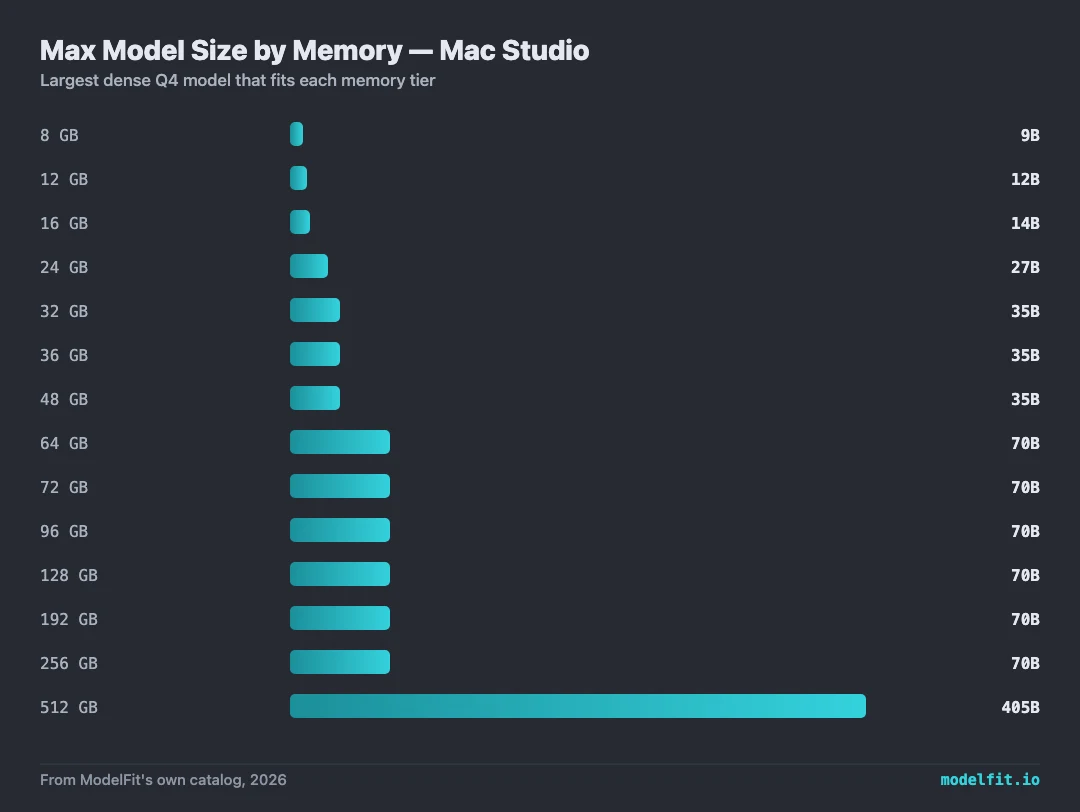
The Mac Studio M5 Ultra (2026) restores the big-memory Mac: 512GB unified memory at 1.2 TB/s bandwidth, roughly 50% above the M3 Ultra. In ModelFit estimates that is ~135 tok/s on a 7B Q4 reference and comfortable speeds on 120B-class MoE models like gpt-oss-120b, entirely in memory. Pre-orders opened 2026-08-26, shipping September 22.
Based on our analysis, 8 out of 8 recommended models run excellently on this configuration. The sweet spot for Mac Studio with Apple M5 Ultra at 256GB is up to about 235B parameter models with Q4_K_M quantization, which provides the best trade-off between quality and inference speed. Higher-RAM configurations in the Apple M5 Ultra generation, including Pro and Max tiers where available, reach into the 70B-120B+ parameter range.
Optimized for Apple M5 Ultra
Best for quality, reasoning. Strong fit for 256 GB RAM with balanced speed and quality.
Best for agentic coding, reasoning, multimodal. Strong fit for 256 GB RAM with balanced speed and quality.
Get told when a better model fits your M5 Ultra 256 GB
When a new open-weight model beats these picks on your configuration, you get one email, plus the Thursday weekly.
For: Mac Studio M5 Ultra 256 GB
Best for reasoning, coding, agents. Strong fit for 256 GB RAM with balanced speed and quality.
Best for agentic coding, long-horizon tasks. Strong fit for 256 GB RAM with balanced speed and quality.
Best for frontier-level reasoning, complex tasks. Strong fit for 256 GB RAM with balanced speed and quality.
Best for long context, quality, multimodal. Strong fit for 256 GB RAM with balanced speed and quality.
Best for agentic workflows, long context, reasoning. Strong fit for 256 GB RAM with balanced speed and quality.
Best for chat, coding, long context. Strong fit for 256 GB RAM with balanced speed and quality.
Context costs memory too. Qwen3 235B A22B loads ~130 GB of weights; at 16k context the KV cache adds ~6.0 GB (still fits the ~218 GB usable RAM), and at 64k it adds ~24.0 GB (still fits).
The model leaves about 82 GB of the usable unified memory budget free after weights and 16k context.
KV-cache figures assume an fp16 cache, the llama.cpp/Ollama default. Standard GQA models use a size-class estimate (8 KV heads x 128 head dim class); hybrid linear-attention models (Qwen3.5/3.6, Qwen3-Next) use the exact per-token cost from their published config, since only their sparse full-attention layers cache KV. A q8_0 KV cache roughly halves either figure. Estimates, not measurements.
Where to Buy for Local AI
best configsArchive your model library off the internal drive. Quantized models run 5 to 40GB each, so 2TB holds dozens with room to spare.
Check price on Amazon40Gbps external storage fast enough to run models from. Pair it with an M.2 drive for a portable model vault.
Check price on AmazonMore ports for the external drives, displays and peripherals around a local-AI workstation.
Check price on AmazonComfortably runs 70B models at usable speed, the value pick for serious local AI.
Check price at AppleFrontierHeadroom for the largest open-weight models (Llama 4 Scout, big MoE) at home.
Check price at AppleModelFit may earn a commission on purchases through these links, at no extra cost to you.
What is the best AI model for Mac Studio with Apple M5 Ultra?
With 256GB RAM and the Apple M5 Ultra chip, we recommend Qwen3 235B A22B for the best balance of speed and quality, handling models up to about 235B parameters at this RAM. Higher-RAM Mac Studio configurations in the Apple M5 Ultra generation, including Pro and Max tiers where available, reach into the 70B-120B+ parameter range.
How much RAM do I need for AI on Mac Studio Apple M5 Ultra?
Mac Studio with Apple M5 Ultra supports 96, 256, 512GB configurations. For most AI workloads, 256GB provides good headroom. A 7B model typically needs 4-5GB of free RAM, while 14B models need 8-10GB.
How fast is Apple M5 Ultra for running local AI models?
Apple M5 Ultra on Mac Studio achieves an estimated 14 tokens per second with optimized models. The Mac Studio M5 Ultra (2026) restores the big-memory Mac: 512GB unified memory at 1.2 TB/s bandwidth, roughly 50% above the M3 Ultra. In ModelFit estimates that is ~135 tok/s on a 7B Q4 reference and comfortable speeds on 120B-class MoE models like gpt-oss-120b, entirely in memory. Pre-orders opened 2026-08-26, shipping September 22. (Speeds are ModelFit estimates, not measured benchmarks.)
Can I run Ollama on Mac Studio Apple M5 Ultra?
Yes, Ollama runs natively on Apple Silicon including Apple M5 Ultra. You can install it in minutes and run models like Qwen3 235B A22B locally. Our wizard recommends the best models based on your exact Apple M5 Ultra configuration and available RAM.
Mac Studio M5 Ultra Deep Dives
256GB M5 Ultra: ~218GB usable, 1.2TB/s. Top picks: Qwen3 235B-A22B at ~14 tok/s, GPT-OSS 120B at ~43 tok/s, and multi-model serving with Laguna S 2.1.
Best LLM for Mac Studio M5 Ultra with 512GB RAM (2026)512GB M5 Ultra: ~435GB usable, runs Llama 4 Maverick 400B at ~12 tok/s, GPT-OSS 120B at ~43 tok/s, and DeepSeek-R1 671B at ~6 tok/s.
Best LLM for Mac Studio M5 Ultra with 96GB RAM (2026)96GB M5 Ultra: ~77GB usable, 1.2TB/s bandwidth. Top picks: Qwen3-Next 80B-A3B at ~64 tok/s, GPT-OSS 120B at ~43 tok/s, and Qwen3.6 35B-A3B Q8.
Have this hardware? Share a measured run.
Measure a fixed Ollama reference model on your machine. This separate, opt-in contribution does not change ModelFit's third-party SWE-Bench leaderboard; results appear on the measured-speed leaderboard after the next site update.