TL;DR: The MacBook Pro M4 Max with 64GB RAM is a 70B-capable laptop. Qwen3.6 27B is the quality pick at ~20-30 tok/s (est.), fitting in ~18GB. Qwen3.6 35B-A3B delivers near-flagship reasoning at small-model speed thanks to its MoE design. Need more? A Llama 3.3 70B Q4 model (~40GB) loads entirely in memory at ~12-18 tok/s (est.), workstation-class output on a machine that runs on battery.
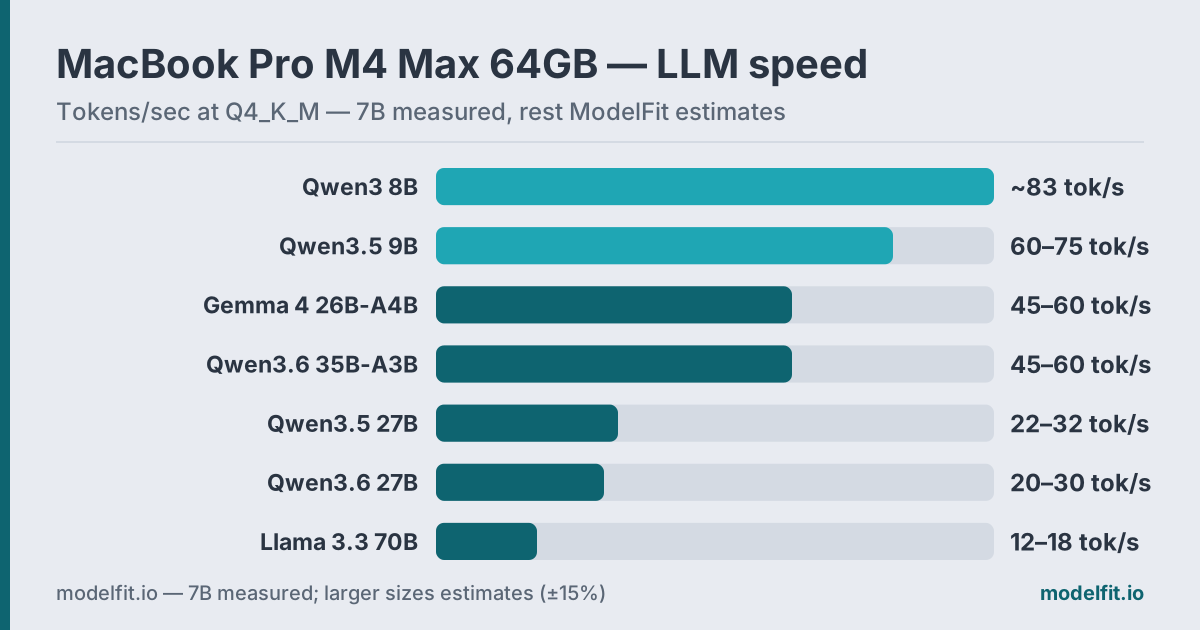 Token generation on the MacBook Pro M4 Max 64GB (546 GB/s) at Q4_K_M. All figures are ModelFit estimates based on chip bandwidth and model size.
The MacBook Pro M4 Max is the first laptop where a 70B model stops being a stretch and becomes a daily tool. Its up to 546 GB/s of memory bandwidth (Apple), 2x the M4 Pro and 4.5x the base M4, drives token generation that older laptops simply cannot match. Pair that with 64GB of unified memory and active cooling, and you get a machine that runs 27-35B models fast and fits a 40GB 70B model with room to spare.
This guide covers which models work best on M4 Max 64GB hardware, how fast they actually run, and what you should skip. For every chip and memory tier, see the MacBook Pro device page.
Why Does Memory Bandwidth Matter So Much?
Token generation speed is bandwidth-bound, not compute-bound. The M4 Max's 546 GB/s on the full 16-core CPU config (410 GB/s on the binned 14-core) sets a hard ceiling on how fast weights stream from memory to the GPU, and that ceiling decides your tokens per second (Apple).
Here is the practical scaling. The base M4 runs at 120 GB/s. The M4 Pro doubles that to 273 GB/s. The M4 Max doubles it again to 546 GB/s. Since LLM inference is memory-bound, a 14B model that hits ~17 tok/s on a base M4 climbs toward 45-55 tok/s (est.) on M4 Max. Same model, same quantization, roughly 4x the throughput.
There is a second lever in 2026: MoE models. Mixture-of-experts models like Qwen3.6 35B-A3B store 35B parameters but activate only ~3B per token. Generation speed tracks the active parameters, so you get big-model quality at small-model token rates, a perfect match for a bandwidth-rich machine like this one.
Active cooling matters too. The M4 Max has a fan, so it sustains peak GPU speed through hours of generation. The fanless Air throttles after 20-30 minutes; the Max does not.
How Much RAM Do You Actually Have?
On a 64GB MacBook Pro M4 Max, roughly 56-58GB is usable for LLMs after macOS and apps take their share. That headroom is what makes 70B models fit. A 40GB model still leaves ~16-18GB for context and system overhead.
| Allocation | Typical Size |
|---|---|
| macOS kernel + services | ~4 GB |
| Active apps (browser, editor) | ~2-4 GB |
| Available for LLM | ~56-58 GB |
Get told when a better model fits your MacBook Pro M5 Pro 48 GB
One email when a new open-weight model beats these picks on your machine, plus the Thursday weekly.
For: MacBook Pro M5 Pro 48 GB
The math is consistent: Q4_K_M quantization costs roughly 0.6 GB per billion parameters. A 27B model needs ~16GB. A 35B MoE needs ~21-22GB. A 70B model needs ~42GB. All fit on 64GB with comfortable margin, something no 24GB or even 48GB laptop can promise for the 70B tier.
The jump from 48GB to 64GB is not about running bigger 27B models; those already fit at 48GB. It is the single threshold where a 70B Q4 model and its context both fit in memory at once, which is the difference between a usable 70B and a swapping one.
What Are Realistic Benchmark Results?
On M4 Max 64GB, here is what realistic token generation looks like with Ollama at Q4_K_M. The 7B-class figure (~83 tok/s, an estimate) is referenced in our M5 analysis, which lists M4 Max as the comparison column; larger sizes are bandwidth-scaled ModelFit estimates informed by r/LocalLLaMA community reports.
| Model | VRAM Used | Tokens/sec | Best For |
|---|---|---|---|
| Qwen3 8B Q4_K_M | ~6.5 GB | ~83 tok/s | Speed reference |
| Qwen3.5 9B Q4_K_M | ~7.0 GB | 60-75 tok/s est. | Fast daily driver |
| Gemma 4 26B-A4B Q4_K_M | ~16 GB | 45-60 tok/s est. | Fast multimodal |
| Qwen3.5 27B Q4_K_M | ~16 GB | 22-32 tok/s est. | Balanced quality |
| Qwen3.6 27B Q4_K_M | ~18 GB | 20-30 tok/s est. | Best quality, coding |
| Qwen3.6 35B-A3B Q4_K_M | ~22 GB | 45-60 tok/s est. | Reasoning, agents |
| Llama 3.3 70B Q4_K_M | ~40 GB | 12-18 tok/s est. | Flagship that fits |
Note the MoE rows: Gemma 4 26B-A4B and Qwen3.6 35B-A3B generate faster than dense models of half their size, because only 3-4B parameters are active per token. The full weights still need to sit in memory, which is exactly what 64GB provides.
What Are the Top Picks?
Six models cover the full range of M4 Max 64GB use cases, from a fast daily driver to a 70B flagship. Each entry below lists the exact ollama run command and the workload it suits best, ordered from lightest to heaviest.
1. Qwen3.5 9B: Fast Daily Driver
Qwen3.5 9B is the model you keep loaded all day. At ~7GB it leaves almost all your memory free, and at an estimated 60-75 tok/s it responds instantly. It also takes images natively and carries a 262K context window. Your quick-answer model handles screenshots too.
ollama run qwen3.5:9bFor chat, drafting, summaries, and quick lookups, the speed makes it feel like a local cloud API. The previous-generation ollama run qwen3:8b remains a fine substitute if your tooling depends on it.
2. Gemma 4 26B-A4B: Fast Multimodal Workhorse
Google's Gemma 4 26B-A4B is a mixture-of-experts design: 26B parameters stored, ~4B active per token. The result is 26B-class quality at an estimated 45-60 tok/s, with native text-plus-image input.
ollama run gemma4:26bIt loads in ~16GB, trivial on this machine, and its throughput makes it the best big-feeling model for interactive work. Document Q&A, screenshot analysis, fast drafting: this is the do-everything middle tier.
3. Qwen3.5 27B: Balanced Quality
Qwen3.5 27B is the dense mid-size option that narrows the gap to frontier models. At ~16GB and an estimated 22-32 tok/s, it stays interactive while delivering clearly stronger long-form coherence than the 9B class.
ollama run qwen3.5:27bPick it when you want dense-model consistency for complex multi-turn sessions: agent scenarios, structured analysis, careful editing.
4. Qwen3.6 27B: Best Quality and Coding
This is the current dense flagship of the open-weight mid-size class. Qwen3.6 27B loads in ~18GB, carries a 262K context (extensible to 1M), and leads its class on coding work. For local development, it is the strongest single model on this list. See our coding on MacBook Pro tier list for how it slots into a dev workflow.
ollama run qwen3.6:27bAt an estimated 20-30 tok/s, it is fast enough for real coding sessions, and the long context means whole repositories fit in a single prompt. Hook it into Continue.dev or any editor that speaks the Ollama API.
5. Qwen3.6 35B-A3B: Reasoning and Agents at Speed
The MoE trick at full power: 35B parameters stored, ~3B active. Qwen3.6 35B-A3B runs at an estimated 45-60 tok/s, faster than the dense 27B, while matching or beating it on reasoning and tool calling.
ollama run qwen3.6:35b-a3bThis is the pick for agent workflows, multi-step reasoning, and any task where the model thinks out loud at length. Fast generation makes long reasoning chains tolerable instead of tedious.
6. Llama 3.3 70B: Legacy Dense Alternative
Llama 3.3 70B at Q4_K_M is ~40GB and loads entirely in 64GB of unified memory, with no CPU offloading and no swapping. It runs at 12-18 tok/s (est.), bandwidth-bound but steady.
ollama run llama3.3:70bThe current quality leader on this hardware is not the dense 70B, though. Qwen3.6 35B-A3B (pick #5 above) now outscores Llama 3.3 70B on modern benchmarks while running 3-4x faster, since its MoE design activates only ~3B of its 35B parameters per token. Reach for the 70B when you specifically want a large dense model's breadth for a careful one-shot answer; reach for the MoE pick for the best quality this laptop can deliver at usable speed. Reasoning-focused alternative: ollama run qwen3.6:35b-a3b.
Is 70B on a Laptop Actually Practical?
Yes, and the M4 Max 64GB is the cheapest Apple config where it works. A 70B Q4 model is ~40GB, which fits in 64GB with ~16-18GB free for context and system. The model runs fully in memory, so you avoid the catastrophic swap penalty that kills 70B on smaller machines.
The two things that make it real are bandwidth and cooling. At 546 GB/s, a 40GB model still streams fast enough for 12-18 tok/s (est.), usable for considered answers, not instant chat. And because the M4 Max has a fan, that speed holds across a long session rather than degrading.
Worth knowing: the 2026 MoE generation has changed the calculus. Qwen3.6 35B-A3B now outscores the dense 70B on quality while running 3-4x faster, thanks to smarter architecture rather than raw parameter count. Run the 70B when you want a large dense model's breadth for one-shot depth; run the MoE pick for the best quality this machine can deliver at usable speed.
For reference, our M5 analysis estimates the newer M5 Max at 18-25 tok/s on the same 70B Q4 model, thanks to its 614 GB/s bandwidth. The M4 Max sits a step below that; keep your 70B expectations conservative, but real.
What Should You Avoid?
Some choices waste your 64GB rather than using it. Skip these.
Q8 quantization on 70B models. A Q8_0 70B model is ~75GB, which does not fit in 64GB. Stick to Q4_K_M for anything in the 70B class. The quality loss from Q4 is small; the failure to load is total.
Old-generation 13B and 7B models. Llama 2 13B, Vicuna, original Mistral 7B. On M4 Max, Qwen3.5 9B runs faster and scores far higher on modern benchmarks. There is no reason to run 2023-era architectures when modern models beat them on every metric.
Running everything at 70B. The 70B is for careful, one-shot answers. For chat and drafting, the 9B at 60-75 tok/s (est.) is far more pleasant, and the 35B-A3B covers hard reasoning at speed. Match the model to the task instead of always reaching for the biggest one.
Forgetting context cost. A 70B at 40GB plus a 32K-token context can push past 50GB. On 64GB that is fine, but loading a second large model on top of it is not. Run one heavy model at a time.
Quick Reference Table
| Use Case | Recommended Model | Command |
|---|---|---|
| Fast daily driver | Qwen3.5 9B | ollama run qwen3.5:9b |
| Fast multimodal | Gemma 4 26B-A4B | ollama run gemma4:26b |
| Balanced quality | Qwen3.5 27B | ollama run qwen3.5:27b |
| Best quality / coding | Qwen3.6 27B | ollama run qwen3.6:27b |
| Reasoning / agents | Qwen3.6 35B-A3B | ollama run qwen3.6:35b-a3b |
| Largest dense model (70B) | Llama 3.3 70B | ollama run llama3.3:70b |
FAQ
What is the best LLM for MacBook Pro M4 Max 64GB?
Qwen3.6 27B is the best quality pick that stays fast, running at 20-30 tok/s (est.) in ~18GB. For the best overall quality on this hardware, Qwen3.6 35B-A3B uses its MoE design to outscore even the dense 70B while hitting 45-60 tok/s (est.). A legacy dense Llama 3.3 70B Q4 still fits entirely in 64GB at ~40GB and runs at 12-18 tok/s (est.), useful for one-shot depth. See our general MacBook LLM guide for cross-device picks.
Can you really run 70B models on a MacBook Pro M4 Max 64GB?
Yes. A 70B Q4_K_M model is about 40GB, which loads entirely in 64GB unified memory with ~16-18GB free for context and system. There is no CPU offloading or swapping, so it runs at a steady 12-18 tok/s (est.). Active cooling holds that speed through long sessions.
Why are the MoE models faster than smaller dense models?
Mixture-of-experts models like Qwen3.6 35B-A3B and Gemma 4 26B-A4B store all their parameters in memory but activate only 3-4B per token. Generation speed tracks active parameters, so they generate like a small model while answering like a large one. The cost is RAM, which is exactly what a 64GB machine has to spend.
How fast is the M4 Max compared to the M4 Pro for LLMs?
Roughly 2x faster for token generation, because inference scales with memory bandwidth. M4 Max has up to 546 GB/s versus the M4 Pro's 273 GB/s (Apple). The bigger practical gain is RAM: 64GB fits 70B models that the 24GB M4 Pro cannot load at all.
What is the difference between the full and binned M4 Max?
The full 16-core CPU M4 Max runs at 546 GB/s memory bandwidth; the binned 14-core config runs at 410 GB/s (Apple). Both ship with the 64GB option and both fit a 70B Q4 model. The binned chip generates tokens about 25% slower, but still comfortably in the usable range.
Should I use Ollama or MLX on M4 Max?
For most users, Ollama is the simplest start and works with every model via GGUF. Our Ollama setup guide covers it. MLX can run 20-30% faster on Apple Silicon because it is tuned at a lower level. Try Ollama first; switch to MLX through LM Studio if you want extra speed on a model you run daily.
Is 64GB worth it over 48GB for local AI?
It depends on whether you want 70B models. At 48GB, a 40GB 70B model plus context gets tight and starts swapping. At 64GB it fits cleanly with room for a long context window. If your ceiling is the 27-35B class, 48GB is enough; if you want 70B as a daily tool, 64GB is the threshold.
Does the M4 Max thermal throttle during long inference?
No, not under normal use. The active cooling fan keeps the chip in range indefinitely, so a 70B generation session holds its speed for hours. This is the main practical edge over the fanless MacBook Air, which throttles after 20-30 minutes of sustained load.
Should I wait for the M5 Max instead?
If you need 70B today, the M4 Max 64GB already delivers it. The M5 Max adds ~15% token generation and a 3-4x faster time-to-first-token, detailed in our M5 Pro & Max guide. For most M4 Max owners the upgrade is optional; for buyers choosing now, the M4 Max remains a strong value.
Related Model Families:- Qwen Models: Home of the 3.5 and 3.6 generations that lead this tier
- Llama Models: Home of the 70B flagship that fits in memory
- Gemma Models: Google's fast MoE multimodal family
Don't miss the next one for your MacBook Pro M5 Pro 48 GB
This article covers one moment. Get one email when a newer open-weight model fits your machine better, plus the Thursday weekly with what changed.
For: MacBook Pro M5 Pro 48 GB
Where to Buy for Local AI
best configsArchive your model library off the internal drive. Quantized models run 5 to 40GB each, so 2TB holds dozens with room to spare.
Check price on Amazon40Gbps external storage fast enough to run models from. Pair it with an M.2 drive for a portable model vault.
Check price on AmazonThe fanless MacBook Air heat-soaks on long inference runs. An aluminum riser lifts the chassis so it sheds heat better off the desk.
Check price on AmazonMore ports for the external drives, displays and peripherals around a local-AI workstation.
Check price on AmazonRuns 30B models with headroom; active cooling sustains long inference without throttling.
Check price at AppleMax headroomLoads 70B models locally, the most capable AI laptop config.
Check price at AppleModelFit may earn a commission on purchases through these links, at no extra cost to you.
Have questions? Reach out on X/Twitter