TL;DR: The MacBook Air M5 with 16GB RAM runs the same ~14B-parameter ceiling as the M4 Air, but its 153 GB/s memory bandwidth (a 28% jump over the M4's 120 GB/s, per Apple) makes every model faster. Qwen3.5 9B is the best all-rounder at ~7GB loaded. Qwen3 8B is the proven runner-up, Gemma 4 12B brings current-generation multimodal quality (its predecessor Gemma 3 12B Instruct is now the fallback), Llama 3.1 8B Instruct is the reliable default, and Ornith 1.0 9B is the agentic coding standout. Token speeds below are ModelFit estimates, not measured benchmarks.
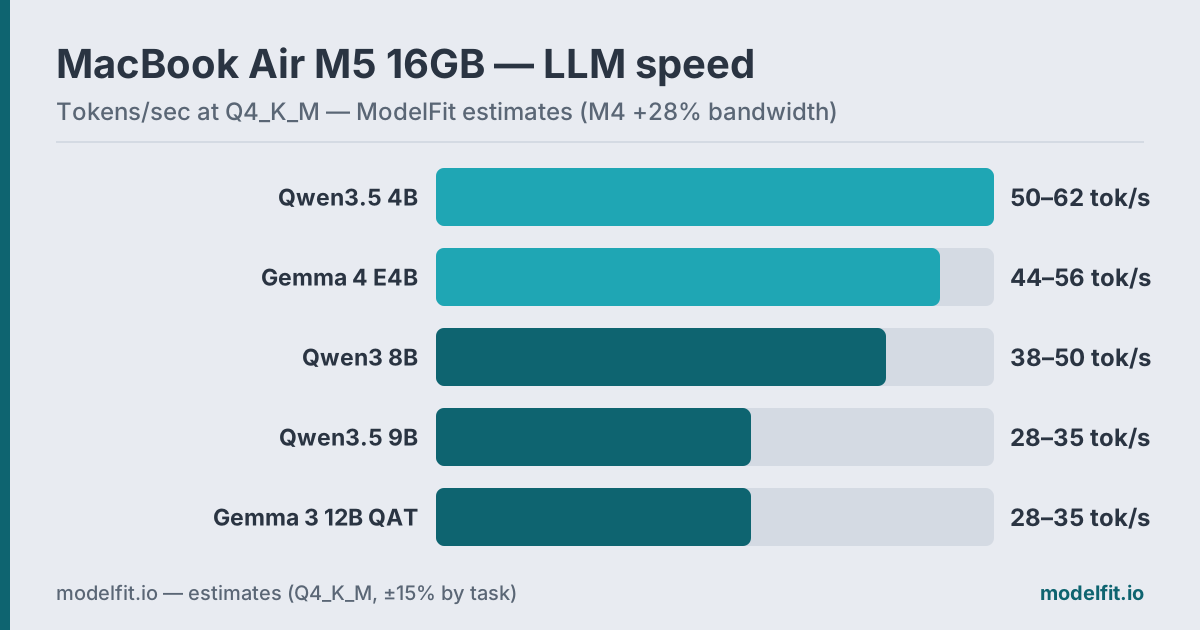 Estimated token generation on the MacBook Air M5 16GB at Q4_K_M, scaled from M4 numbers by the 28% bandwidth uplift. ModelFit estimates.
Apple announced the M5 MacBook Air on March 3, 2026, with units shipping March 11 (Apple Newsroom). For local AI, the headline is memory bandwidth: the M5 moves data at 153 GB/s versus 120 GB/s on the M4. Because LLM token generation is memory-bandwidth-bound, that 28% gain is the single spec that matters most for inference speed on a fanless laptop.
This guide ranks which models to run on the base 16GB M5 Air, how fast each one goes, and where the 24GB and 32GB configurations change the picture. For the full chip rundown, see the MacBook Air device page, and for sizing any model to any RAM tier, the how much RAM for a local LLM guide.
What Changed from the M4 Air?
The M5 Air keeps the same memory ceilings (16GB base, configurable to 24GB or 32GB, per Apple specs), so the model sizes you can load are unchanged. What moved is speed and price:
| Spec | MacBook Air M4 | MacBook Air M5 |
|---|---|---|
| Memory bandwidth | 120 GB/s | 153 GB/s (+28%) |
| Unified memory | 16 / 24 / 32 GB | 16 / 24 / 32 GB |
| Neural Engine | 16-core | 16-core |
| GPU | 10-core | up to 10-core, Neural Accelerator per core |
| Base storage | 256 GB | 512 GB |
| Starting price (13") | $999 | $1,099 |
Apple states the M5 Air delivers "up to 4x faster performance for AI tasks than MacBook Air with M4, and up to 9.5x faster than MacBook Air with M1" (Apple). That figure measures specific Neural-Engine and GPU-accelerator workloads. For Ollama token generation, which runs on the GPU cores and is bandwidth-bound, the realistic gain tracks the 28% bandwidth uplift, not the 4x marketing number. We size our estimates to bandwidth and label them as estimates.
How Much RAM Do You Actually Have for Models?
macOS reserves memory aggressively, so the 16GB on the box is not all yours.
| Allocation | Typical Size |
|---|---|
| macOS kernel + services | ~2-3 GB |
| Active apps (browser, editor) | ~2-4 GB |
| Available for LLM | ~9-12 GB |
The rule of thumb holds across every Apple Silicon Mac: Q4_K_M quantization costs roughly 0.6 GB per billion parameters. A 4B model needs ~3.5GB. A 9B model needs ~7GB. A 14B model needs ~9.5GB, doable on 16GB but tight. For the full model-size-to-memory matrix, see how much RAM you need for a local LLM.
Performance Expectations
Here is realistic token generation on the M5 Air 16GB with Ollama at Q4_K_M. These are ModelFit estimates, scaled from M4 community numbers by the 28% bandwidth increase, not measured benchmarks.
| Model | RAM Used | Est. Tokens/sec | Best For |
|---|---|---|---|
| Qwen3.5 9B Q4_K_M | ~7.0 GB | 20-26 tok/s (est.) | Quality all-rounder |
| Qwen3 8B Q4_K_M | ~6.5 GB | 23-29 tok/s (est.) | Proven runner-up |
| Gemma 4 12B Q4_K_M | ~8.0 GB | 15-20 tok/s (est.) | Current-gen multimodal |
| Llama 3.1 8B Instruct Q4_K_M | ~6.5 GB | 23-29 tok/s (est.) | Reliable default |
| Ornith 1.0 9B Q4_K_M | ~5.6 GB | 20-26 tok/s (est.) | Agentic coding |
Models above ~14B parameters still do not fit comfortably in 16GB. They load but swap into CPU memory, dropping speed below 5 tok/s. The extra bandwidth does not change the memory ceiling. For 14B-27B models, configure 24GB or 32GB at purchase, since Apple Silicon memory cannot be upgraded later.
The Top Picks
1. Qwen3.5 9B: Best All-Rounder
Qwen3.5 9B is the model the 16GB Air was built for. At ~7GB loaded it fits with your browser open, ships native multimodal input, and carries a 262K context window. On the M5's faster bus it lands around an estimated 20-26 tok/s, comfortably interactive.
ollama run qwen3.5:9bWhy it wins: near-frontier quality under 10GB of memory, covering writing, analysis, coding, and image questions from one model.
2. Qwen3 8B: Proven Runner-Up
The previous-generation favorite is still excellent: battle-tested, widely documented, ~6.5GB, and an estimated 23-29 tok/s on the M5. If you already run it, there is no urgency to switch, but new installs should start with Qwen3.5 9B.
ollama run qwen3:8b3. Gemma 4 12B: Current-Gen Multimodal
Gemma 4 12B is Google DeepMind's June 2026 dense 12B release. It beats the older Gemma 3 27B on quality benchmarks (MMLU-Pro 77.2, per Google's model card) while loading in ~8GB at Q4_K_M, and it handles text, images, and audio natively with a 256K context window.
ollama run gemma4:12bAt an estimated 15-20 tok/s on the M5 it is the patient lane of this list, best for deliberate work rather than rapid chat. On a fanless machine, its modest footprint keeps thermal pressure low on long sessions. Gemma 3 12B Instruct, the previous generation's balanced pick at ~9.5GB, is now the fallback if your tooling predates the Gemma 4 releases.
4. Llama 3.1 8B Instruct: Reliable Default
Meta's Llama 3.1 8B Instruct is the old reliable of local AI: a dense 8B that loads in ~6.5GB and runs at an estimated 23-29 tok/s on the M5. Every tool, tutorial, and integration supports it, which makes it the safest default for assistants and scripting.
ollama run llama3.1:8b-instruct-q4_K_MNewer models beat it on quality, but nothing beats its ecosystem. If an app assumes a Llama endpoint, this is the model you point it at.
5. Ornith 1.0 9B: Agentic Coding Standout
Ornith 1.0 9B is Deep Reinforce's July 2026 release, an MIT-licensed model post-trained on top of Gemma 4 and Qwen 3.5. It targets agentic coding: tool calling, multi-step edits, and long-running coding sessions. Deep Reinforce reports coding-agent results approaching 35B-class models, a publisher claim rather than an independently verified benchmark. At Q4_K_M it pulls in ~5.6GB, comfortably inside the 16GB Air's budget.
ollama run ornith:9bFor the full rundown on running Ornith on a 16GB Mac, see our Ornith 9B coding model guide.
Honorable mentions: Qwen3.5 4B (qwen3.5:4b) remains the speed pick at ~3.5GB for autocomplete-style work (see our coding on MacBook Air guide), Gemma 4 E4B (gemma4:e4b) covers ultra-light multimodal chat, and LFM2.5 8B-A1B (lfm2.5:8b-a1b-q4_K_M) is a fast agentic MoE for tool-calling workflows. All three fit easily on 16GB; they simply rank outside the top five on balanced quality right now.
Should You Buy the M5 Air, or Something Else?
M5 Air vs M4 Air for local AI: if you already own an M4 Air, the 28% bandwidth gain is real but not transformative for inference. A 17-22 tok/s model becomes roughly 20-26 tok/s. Buy the M5 for the larger 512GB base storage and a new machine's longevity, not for an AI speed revolution. If you are buying new, the M5 is the obvious pick at the same tier.
Base M5 Air vs M5 Pro MacBook Pro: the Air tops out at 32GB and throttles under sustained load because it is fanless. If you run 27B-70B models or generate for hours at a stretch, the actively cooled MacBook Pro is the better tool. See our M5 Pro and M5 Max local LLM guide. For 7B-14B models and bursty interactive use, the Air handles the job and stays silent.
Which RAM should you configure? 16GB covers 7B-9B models comfortably. Step up to 24GB for clean 14B headroom, or 32GB if you want to run 14B models alongside a full app stack. The 16GB vs 32GB breakdown walks through the trade-off.
Cooling Reality Check
The MacBook Air M5 is fanless, like every Air. For interactive chat you will never notice. Under continuous load (a long reasoning chain or batch document processing) the chip throttles after 20-30 minutes, costing roughly 15-25% of peak speed. For sustained workloads, the MacBook Pro or Mac Mini with active cooling holds throughput steady.
Quick Comparison Table
| Use Case | Recommended Model | Command |
|---|---|---|
| General assistant | Qwen3.5 9B | ollama run qwen3.5:9b |
| Proven fallback | Qwen3 8B | ollama run qwen3:8b |
| Multimodal quality | Gemma 4 12B | ollama run gemma4:12b |
| Reliable default | Llama 3.1 8B Instruct | ollama run llama3.1:8b-instruct-q4_K_M |
| Agentic coding | Ornith 1.0 9B | ollama run ornith:9b |
| Maximum speed | Qwen3.5 4B | ollama run qwen3.5:4b |
New to Ollama? The Ollama setup guide installs it in under five minutes, and the best LLM for MacBook overview ranks picks across every configuration. To match a model to your exact chip and RAM, run the ModelFit wizard or browse the open compatibility dataset.
FAQ
Is the MacBook Air M5 good for running local LLMs?
Yes. The M5 Air runs models up to ~14B parameters at Q4 on 16GB, and its 153 GB/s memory bandwidth makes token generation about 28% faster than the M4 Air. Unified memory means all of the RAM is available to the GPU for inference, unlike a PC limited to discrete VRAM.
How much faster is the M5 Air than the M4 Air for AI?
For Ollama token generation, expect roughly 28% faster output, tracking the bandwidth increase from 120 GB/s to 153 GB/s. Apple's headline "up to 4x faster AI" claim measures specific Neural-Engine and GPU-accelerator tasks, not general LLM inference.
What is the best LLM for a 16GB MacBook Air M5?
Qwen3.5 9B is the best all-rounder at ~7GB loaded, with an estimated 20-26 tok/s on the M5. For maximum speed, Qwen3.5 4B runs at an estimated 45-55 tok/s. For current-generation multimodal quality, Gemma 4 12B loads in ~8GB.
How much RAM should I get on the M5 Air for AI?
16GB handles 7B-9B models comfortably. 24GB gives clean headroom for 14B models, and 32GB lets you run 14B models alongside a full app stack. Apple Silicon memory is soldered and cannot be upgraded later, so choose carefully at purchase.
Can the M5 Air run 70B models?
No. A 70B model at Q4 needs about 42GB of memory, far beyond the Air's 32GB maximum. For 70B models you need a MacBook Pro or Mac Studio with 64GB or more. See the M5 Pro and M5 Max guide.
Related Model Families:- Qwen Models: All Qwen variants, RAM requirements, and benchmarks
- Gemma Models: Google's efficient models from E2B to 31B
- Phi Models: Microsoft's small-but-mighty models for low-RAM devices
Related guides: How much RAM for a local LLM · Best LLM for MacBook · M5 Pro & M5 Max local LLM guide
Where to Buy for Local AI
best configsPrefer to buy direct? Buy from Apple (same price, no affiliate link).
Archive your model library off the internal drive. Quantized models run 5 to 40GB each, so 2TB holds dozens with room to spare.
Check price on Amazon40Gbps external storage fast enough to run models from. Pair it with an M.2 drive for a portable model vault.
Check price on AmazonThe fanless MacBook Air heat-soaks on long inference runs. An aluminum riser lifts the chassis so it sheds heat better off the desk.
Check price on AmazonMore ports for the external drives, displays and peripherals around a local-AI workstation.
Check price on AmazonModelFit may earn a commission on purchases through these links, at no extra cost to you.
Want a Model Bigger Than This Mac Runs? Rent a Cloud GPU
by the hour70B+ and frontier open-weight models that won't fit in unified memory run great on an hourly rented GPU, same open weights, same Ollama workflow, no subscription.
ModelFit may earn a commission on sign-ups made through these links, at no extra cost to you.
The weekly local-AI refresh
New open-weight models, real Apple Silicon benchmarks, and the one model worth running on your Mac this week. Free, one email a week, unsubscribe anytime.
By subscribing you agree to our Privacy Policy and to receive the weekly email. Unsubscribe anytime.
Have questions? Reach out on X/Twitter