TL;DR: The MacBook Air M4 with 24GB RAM runs models up to ~20B parameters at Q4 quantization, and pushes to qwen3.8:27b at a tight fit, the new 27B quality leader with native vision. Qwen3.5 9B is the best daily driver: near-frontier quality, native multimodal, ~7GB loaded. The real upgrade over 16GB is running GPT-OSS 20B and LFM2 24B-A2B, two fast Mixture-of-Experts models with big-model knowledge, comfortably alongside your apps.
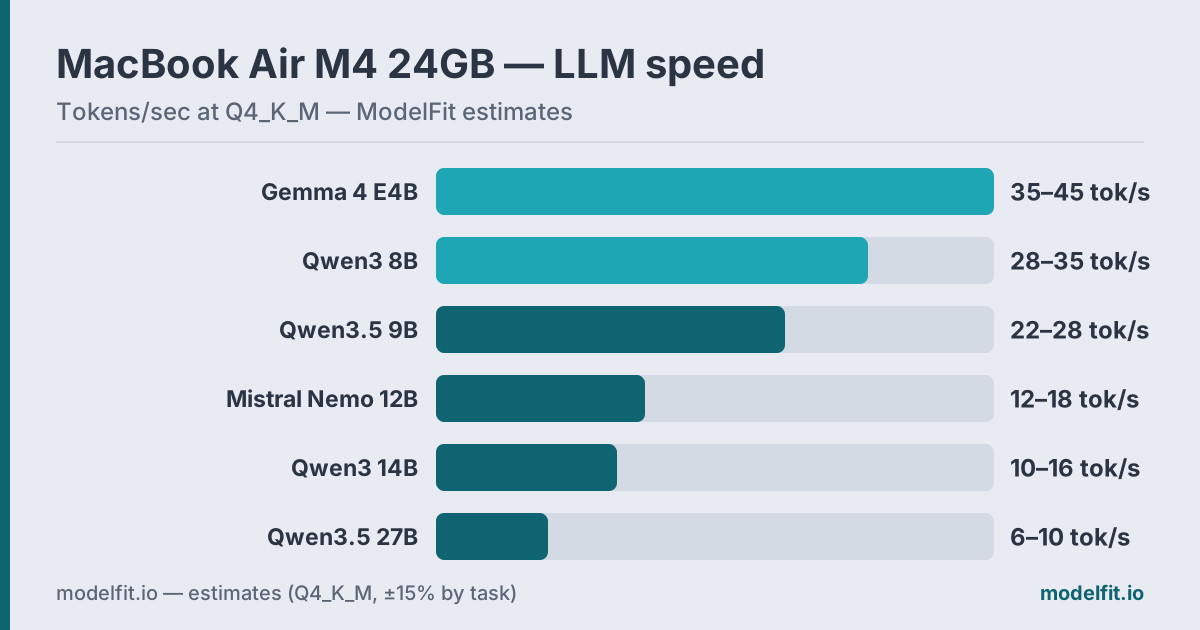 Estimated token generation on the MacBook Air M4 24GB at Q4_K_M. ModelFit estimates.
The MacBook Air M4 with 24GB is the same fanless chassis and the same M4 chip as the 16GB model: 10-core CPU, 10-core GPU, 120 GB/s LPDDR5X unified memory (Apple). The chip is identical. The memory is what changes everything.
On 16GB, a 14B model only loads if you close your browser and your editor. On 24GB, that same 14B model runs alongside your normal apps with room to spare. The extra 8GB moves you up a full tier, into 14-20B territory, and even a 27B at a careful fit.
This guide covers which models the 24GB Air unlocks, how fast they actually run, and where the fanless design sets a ceiling. For the broader picture across configurations, see our best LLM for MacBook guide, or check the MacBook Air device page for chip-by-chip specs.
How Much RAM Do You Actually Have?
On a 24GB MacBook Air M4, your real inference budget is roughly 18-19GB, and that is what unlocks the bigger models.
| Allocation | Typical Size |
|---|---|
| macOS kernel + services | ~3 GB |
| Active apps (browser, editor) | ~2-3 GB |
| Available for LLM | ~18-19 GB |
Get told when a better model fits your MacBook Air M5 16 GB
One email when a new open-weight model beats these picks on your machine, plus the Thursday weekly.
For: MacBook Air M5 16 GB
Compared to the 16GB Air, where the real budget tops out near 12GB, those extra gigabytes are the whole point. The rule of thumb holds: Q4_K_M quantization costs roughly 0.6 GB per billion parameters. A 9B model needs ~7GB. A 14B model needs ~9.5GB. Even qwen3.8:27b fits at a tight Q4 around 17.5GB, and qwen2.5:32b is borderline at ~20GB, possible only with every other app closed.
The 24GB headroom also means you can keep two smaller models loaded at once, a coder and a general assistant, say, and switch without reload delays.
Benchmark Results
These figures are estimates for the M4 base chip (10-core GPU, 120 GB/s) with Ollama via GGUF, scaled from community reports across r/LocalLLaMA and like2byte.com:
| Model | RAM Used | Tokens/sec (est.) | Best For |
|---|---|---|---|
| Qwen3.5 9B Q4_K_M | ~7.0 GB | 15-20 tok/s | All-purpose |
| GPT-OSS 20B MXFP4 | ~14 GB | 16-21 tok/s | Reasoning, coding |
| LFM2 24B-A2B Q4_K_M | ~14 GB | 20-25 tok/s | Agents, tool calling |
| Mistral Nemo 12B Q4_K_M | ~9.5 GB | 11-15 tok/s | Multilingual |
| Ministral 3 14B Q4_K_M | ~9.1 GB | 10-13 tok/s | Multimodal 14B |
| Qwen3.8 27B Q4_K_M | ~17.5 GB | 5-7 tok/s | Top quality VLM (tight) |
The jump that matters: on 16GB, a 14B model is a "close everything" gamble. On 24GB, qwen3:14b loads with apps open and holds 10-16 tok/s: slow for rapid chat, but steady for deliberate work. And qwen3.8:27b becomes a genuine, if patient, option for the highest-quality output the Air can produce.
The Top Picks
1. Qwen3.5 9B: Best All-Rounder
Qwen3.5 9B is the new default for this machine. At ~7GB loaded, it leaves huge headroom on 24GB, and its quality competes with previous-generation 30B-class models. Native multimodal input and a 262K context window mean one model handles text, images, and long documents.
ollama run qwen3.5:9bAt an estimated 15-20 tok/s it stays interactive for writing, summarization, Q&A, and coding. On 24GB you can keep it resident alongside a bigger model and switch instantly.
2. GPT-OSS 20B: Best Reasoning MoE
OpenAI's open-weight GPT-OSS 20B (August 2025, Apache 2.0) is a Mixture-of-Experts model: 21B total parameters but only 3.6B active per token, per the official model card. That means near-20B-class knowledge at small-model speed. Native MXFP4 quantization loads it in ~14GB, which is exactly what the 24GB tier unlocks: impossible to run comfortably on 16GB, easy here.
ollama run gpt-oss:20bAt an estimated 16-21 tok/s on the M4 Air it handles chat, coding, and multi-step reasoning at interactive speed. Use it for short, high-value sessions; on a fanless chassis, very long runs will eventually throttle.
3. LFM2 24B-A2B: Best Agentic MoE
Liquid AI's LFM2 24B-A2B Instruct is a hybrid Mixture-of-Experts model: 24B total parameters with only ~2.3B active per token, per the model card. It loads in ~14GB and is tuned for tool calling and on-device agents, powering the open-source LocalCowork agent app over MCP.
ollama run lfm2:24b-a2bAt an estimated 20-25 tok/s on the M4 Air it is one of the fastest options in this tier despite the 24B name. That makes it the pick for privacy-first automation and local agent workflows that never touch a cloud API.
4. Mistral Nemo 12B: Best Multilingual
Mistral Nemo 12B is Mistral's compact multilingual model, with strong quality across non-English languages at a ~9.5GB Q4_K_M load. It runs at an estimated 11-15 tok/s on the M4 Air.
ollama run mistral-nemo:12bIf your work involves translation or non-English writing, this is the pick. For English-only chat and coding, the Qwen and Gemma options edge it out.
5. Ministral 3 14B: Mistral's Multimodal 14B
Ministral 3 14B is the largest of Mistral AI's 2512 edge models, Apache 2.0: a 13.5B language model plus a 0.4B vision encoder with a 256k context window, per Mistral's model card. It loads in ~9.1GB at Q4_K_M and runs at an estimated 10-13 tok/s on the M4 Air.
ollama run ministral-3:14bMistral's card scores it 68.5 on WildBench against 65.1 for Qwen3 14B in non-thinking mode. It is the pick when you want image input and 14B-class text quality in one download. Gemma 4 12B (gemma4:12b) remains a lighter current-generation alternative at ~8GB.
6. Qwen3.8 27B: Best Quality, Patient Fit
If you want the highest-quality output a 24GB Air can produce, qwen3.8:27b at Q4_K_M (~17.5GB) is it, now with native vision and Apache-2.0 per the model card. It runs at an estimated 5-7 tok/s: slow, but usable for deliberate, one-prompt-at-a-time work where the answer matters more than the wait.
ollama run qwen3.8:27bThis model is impossible on 16GB and tight even here; close most apps before loading it. The fanless Air will also throttle on long runs (see below), so treat it as a quality tool for short, high-value prompts rather than batch work. Prefer Gemma's style? ollama run gemma4:26b (Gemma 4 26B, current-generation MoE, ~16GB) fits the same footprint and is faster thanks to its efficient MoE architecture.
Honorable mentions: Qwen3 14B (qwen3:14b) remains the deliberate-quality dense option at ~11GB, Gemma 4 E4B (gemma4:e4b) covers ultra-light multimodal chat, and Qwen3 8B (qwen3:8b) is the proven previous-generation fallback. All three run easily on 24GB; they simply rank outside the top six on balanced quality right now.
Cooling Reality Check
The MacBook Air M4 is fanless, and on 24GB you will feel that limit more, because the bigger models you can now load are exactly the ones that run long. Under continuous inference, the chip throttles after 20-30 minutes, dropping speed 15-25%.
For interactive chat, short, bursty exchanges, you will never notice. The Air handles 1-2 hour conversations fine because inference is intermittent, not constant. But a 27B model grinding through a long document, or a 14B reasoning chain that runs for half an hour, will hit the thermal wall.
The practical rule on 24GB: use the big models (14-27B) for short, high-value prompts, and lean on Qwen3.5 9B for anything sustained. If you run AI for hours at a stretch, the Mac Mini M4 or MacBook Pro M4, both actively cooled, hold throughput steady. For the desktop equivalent of this exact memory tier, see our Mac Mini M4 24GB companion guide.
What to Avoid
70B models: They require ~40GB at Q4, far over the 24GB ceiling. Expect CPU-backed inference at 1-3 tok/s. Not usable.
qwen2.5:32b for daily use: At ~20GB it is borderline even on 24GB, leaving almost nothing for macOS and apps. It loads only with everything else closed, and the fanless throttle hits it hard. Treat it as an experiment, not a workflow.
Q8_0 for anything above ~12B: Q8_0 doubles memory. A 14B at Q8 needs ~15GB and a 27B is out of reach entirely. Swap will kill your speed. Use Q4_K_M or QAT variants.
Big models for fast chat: qwen3:14b and qwen3.8:27b at an estimated 6-16 tok/s are usable but slow. Fine for deliberate work, frustrating for back-and-forth. Use Qwen3.5 9B or Gemma 4 E4B for interactive chat instead.
Quick Reference Table
| Use Case | Best Model | Command | Speed (est.) |
|---|---|---|---|
| General assistant | Qwen3.5 9B | ollama run qwen3.5:9b | 15-20 t/s |
| Reasoning, coding | GPT-OSS 20B | ollama run gpt-oss:20b | 16-21 t/s |
| Agents, tool calling | LFM2 24B-A2B | ollama run lfm2:24b-a2b | 20-25 t/s |
| Multilingual | Mistral Nemo 12B | ollama run mistral-nemo:12b | 11-15 t/s |
| Multimodal 14B | Ministral 3 14B | ollama run ministral-3:14b | 10-13 t/s |
| Top quality (tight) | Qwen3.8 27B | ollama run qwen3.8:27b | 5-7 t/s |
First time running local models? The Ollama setup guide gets you from download to first prompt in minutes.
FAQ
What is the largest model I can run on a MacBook Air M4 24GB?
Practically, a 20-22B model at Q4_K_M (~11-12GB) runs comfortably. qwen3.8:27b fits at a tight Q4 around 17.5GB if you close most apps. qwen2.5:32b is borderline at ~20GB, possible only with everything else closed, and slow. The clean sweet spot is 9-20B.
Is 24GB worth it over 16GB on the MacBook Air M4?
Yes, if you want 14B+ models. On 16GB, a 14B model only loads by closing your browser and editor. On 24GB, qwen3:14b runs with apps open at full speed, and you can reach qwen3.8:27b for top quality. The 24GB tier also lets you keep two models loaded at once.
How fast does Qwen3 14B run on the M4 Air 24GB?
Community testing on the M4 base chip (120 GB/s) puts qwen3:14b at Q4 around 10-16 tok/s, per r/LocalLLaMA and like2byte.com reports. That is slow for rapid chat but steady for deliberate work like reasoning and structured writing. The 24GB RAM is what lets it run without app-killing.
Does the fanless MacBook Air throttle during AI tasks?
Yes, but only during sustained inference past 20-30 minutes, where speed drops 15-25%. Short, bursty chat never triggers it. The catch on 24GB: the bigger 14-27B models you can now load are exactly the ones that run long. Use them for short prompts; use Qwen3.5 9B for anything sustained.
Can I run a 27B model on the MacBook Air M4 24GB?
Yes. qwen3.8:27b at Q4_K_M (~17.5GB) loads on 24GB if you close most other apps, running at an estimated 6-10 tok/s. It delivers the highest output quality the Air can produce. Because of the fanless throttle, treat it as a quality tool for short, high-value prompts rather than long batch jobs.
Is the MacBook Air M4 24GB the same as the Mac Mini M4 24GB for AI?
Same chip, same 120 GB/s bandwidth, same speed on short tasks. The difference is cooling. The Mac Mini has a fan and sustains full performance indefinitely; the fanless Air throttles after 20-30 minutes of continuous inference. For sustained or always-on workloads, the Mac Mini M4 24GB is the better machine.
Which format is faster on M4: GGUF or MLX?
For most users, GGUF via Ollama is simpler and well-supported. MLX (Apple's framework, via mlx-lm or LM Studio's MLX backend) can be 10-20% faster on M4 for some models because it is optimized for Apple Silicon at a lower level. Both run the same models; pick based on your tooling.
Should I run Qwen3.5 9B or Qwen3 14B day to day?
Use Qwen3.5 9B for interactive work: at an estimated 15-20 tok/s it stays responsive, handles images natively, and its quality already rivals much larger previous-generation models. Switch to qwen3:14b when you want a different flavor of deliberate reasoning and can accept an estimated 10-16 tok/s. On 24GB you do not have to choose at install time; keep both and load per task.
Related Model Families:- Qwen Models: Best all-rounders for 24GB, from 0.8B to 122B
- Gemma Models: Google's efficient models, strong from E2B to 31B
Don't miss the next one for your MacBook Air M5 16 GB
This article covers one moment. Get one email when a newer open-weight model fits your machine better, plus the Thursday weekly with what changed.
For: MacBook Air M5 16 GB
Where to Buy for Local AI
best configsArchive your model library off the internal drive. Quantized models run 5 to 40GB each, so 2TB holds dozens with room to spare.
Check price on Amazon40Gbps external storage fast enough to run models from. Pair it with an M.2 drive for a portable model vault.
Check price on AmazonThe fanless MacBook Air heat-soaks on long inference runs. An aluminum riser lifts the chassis so it sheds heat better off the desk.
Check price on AmazonMore ports for the external drives, displays and peripherals around a local-AI workstation.
Check price on AmazonModelFit may earn a commission on purchases through these links, at no extra cost to you.
Have questions? Reach out on X/Twitter