TL;DR: The Mac Mini M4 with 24GB RAM runs models up to ~20B parameters at Q4 quantization cleanly, and squeezes 27B at a tight fit, with Qwen3.8 27B now the top quality pick at ~17.8GB. GPT-OSS 20B is the best daily driver: OpenAI's open-weight MoE with 21B-class knowledge at small-model speed, ~14GB loaded. LFM2 24B-A2B covers agentic tool-calling workflows, and Qwen3 14B remains the deliberate-work option at an estimated 12-16 tok/s. The Mini's active cooling holds those speeds indefinitely, and the desktop form factor makes it an ideal always-on local AI server.
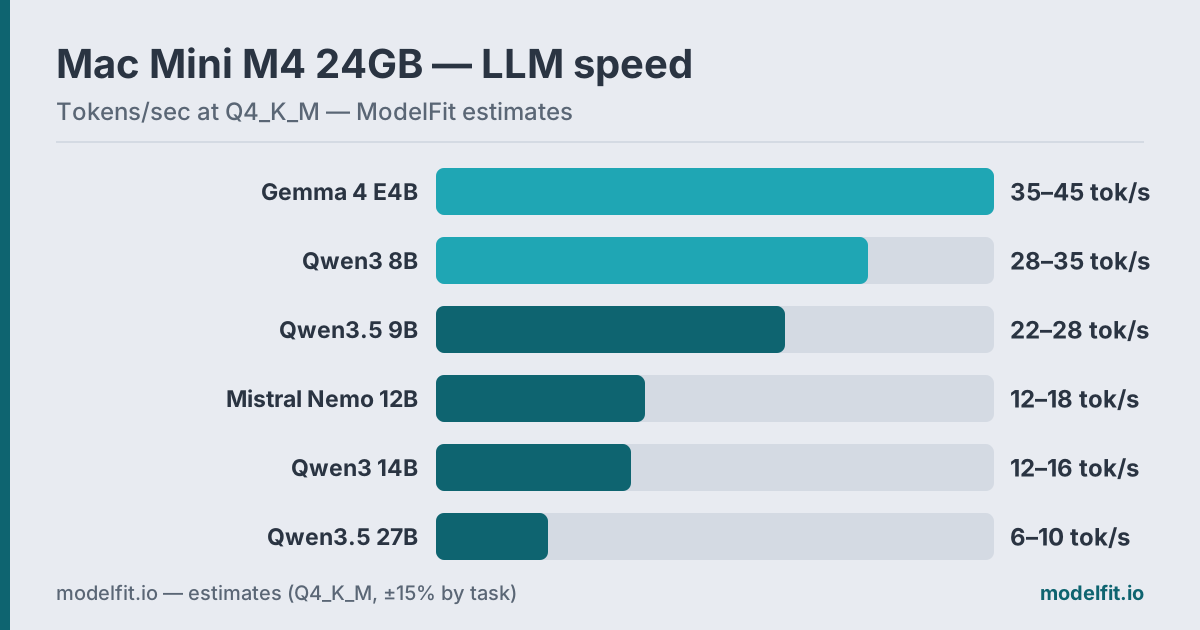 Estimated token generation on the Mac Mini M4 24GB at Q4_K_M. ModelFit estimates.
The Mac Mini M4 base model starts at $799 (Apple raised the price from $599 in May 2026 amid an industry-wide memory shortage, Bloomberg) and contains the same M4 chip as the MacBook Air M4: 10-core CPU, 10-core GPU, 120 GB/s LPDDR5X unified memory (Apple). On paper, a 24GB Mini and a 24GB Air are identical for inference.
In practice, they are not. The Mac Mini has a fan. That single difference changes everything for sustained local AI use.
This guide covers which models the 24GB tier unlocks, how fast they actually run, and why this little box is the smarter choice if you plan to keep AI running for more than casual chat. See the 16GB sibling guide for the entry tier, the Air 24GB companion if you need portability, or the Mac Mini device page for every configuration.
The Active Cooling Advantage
The MacBook Air M4 is fanless. After 20-30 minutes of continuous inference, the chip throttles. Speed drops 15-25%. This is not a flaw. It is physics. A sealed aluminum slab can only dissipate so much heat.
The Mac Mini has a fan. It spins up quietly under load and keeps the M4 at full clock speed indefinitely. If you run a long reasoning chain, process a batch of documents, or leave a local server running overnight, the Mini delivers consistent throughput the entire time.
For short conversations, both machines feel identical. For anything sustained, and 24GB invites bigger, slower models, the Mini wins decisively.
How Much RAM Do You Actually Have?
On 24GB, your real inference budget looks like this:
| Allocation | Typical Size |
|---|---|
| macOS kernel + services | ~2-3 GB |
| Active apps (browser, terminal) | ~1-3 GB |
| Available for LLM | ~19-20 GB |
Get told when a better model fits your Mac Mini M6 16 GB
One email when a new open-weight model beats these picks on your machine, plus the Thursday weekly.
For: Mac Mini M6 16 GB
The Mac Mini often runs headless or with minimal apps open, which means you can push closer to 20GB for model load, more than a laptop juggling a browser and other windows.
The rule of thumb still applies: Q4_K_M quantization costs roughly 0.6 GB per billion parameters. A 14B model needs ~9.5GB and runs at full speed with room to spare. A 27B model (qwen3.8:27b) fits at a tight Q4 around 17.5GB. A 32B model (qwen2.5:32b) is borderline at ~20GB, possible headless, but with little margin.
Benchmark Results
These figures are estimates for the M4 base chip (10-core GPU) with Ollama via GGUF format, scaled from community reports across r/LocalLLaMA and like2byte.com:
| Model | RAM Used | Tokens/sec (est.) | Best For |
|---|---|---|---|
| GPT-OSS 20B MXFP4 | ~14 GB | 18-24 tok/s | Daily driver, reasoning |
| LFM2 24B-A2B Q4_K_M | ~14 GB | 22-28 tok/s | Agents, tool calling |
| Qwen3 14B Q4_K_M | ~11 GB | 12-16 tok/s | Deliberate quality |
| Ministral 3 14B Q4_K_M | ~9.1 GB | 11-14 tok/s | Multimodal 14B |
| Qwen3.8 27B Q4_K_M | ~17.5 GB | 5-7 tok/s | Max quality VLM (tight) |
| Qwen3.5 9B Q4_K_M | ~7.0 GB | 17-22 tok/s | Fast fallback |
The big unlock at 24GB is breathing room. On 16GB, a 14B model runs but leaves almost no headroom. On 24GB, you load a 14B model and still have 10GB free for context, macOS, and a second small model kept warm.
Qwen3.5 9B changes the calculus too: it delivers quality that used to require the 14B class, at twice the speed and half the squeeze. The 14B is now the deliberate-work option rather than the default.
The Top Picks
1. GPT-OSS 20B: Best Daily Driver
OpenAI's open-weight GPT-OSS 20B (August 2025, Apache 2.0) is a Mixture-of-Experts model: 21B total parameters but only 3.6B active per token, per the official model card. That means near-20B-class knowledge at small-model speed. Native MXFP4 quantization loads it in ~14GB, comfortably inside the 24GB budget with apps open.
ollama run gpt-oss:20bAt an estimated 18-24 tok/s on the M4 it handles chat, coding, and reasoning at interactive speed, and the Mini's active cooling holds that pace through long sessions. On 24GB you can keep it resident alongside a smaller model and switch instantly.
2. LFM2 24B-A2B: Best Agentic MoE
Liquid AI's LFM2 24B-A2B Instruct is a hybrid Mixture-of-Experts model: 24B total parameters with only ~2.3B active per token, per the model card. It loads in ~14GB and is tuned for tool calling and on-device agents, powering the open-source LocalCowork agent app over MCP.
ollama run lfm2:24b-a2bAt an estimated 22-28 tok/s on the M4 it is one of the fastest options in this tier despite the 24B name. That makes it the pick for privacy-first automation and local agent workflows that never touch a cloud API, and the Mini's cooling keeps that speed steady through long agentic sessions.
3. Qwen3 14B: Best Deliberate Quality
The 24GB tier still earns its keep with this class of model. Qwen3 14B at Q4_K_M loads in ~11GB and still leaves room for long context. Its hybrid thinking mode handles multi-step reasoning without a separate reasoning model, and its output style differs enough from the MoE picks that many keep both.
ollama run qwen3:14bAt an estimated 12-16 tok/s it is fast enough for deliberate writing, analysis, and coding. On the Mini's cooling, you can run it for hours without a speed drop, the single biggest reason to pick the Mini over the Air at this tier.
4. Ministral 3 14B: Mistral's Multimodal 14B
Ministral 3 14B is the largest of Mistral AI's 2512 edge models, Apache 2.0: a 13.5B language model plus a 0.4B vision encoder with a 256k context window, per Mistral's model card. It loads in ~9.1GB at Q4_K_M and runs at an estimated 11-14 tok/s on the M4.
ollama run ministral-3:14bMistral's card scores it 68.5 on WildBench against 65.1 for Qwen3 14B in non-thinking mode. It is the pick when you want image input and 14B-class text quality in one download. Gemma 4 12B (gemma4:12b) remains a lighter current-generation alternative at ~8GB.
5. Qwen3.8 27B: Maximum Quality, Tight Fit
If you want the highest output quality a 24GB Mini can manage, qwen3.8:27b at Q4 (~17.5GB loaded with its vision projector) delivers, with native vision and Apache-2.0 per the model card. It only fits cleanly when the machine is headless or near-idle on apps. At an estimated 5-7 tok/s it is slow for chat but excellent for deliberate, high-stakes writing and analysis.
ollama run qwen3.8:27bThis only makes sense on the Mac Mini. On a fanless laptop, throttling would drag a 27B model down after a long session. The Mini holds the line. ollama run gemma4:26b (Gemma 4 26B, a current-generation MoE at a similar ~16GB footprint) is a faster Gemma-family alternative at this tier, and qwen2.5:32b (~20GB) runs headless but leaves almost no margin.
6. Qwen3.5 9B: Fast Multimodal Fallback
Qwen3.5 9B remains the small-class benchmark. At ~7GB loaded it leaves 13GB free, takes text and images natively, and carries a 262K context window. Its output rivals previous-generation 30B-class models.
ollama run qwen3.5:9bAt an estimated 17-22 tok/s it stays interactive for writing, analysis, coding, and image questions. GPT-OSS 20B is the stronger daily driver on this tier, but the 9B wins when you want a light model that leaves room for everything else.
Honorable mentions: Gemma 4 E4B (gemma4:e4b) remains the ultra-light multimodal option at ~4GB, and Qwen3 8B (qwen3:8b) is the proven previous-generation fallback. Both run easily on 24GB; they simply rank outside the top six on balanced quality right now.
Running as a Local AI Server
The Mac Mini's desktop form factor opens a use case laptops cannot match: always-on local inference server. With 24GB, that server can host real 9-14B models, not just toys.
With Ollama's built-in API server, the Mac Mini serves requests to any device on your network:
# Start Ollama server (listens on port 11434)
OLLAMA_HOST=0.0.0.0 ollama serve
From any other machine, point your app at http://mac-mini-ip:11434. The Mini sits under your monitor, draws about 12-15W at idle, and answers requests from your iPad, phone, or other computers, all without sending data to any cloud. If you are setting this up for the first time, the Ollama setup guide covers install through first API call, and our coding on Mac Mini picks show which models to serve for development work.
Power cost for 24/7 operation: roughly $15-20 per year at average US electricity rates. That is less than one month of most cloud API subscriptions, and a 9-14B model is genuinely capable enough to replace many of those calls.
What to Avoid
70B models: They require ~40GB at Q4. Well over the 24GB ceiling. Expect CPU-backed inference at 1-3 tok/s. Not usable.
Qwen2.5 32B for interactive chat: At ~20GB it loads headless but leaves almost no room for context or apps. At 5-9 tok/s it is fine for deliberate work, painful for conversation. Treat it as a batch tool, not a chat partner.
Q8_0 for anything above 9B: Q8_0 doubles the memory requirement. A 14B at Q8 needs ~18GB, leaving little for macOS and context. Swap will kill your speed. Use Q4_K_M or QAT variants.
Running 27B with a full desktop open: qwen3.8:27b needs the machine near-headless to fit at Q4. Keep a browser with many tabs open and you will spill into swap. Close apps or run the Mini headless for big models.
Quick Reference Table
| Use Case | Best Model | Command | Speed (est.) |
|---|---|---|---|
| Best daily driver | GPT-OSS 20B | ollama run gpt-oss:20b | 18-24 t/s |
| Agents, tool calling | LFM2 24B-A2B | ollama run lfm2:24b-a2b | 22-28 t/s |
| Deliberate quality | Qwen3 14B | ollama run qwen3:14b | 12-16 t/s |
| Multimodal 14B | Ministral 3 14B | ollama run ministral-3:14b | 11-14 t/s |
| Maximum quality (tight) | Qwen3.8 27B | ollama run qwen3.8:27b | 5-7 t/s |
| Fast fallback | Qwen3.5 9B | ollama run qwen3.5:9b | 17-22 t/s |
FAQ
Is the Mac Mini M4 24GB the same as the MacBook Air M4 24GB for AI?
Same chip, same memory bandwidth (120 GB/s), same inference speed on short tasks. The difference is cooling. The Mac Mini has active cooling and sustains full performance indefinitely. The MacBook Air M4 is fanless and throttles after 20-30 minutes of continuous inference, dropping speed 15-25%. For 14B+ models that run long, the Mini holds speed where the Air sags.
What is the largest model I can run on Mac Mini M4 24GB?
A 14B model at Q4_K_M (~9.5GB) is the comfortable sweet spot. qwen3.8:27b at Q4 (~17.5GB) fits when the Mini is headless or near-idle. qwen2.5:32b at Q4 (~20GB) is borderline, it loads headless but leaves almost no margin for context. Anything above 32B at Q4 exceeds the 24GB ceiling and swaps to virtual memory, dropping speed below 5 tok/s.
Is 24GB worth it over the 16GB Mac Mini M4?
Yes, if you plan to run 14B+ models daily or serve multiple users. 16GB handles 4-13B models comfortably but leaves a 14B model with almost no headroom. 24GB runs 14B models cleanly with 10GB free, and unlocks tight 27B Q4 options. If you only chat with 9B-class models, 16GB is enough; see our 16GB Mini guide. For 14B-as-a-daily-driver, 24GB is the better buy.
Can I run the Mac Mini M4 24GB as a 24/7 local AI server?
Yes, and 24GB makes it far more capable than the 16GB tier. With OLLAMA_HOST=0.0.0.0 ollama serve, any device on your network can query a real 9-14B model. The Mini draws ~12-15W at idle and ~30W under load. Annual power cost at 24/7 operation is roughly $15-20, less than one month of a cloud API subscription.
Does the Mac Mini M4 support MLX format models?
Yes. Apple's MLX framework runs natively on M4 and can be 10-20% faster than GGUF via Ollama on some models. Use mlx-lm from the command line or LM Studio's MLX backend. The tradeoff: fewer models ship in MLX format compared to GGUF, and the tooling is less mature. Ollama (GGUF) remains the easiest starting point.
How does the Mac Mini M4 24GB compare to a PC with a 16GB GPU?
The Mac Mini can use ~20GB for inference. A 16GB VRAM GPU tops out near 13B models on the card; larger models spill into system RAM via PCIe, dropping speed sharply. For 14B models, the 24GB Mini runs them entirely in unified memory and stays fast. For sub-8B models, a modern NVIDIA GPU can be quicker thanks to higher VRAM bandwidth.
Which model should I pick first on a 24GB Mini?
Start with GPT-OSS 20B (ollama run gpt-oss:20b). It covers chat, coding, and reasoning at interactive speed with headroom to spare. Add Qwen3 14B for deliberate deep work and Qwen3.5 9B for fast multimodal responses. That trio covers most daily use. For more options across machines, see our best LLM for MacBook guide.
- Qwen Models: Best all-rounders for 24GB, from 0.8B to 122B
- Gemma Models: Google's efficient models, from E2B to 31B
- Mistral Models: Strong mid-size writing models
Don't miss the next one for your Mac Mini M6 16 GB
This article covers one moment. Get one email when a newer open-weight model fits your machine better, plus the Thursday weekly with what changed.
For: Mac Mini M6 16 GB
Where to Buy for Local AI
best configsArchive your model library off the internal drive. Quantized models run 5 to 40GB each, so 2TB holds dozens with room to spare.
Check price on Amazon40Gbps external storage fast enough to run models from. Pair it with an M.2 drive for a portable model vault.
Check price on AmazonMore ports for the external drives, displays and peripherals around a local-AI workstation.
Check price on AmazonCheapest way into the 24GB sweet spot: runs 14B models comfortably and 30B MoE via mmap.
Check price at AppleMore headroomLoads 70B-class models and leaves room for a multi-model local stack.
Check price at AppleModelFit may earn a commission on purchases through these links, at no extra cost to you.
Have questions? Reach out on X/Twitter