Run Gemma 4 on iPhone 17 Pro with Google AI Edge Gallery
The iPhone 17 Pro is the fastest iPhone ever released for on-device AI. With 12 GB of RAM and the A19 Pro's upgraded 16-core Neural Engine, it is the only iPhone that can run Google Gemma 4 E4B (5 GB, 4.5B effective parameters) without forcing other apps out of memory. Real-world testing puts E4B around 30 tokens per second and the smaller E2B variant past 40 tok/s. If you want the best on-device AI experience iOS currently offers, this is the device.
On the iPhone 17 Pro (Apple A19 Pro, 12GB RAM), run Google Gemma 4 E4B at ~30 tok/s (measured) via Google AI Edge Gallery. Gemma 4 E4B is ~5 GB on disk and uses 2-3 GB in memory, fully offline, no account required.
Sizing rule: an on-device model must fit its weights plus working memory inside the iPhone 17 Pro's 12GB of RAM, shared with iOS and the host app. If E4B feels slow, Gemma 4 E2B (~2.5GB on disk, ~40 tok/s est.) is the lighter fallback. Everything runs fully offline once the model is downloaded, and speed varies with thermal state during long sessions. What it will not run: 7B-class and larger models exceed a phone's usable memory; those need a Mac, a GPU, or a cloud API.
→ Install Google AI Edge Gallery (iOS 17+), then download Gemma 4.
Speed is a real-world user-reported measurement; on-device speed varies with thermal state.
Cite this page: ModelFit, Run Gemma 4 on iPhone 17 Pro: 40+ tok/s with Edge Gallery (2026), https://modelfit.io/iphone/iphone-17-pro/, updated October 2026, CC BY 4.0.
Last updated: October 13, 2026 · Editor: ModelFit Team
Verdict
Recommended: Gemma 4 E4BiPhone 17 Pro is the only iPhone where Gemma 4 E4B runs comfortably. Pick E4B for the highest local quality, or E2B if you want maximum speed and battery efficiency.
Gemma 4 Performance on iPhone 17 Pro
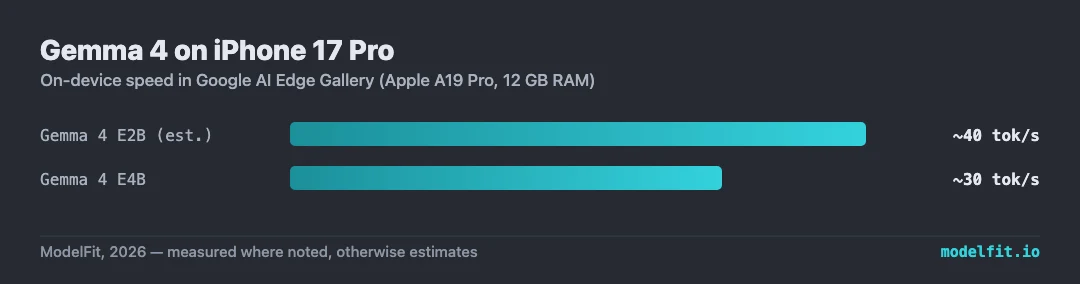
Speeds via Google AI Edge Gallery on iOS 17+. "Measured" numbers come from real-world Hacker News user reports; "Estimated" numbers are interpolations from chip generation. Both Gemma 4 variants use int4 quantization-aware training.
Best for
- Multimodal AI: text + image + 30s audio in one conversation
- Long context (128K) document analysis on the go
- Travelers who need offline translation in any language
- Privacy-sensitive workflows where no data can leave the phone
Watch outs
- Sustained inference still warms the device. Expect throttling after ~10 minutes of continuous generation
- E4B model download is ~5 GB. Use Wi-Fi, not cellular
- Battery: continuous chat drains roughly 15-20% per hour
Setup Guide
Step-by-step install for Google AI Edge Gallery on iPhone 17 Pro, plus full benchmarks and the privacy details.
Get told when a better model fits your iPhone 17 Pro
Get one email when a new open-weight model is a better fit for this machine.
For: iPhone 17 Pro