Run Gemma 4 on iPhone 15 with Google AI Edge Gallery
iPhone 15 with the A16 Bionic chip and 6 GB of RAM is the entry-level choice for on-device Gemma. The smaller memory budget rules out the larger Gemma 4 E4B model, but Gemma 4 E2B runs fine through Google AI Edge Gallery at an estimated 15 tokens per second. That is slower than 8 GB iPhones but still useful for chat, translation, and image Q&A on the go. Apple Intelligence is not supported here, so Edge Gallery is your only option for serious on-device AI on this phone.
On the iPhone 15 (Apple A16 Bionic, 6GB RAM), run Google Gemma 4 E2B at ~15 tok/s (est.) via Google AI Edge Gallery. Gemma 4 E2B is ~2.5 GB on disk and uses 1-1.5 GB in memory, fully offline, no account required.
Sizing rule: an on-device model must fit its weights plus working memory inside the iPhone 15's 6GB of RAM, shared with iOS and the host app. The larger Gemma 4 E4B (~5GB on disk, 2-3GB in use) is the quality upgrade, but it only fits phones with more free memory. Everything runs fully offline once the model is downloaded, and speed varies with thermal state during long sessions. What it will not run: 7B-class and larger models exceed a phone's usable memory; those need a Mac, a GPU, or a cloud API.
→ Install Google AI Edge Gallery (iOS 17+), then download Gemma 4.
Speed is a ModelFit estimate from chip generation, not a measured benchmark.
Cite this page: ModelFit, Run Gemma 4 on iPhone 15: Edge Gallery + 6GB RAM (2026), https://modelfit.io/iphone/iphone-15/, updated October 2026, CC BY 4.0.
Last updated: October 13, 2026 · Editor: ModelFit Team
Verdict
Recommended: Gemma 4 E2BiPhone 15 supports Gemma 4 E2B comfortably. The 6 GB RAM ceiling means E4B is off the table. That is fine, E2B is plenty for daily use.
Gemma 4 Performance on iPhone 15
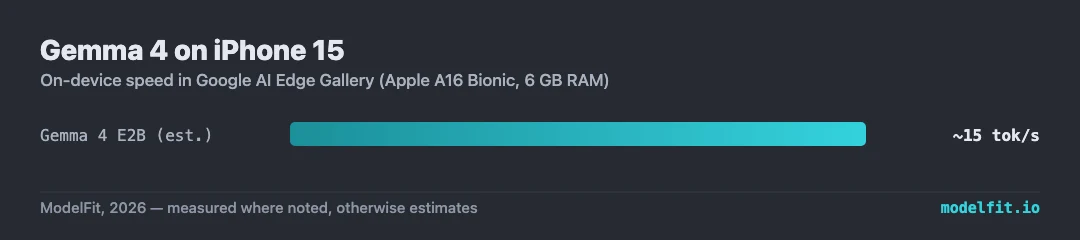
Speeds via Google AI Edge Gallery on iOS 17+. "Measured" numbers come from real-world Hacker News user reports; "Estimated" numbers are interpolations from chip generation. Both Gemma 4 variants use int4 quantization-aware training.
Best for
- iPhone 15 owners who do not have Apple Intelligence
- Casual chat, writing, and translation
- Offline use during travel
- Privacy-sensitive personal queries
Watch outs
- Gemma 4 E4B is not recommended. RAM headroom too tight
- Older A16 chip is slower than A17 Pro and A18 generations
- Apple Intelligence is not supported on iPhone 15 (non-Pro)
Setup Guide
Step-by-step install for Google AI Edge Gallery on iPhone 15, plus full benchmarks and the privacy details.
Get told when a better model fits your iPhone 15
Get one email when a new open-weight model is a better fit for this machine.
For: iPhone 15