TL;DR: Local AI hardware comes down to three things: memory capacity (what fits), memory bandwidth (how fast it answers), and software stack maturity (how much of the spec you actually get). Vendor numbers span the RTX PRO 6000's 1792 GB/s down to the base M4's 120 GB/s. Quantization is the free lever: dropping FP16 to 4-bit roughly quarters memory footprint.
Local AI hardware is three things multiplied together: memory capacity, memory bandwidth, and the software stack. Capacity decides what fits. Bandwidth decides how fast it answers. The stack decides how much of the spec sheet you actually get. The wrong question is "which hardware is best?" The right question is "which bottleneck am I buying?"
Most buying advice fixates on one number, usually VRAM. That misses how local models actually run. A box can hold a 70B model and still feel slow. A fast card can be useless if the model does not fit. The three legs interact, and a fourth leg, raw compute, decides how fast your prompts get read. This guide walks each one with vendor-published numbers, so you can match hardware to your real workload.
What decides local AI speed?
Four properties, in plain terms:
- Capacity (RAM or VRAM): the gate. If the model plus its context does not fit, nothing else matters.
- Bandwidth (GB/s): the decode engine. Token generation reads the whole active model from memory for every token, so speed tracks bandwidth.
- Compute (TFLOPs): the prefill engine. Reading your prompt is a math-heavy step that scales with raw compute, not bandwidth.
- Software stack: the tax. CUDA, ROCm, Metal, and others differ in how much of the silicon real workloads can reach.
A purchase is really a bet on which of these you will run out of first. Pick the bottleneck that matches your work, not the biggest headline spec.
Capacity: what fits
Capacity is the first filter because it is binary. The model weights plus the KV cache for your context window have to sit in memory, or the run fails or spills to slow storage. This is where unified-memory machines stand out. Apple's M3 Ultra is configurable up to 512GB of unified memory (Apple Newsroom, 2025). AMD's Ryzen AI Max+ 395 supports up to 128GB (AMD). NVIDIA's DGX Spark ships 128GB of coherent unified memory (NVIDIA).
Discrete GPUs hold far less. The consumer RTX 5090 tops out at 32GB. Even the workstation RTX PRO 6000 Blackwell carries 96GB (NVIDIA). So if your goal is to hold one very large model in one box without sharding across multiple cards, big unified memory wins the capacity leg outright.
Bandwidth: how fast it decodes
Bandwidth sets your token generation speed. During the decode stage, the model reads its active parameters from memory once per token, which makes the step memory-bound. A roofline study of LLM inference puts it plainly: "during the decode stage, all computations are memory-bound, resulting in performance significantly below the computational capacity of the GPU's computation units" (LLM Inference Unveiled, arXiv 2402.16363).
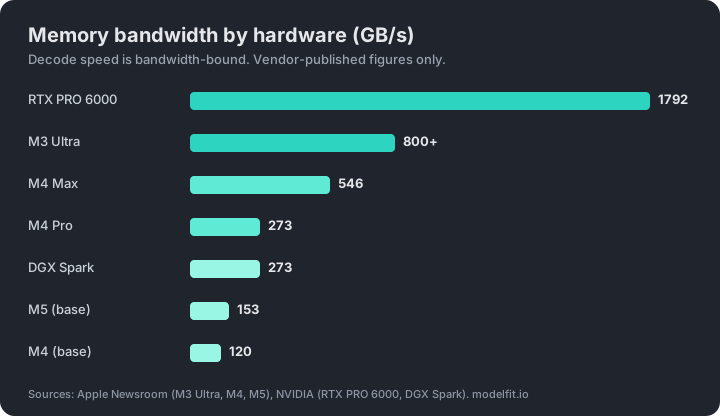
The practical rule: tokens per second scale with bandwidth divided by the bytes of the active model. Higher GB/s means faster replies. Here the ranking flips. The RTX PRO 6000 Blackwell delivers 1792 GB/sec (NVIDIA). Apple's M3 Ultra offers over 800GB/s, the M4 Max 546GB/s, and the M4 Pro 273GB/s (Apple M4). The base M5 reaches 153GB/s, a nearly 30 percent gain over the M4's 120GB/s (Apple M5).
One number reframes a whole product. The DGX Spark runs at 273GB/s (NVIDIA), the same bandwidth tier as an M4 Pro. It is a coherent CUDA development appliance, not a high-throughput serving box. Read the bandwidth before you read the price.
The hidden fourth leg: prefill is compute-bound
Bandwidth rules decode, but it does not rule prefill. Prefill is the step where the model reads your prompt before it writes anything. That step is a large matrix multiply, so it is compute-bound, not memory-bound. The same roofline study notes that "during the prefill stage, the majority of computations are compute-bound, leading to high performance" (arXiv 2402.16363). A practitioner writeup sums the split up: prefill is a matrix multiplication problem, decode is a memory bandwidth problem (Towards Data Science).
This is why long prompts and many concurrent users punish hardware that is strong on bandwidth but light on compute. Apple silicon shows this trade. Decode can feel fine while a long prompt takes a beat to process, because the compute leg is the limiter there. If your work is short chats, prefill barely matters. If you paste whole codebases or serve a team, it matters a lot.
Software stack: how much spec you cash out
The stack is the gap between the spec sheet and reality. The same theoretical bandwidth delivers different real speed depending on how mature the runtime is. NVIDIA's CUDA is the reference: most local tools target it first, so a CUDA card tends to cash out close to its full spec on day one. AMD's ROCm and Intel's stack are improving but still trail in coverage and polish, which is a recurring complaint in the local AI community. Apple's Metal path, through MLX and llama.cpp, has matured enough to be a daily driver.
The point for buyers: a card with a big number on paper can underdeliver if the framework support is thin. When you compare two options with similar bandwidth, the one with the deeper software support usually wins on the day, not on the datasheet.
Quantization: the biggest lever you control
Quantization is the one knob that moves all the legs at once, and it costs nothing. Lowering the precision of the weights shrinks the bytes per parameter, which cuts both the capacity you need and the bandwidth you spend per token. HuggingFace's guide states that an 8-bit model is "roughly 4 times smaller than its float32 counterpart," and that 4-bit "further reduces the model size and memory usage (halving it compared to int8)" (HuggingFace).
In round bytes per parameter: FP16 is about 2 bytes, 8-bit is about 1 byte, and 4-bit is about 0.5 bytes. Moving from FP16 to 4-bit roughly quarters the footprint. That can be a bigger speed and fit win than a hardware swap, with a small quality cost most users accept. Before you buy more memory, try a smaller quant of the model you want.
The bandwidth ladder at a glance
| Hardware | Memory bandwidth | Max memory | Source |
|---|---|---|---|
| RTX PRO 6000 Blackwell | 1792 GB/sec | 96 GB | NVIDIA |
| Apple M3 Ultra | over 800GB/s | 512 GB | Apple |
| Apple M4 Max | 546GB/s | up to 128 GB | Apple |
| Apple M4 Pro | 273GB/s | up to 64 GB | Apple |
| NVIDIA DGX Spark | 273 GB/s | 128 GB | NVIDIA |
| Apple M5 (base) | 153GB/s | up to 32 GB | Apple |
| Apple M4 (base) | 120GB/s | up to 32 GB | Apple |
NVIDIA does not publish a GB/s figure on its consumer GeForce pages, so the RTX 5090 and 4090 bandwidths often quoted are third-party interface calculations, not vendor numbers. They are left out of this vendor-only table on purpose.
Which bottleneck are you buying?
Match the archetype to your work:
- Big unified memory (Apple M3 Ultra, AMD Strix Halo, DGX Spark): you are buying capacity. Best when you must hold one very large model in one box. You give up some decode speed and a lot of prefill compute. Read the Strix Halo writeup for the first real x86 unified-memory option.
- High-end discrete GPU (RTX PRO 6000, top GeForce): you are buying bandwidth and the CUDA stack. Best for fast tokens, long prompts, and serving several users, as long as your model fits the smaller VRAM.
- DGX Spark: you are buying a coherent CUDA development appliance. Treat it as a dev box at M4 Pro bandwidth, not a serving rig.
- A Mac you already own: you likely have more headroom than you think. Pick the right model size and quant first.
How much model fits your hardware?
A rough capacity ladder, as a starting point, not a promise:
- 8GB: 7B to 8B class models at a 4-bit quant
- 16GB: 13B to 14B class
- 24GB to 32GB: 24B to 32B class
- 64GB and up: 70B class
The exact best pick depends on bandwidth, context length, and the quant, which is why a static table only gets you close. To get the real answer for your machine, run the ModelFit wizard, check the how much RAM guide, or run the open CLI:
npx @wecko-ai/modelfitFor the underlying numbers, the open hardware dataset lists model and hardware fits, and the benchmark page tracks open-weight scores against cloud models.
FAQ
Is VRAM the only thing that matters for local AI?
No. VRAM, or unified memory, decides what fits, which is the first gate. After that, memory bandwidth decides how fast tokens generate, raw compute decides how fast prompts get read, and software stack maturity decides how much of the spec you actually reach. A box can fit a big model and still feel slow if its bandwidth is low.
Why is the DGX Spark only as fast as an M4 Pro for decode?
Both run memory at 273 GB/s (NVIDIA, Apple). Token generation is memory-bound, so decode speed tracks that bandwidth. The DGX Spark's value is its 128GB of coherent memory and the CUDA software stack for development, not raw serving throughput.
Does quantization really beat buying more memory?
Often yes. Going from FP16 to 4-bit roughly quarters the memory footprint, since 4-bit is about 0.5 bytes per parameter versus about 2 for FP16 (HuggingFace). That shrinks both the capacity you need and the bandwidth you spend per token, usually with a small quality cost. Try a smaller quant before upgrading hardware.
Why does Apple silicon feel slow on long prompts but fine on chat?
Long prompts stress prefill, which is compute-bound rather than bandwidth-bound (arXiv 2402.16363). Apple's unified memory gives strong bandwidth for decode but less raw compute for prefill, so a short chat feels quick while a very long prompt takes a beat to process before the reply starts.
What about the RTX 5090 and 4090 bandwidth numbers?
NVIDIA does not list a GB/s memory bandwidth figure on its consumer GeForce product pages. The numbers commonly cited are calculated from the memory interface width and speed by third parties, not published by NVIDIA. We omit them here and anchor on vendor-published figures like the RTX PRO 6000 at 1792 GB/sec (NVIDIA).
Sources
- Apple Newsroom, M3 Ultra: https://www.apple.com/newsroom/2025/03/apple-reveals-m3-ultra-taking-apple-silicon-to-a-new-extreme/
- Apple Newsroom, M4 Pro and M4 Max: https://www.apple.com/newsroom/2024/10/apple-introduces-m4-pro-and-m4-max/
- Apple Newsroom, M5: https://www.apple.com/newsroom/2025/10/apple-unleashes-m5-the-next-big-leap-in-ai-performance-for-apple-silicon/
- NVIDIA, RTX PRO 6000 Blackwell: https://www.nvidia.com/en-us/products/workstations/professional-desktop-gpus/rtx-pro-6000/
- NVIDIA, DGX Spark: https://www.nvidia.com/en-us/products/workstations/dgx-spark/
- AMD, Ryzen AI Max+ 395: https://www.amd.com/en/products/processors/laptop/ryzen/ai-300-series/amd-ryzen-ai-max-plus-395.html
- LLM Inference Unveiled, roofline survey, arXiv: https://arxiv.org/html/2402.16363v4
- Prefill compute-bound, decode memory-bound, Towards Data Science: https://towardsdatascience.com/prefill-is-compute-bound-decode-is-memory-bound-why-your-gpu-shouldnt-do-both/
- HuggingFace, quantization concept guide: https://huggingface.co/docs/transformers/main/en/quantization/concept_guide
Match this model to a machine that can run it: by RAM tier for Apple Silicon, or by VRAM for an NVIDIA GPU.
The weekly local-AI refresh
New open-weight models, real Apple Silicon benchmarks, and the one model worth running on your Mac this week. Free, one email a week, unsubscribe anytime.
By subscribing you agree to our Privacy Policy and to receive the weekly email. Unsubscribe anytime.
Have questions? Reach out on X/Twitter