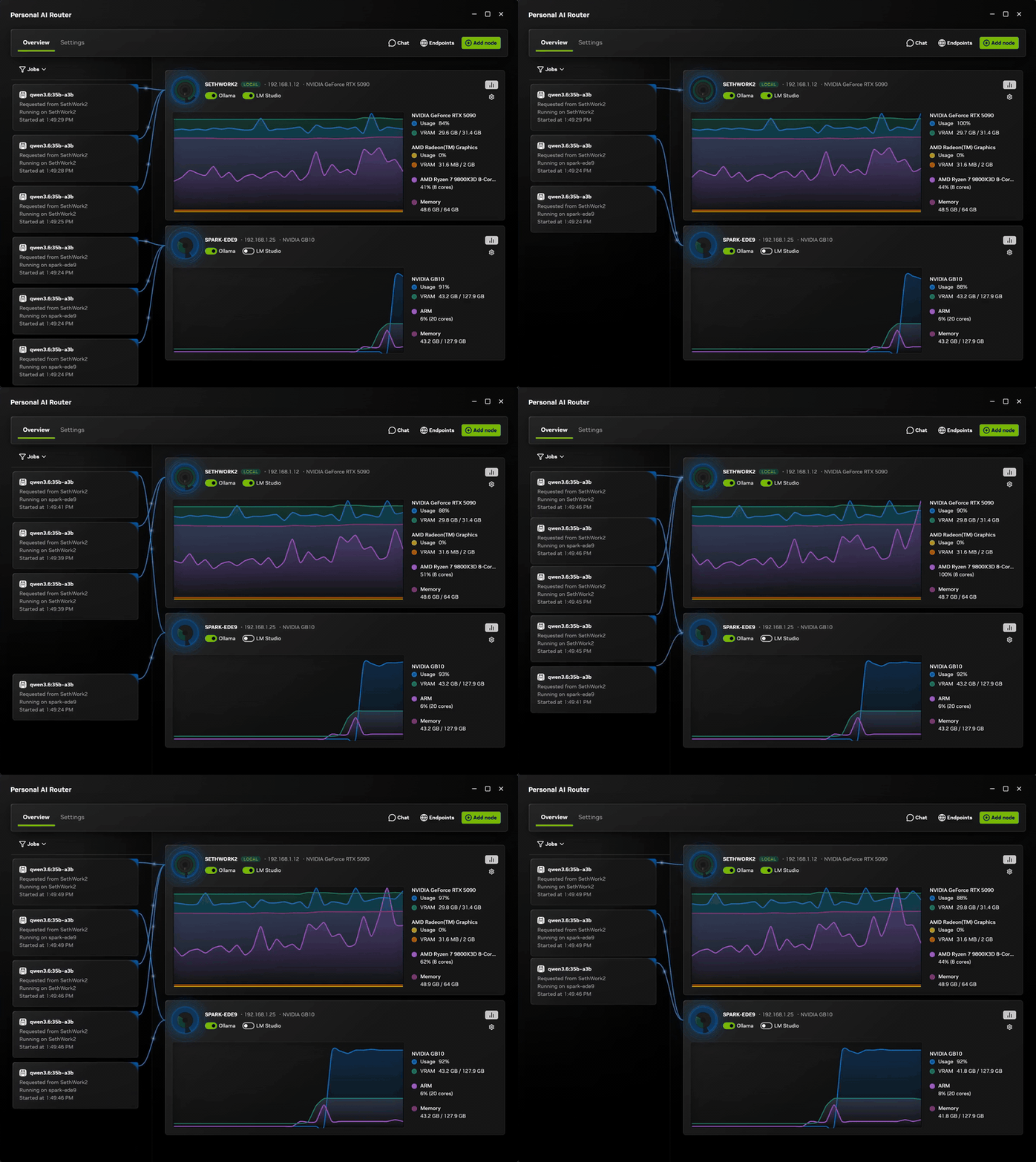
NVIDIA released PAIR (Personal AI Router) as a public beta on September 3, 2026, and it is the first tool that turns several home computers into one distributed inference cluster without special hardware or network changes. It is free, open source under Apache 2.0, and it treats Apple Silicon M4 and newer as first-class nodes alongside Windows RTX systems and DGX Spark. In a five-subagent Hermes Desktop demonstration, a three-device PAIR cluster completed the workload in 8 minutes 48 seconds compared to 18 minutes on a single RTX Spark laptop (NVIDIA Developer Blog, September 2026). For Mac users running local LLMs, this changes the question from "what can one machine hold" to "what can every machine on my network share."
What is NVIDIA PAIR?
PAIR is software that runs on each machine you want to include. It discovers other PAIR nodes on the local network over mDNS, checks which inference engines are running, and presents a single Ollama-compatible and OpenAI-compatible proxy endpoint to your applications and agents. When you send a request to that endpoint, PAIR routes it to whichever node can handle it based on engine availability, model presence, and current GPU load.
Supported hardware covers Windows 11, Linux, and macOS on both x64 and arm64. Nodes with different operating systems can pair with each other freely. Apple Silicon M4 and newer is supported, along with GeForce RTX 20 Series GPUs and newer, RTX PRO workstation GPUs, and DGX Spark. The minimum system RAM across all platforms is 8 GB (NVIDIA.com, September 2026).
What PAIR does not do
PAIR does not pool GPU memory or combine GPUs into a larger logical device. It does not shard a single model across machines or split an inflight inference request between nodes. Each independent request goes to exactly one node and runs entirely on that node. The GitHub README states this clearly: "PAIR routes each independent request to one node. It does not pool GPU memory, combine GPUs into a larger logical GPU, shard one model across machines, or split an in-flight inference request between nodes" (GitHub: NVIDIA/Personal-AI-Router, Apache 2.0).
This distinction matters. PAIR is a load balancer for concurrent independent requests, not a distributed inference engine like vLLM in tensor-parallel mode. A single large model still needs to fit on one machine. What PAIR enables is using multiple machines for parallel workloads.
Get told when a better model fits your RTX 4090
One email when a new open-weight model is a better fit for your machine, plus the Thursday weekly.
For: RTX 4090
You'll also get the weekly ModelFit email. By signing up you agree to our Privacy Policy. Unsubscribe from either email anytime, in one click.
How does PAIR change the workflow for Mac users?
The main bottleneck for running LLMs on a Mac is unified memory. A Mac Studio with 128 GB can run large MoE models, but that machine carries the entire load alone. If you also own an M4 Mac Mini with 24 GB, that Mini sits idle while the Studio handles everything.
PAIR changes that equation. Your secondary Mac becomes usable capacity for concurrent workloads. Multi-agent setups that spawn several subagents in parallel are the clearest use case. NVIDIA's demonstration showed a Hermes Desktop workflow that orchestrated five subagents. A single RTX Spark laptop took 18 minutes. A three-device PAIR cluster (one RTX Spark plus two other nodes) completed the same workload in 8 minutes 48 seconds (NVIDIA Developer Blog, September 2026). The second and third machines halved the wall-clock time without any code changes to the agent harness.
For Mac-only households, the benefit is more modest but still real. A Mac Studio paired with an M4 Mac Mini gives you two nodes that can serve different models simultaneously. Keep a fast 8B model like Qwen3.5 9B on the Mini for quick queries and a larger reasoning model like GPT-OSS 20B on the Studio for complex tasks, all behind one endpoint. Not sure which model fits your hardware? The ModelFit wizard matches models to your Mac's RAM and chip in seconds.
What hardware works with PAIR?
| Component | Supported |
|---|---|
| Operating systems | Windows 11, Linux, macOS |
| Architectures | x64 and arm64 on all three |
| Cross-platform pairing | Yes. Windows, Linux, and macOS nodes can pair freely |
| Apple Silicon | M4 and newer |
| NVIDIA GPUs | GeForce RTX 20 Series and newer, RTX PRO workstation GPUs |
| DGX | DGX Spark |
| RAM minimum | 8 GB |
| Disk recommended | 20 GB |
| Inference engines | Ollama and LM Studio |
| License | Apache 2.0 |
Source: NVIDIA PAIR Overview and GitHub repository, September 2026.
A machine running PAIR does not automatically become a capable inference node. Each node still needs enough memory for the model you want to run there, and the inference engine must be installed and running. PAIR discovers available engines, but the engines themselves set their own hardware requirements. The how-much-ram-for-local-llm guide helps you estimate what fits on each machine.
Can multiple Macs work together on the same network?
Yes. Mac-to-Mac pairing works because PAIR is engine-agnostic. Both machines run Ollama or LM Studio. PAIR discovers both, sees which models each has cached, and routes accordingly. The macOS installer is a standard .dmg, and the setup flow is the same as on any other platform.
The practical limitation is network latency. PAIR sends the full prompt to whichever node it selects, and the full generated text comes back over the LAN. On a wired gigabit network this is negligible for any model smaller than 100B parameters. On WiFi, a long generation at high token throughput will add visible latency between request and first token. PAIR prefers nodes it already knows have the model loaded, so steady-state usage routes to the same machine and the network handoff happens only when that node is busy.
How does PAIR compare to running multiple GPUs on one machine?
If you already run a multi-GPU Linux setup with vLLM or llama.cpp in server mode across machines, PAIR is a simpler tool aimed at the home user. It does not require configuring distributed inference, managing cluster state, or editing configuration files. It discovers nodes automatically, pairs them with a PIN-based trust bootstrap on the local network, and exposes a single standard API.
For Mac users specifically, PAIR competes with the idea that one machine needs to do everything. Before PAIR, the answer to "can my Mac Mini help my Studio run this big model" was no. Now the answer is "it can handle the requests the Studio is too busy for." If you are shopping for a new Mac and wondering which configuration handles local models best, the device pages break down what each tier runs.
Getting started with PAIR
The setup flow is straightforward. Download the installer from the NVIDIA PAIR page for each machine, install it, open the PAIR desktop app, pair the machines using the PIN shown on each node, and point your existing Ollama or LM Studio client at the PAIR endpoint instead of localhost. The machines discover each other automatically over mDNS on the local network.
FAQ
Does PAIR work on M1, M2, or M3 Macs?
NVIDIA lists M4 and newer as supported at launch. M1 through M3 Macs are not in the published system requirements. This may change as the beta progresses.
Does PAIR combine RAM from two Macs into a larger pool?
No. PAIR routes individual requests to one node at a time. It does not pool memory or shard models across machines. Each model must still fit entirely on one node.
Can I use PAIR with any LLM application?
If the application speaks the Ollama or OpenAI chat completions API, yes. PAIR presents a standard endpoint that replaces your local Ollama or LM Studio address. No application changes are needed.
Does PAIR send data to the cloud?
NVIDIA states that prompts and responses stay on the local network when every component is local. An internet connection is needed only to download models.
How many nodes can PAIR handle?
The beta documentation did not publish a hard limit. The demonstration setup used three nodes. PAIR schedules based on engine state, model presence, and GPU utilization, so the practical limit depends on how many machines you have running compatible engines.
Sources
- NVIDIA PAIR official page : system requirements, download
- NVIDIA/Personal-AI-Router on GitHub : Apache 2.0, README, demo
- NVIDIA Developer Blog: PAIR deep-dive : 3-node demo benchmark
- NVIDIA Blog: IFA 2026 local AI announcements : September 3, 2026 launch coverage
Don't miss the next one for your RTX 4090
This article covers one moment. Get one email when a newer open-weight model fits your machine better, plus the Thursday weekly with what changed.
For: RTX 4090
You'll also get the weekly ModelFit email. By signing up you agree to our Privacy Policy. Unsubscribe from either email anytime, in one click.
Match this model to a machine that can run it: by RAM tier for Apple Silicon, or by VRAM for an NVIDIA GPU.
See how this changes your recommendation
Run the wizardHave questions? Reach out on X/Twitter