The local AI community calls 64GB Macs a dead zone, and the math backs half of it. A 70B model at Q4 weighs 43GB on disk (Ollama registry), a 64GB Mac gives a model roughly 48GB to work with, and 32k tokens of context adds about 10GB of KV cache on top. The weights fit; the working model barely does. But "dead zone" is only half the story in 2026: the same 64GB runs 35B-class MoE models at near-lossless Q8 with full context, something 48GB cannot do. Here is the honest breakdown.
Why do people call 64GB a dead zone?
Because the tier's headline promise, running 70B-class models, works on paper and disappoints in practice. macOS reserves memory for the system, so a rule-of-thumb working budget on a 64GB machine is about 75%, or 48GB. Our recommendation engine uses exactly that tiered budget.
Now place a 70B in it. llama3.3:70b at the default Q4_K_M is a 43GB download (Ollama). That leaves about 5GB of headroom, and KV cache for context eats it instantly: a 70B-class model needs roughly 10GB for 32k tokens of context at fp16, per the context calculator. So the configuration that looked like a 70B machine really runs a 70B with a short-context ceiling, at an estimated 19 tok/s on a typical 64GB Mac. Our engine labels that fit "Heavy" and ranks it below smaller models.
The next rungs are worse. The Q8 build of the same model is 75GB and the popular gpt-oss:120b is 65GB (Ollama): both overflow 64GB entirely, and both fit a 128GB machine. Stuck between "barely" and "not at all" is exactly what a dead zone feels like.
What does 64GB actually run well?
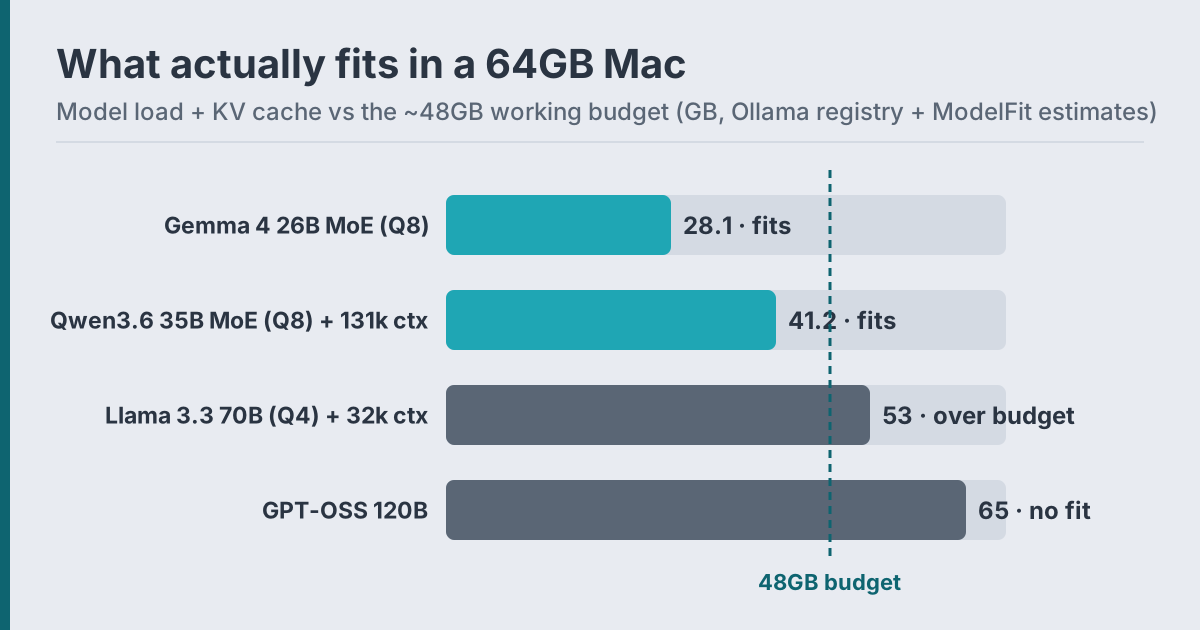
The 2026 answer is Q8 MoE models, and it makes 64GB much less dead than the complaint suggests. Mixture-of-Experts models in the 26B to 35B class became the quality sweet spot this year, and 64GB is the first tier that runs them at Q8 precision with room to spare.
| Model | On-disk load | Fits 48GB budget? | Est. speed on 64GB Mac |
|---|---|---|---|
| Qwen3.6 35B-A3B (Q8) | 38.7GB | Yes, with full 131k context (~2.5GB KV) | ~70 tok/s est. |
| Gemma 4 26B-A4B (Q8) | 28.1GB | Yes | ~73 tok/s est. |
| Qwen3.6 27B (Q8) | 30GB | Yes | ~30 tok/s est. |
| Llama 3.3 70B (Q4) | 43GB | Barely, short context only | ~19 tok/s est. |
| Llama 3.3 70B (Q8) | 75GB | No | n/a |
| GPT-OSS 120B | 65GB | No | n/a |
Get told when a better model fits your MacBook Air M5 16 GB
One email when a new open-weight model is a better fit for your machine, plus the Thursday weekly.
For: MacBook Air M5 16 GB
All speeds are bandwidth-derived estimates, not measurements. Two things stand out. First, the Q8 MoE rows beat the 70B row on speed by 3x while matching or beating it on current benchmarks: Qwen3.6 27B scores 77.2 on SWE-Bench Verified (model card), the top open-weight score on our leaderboard. Second, the hybrid-attention Qwen3.6 generation caches KV so efficiently that full 131k context costs ~2.5GB, so a 64GB Mac runs it with maximum context comfortably.
So the honest reframe: 64GB is a dead zone for the dense-70B dream, and simultaneously the cheapest tier for the Q8-MoE-with-full-context reality. Whether that is a dead zone depends on which of the two you are buying for.
Is 64GB worth it during the 2026 RAM price surge?
The upgrade math got harsher in June 2026, which sharpened the dead-zone debate. Apple raised prices across the lineup as memory costs spiked: the 14-inch MacBook Pro M5 Pro with 64GB and 1TB went from $2,999 to $3,699, a $700 jump, or 23.3% (BasicAppleGuy, 2026). Tim Cook attributed the hikes to memory pricing increases passed through to Apple.
Three buying rules fall out of the fit math:
1. Buying for 27B to 35B models? Stop at 48GB. Those models at Q4/Q5 run in a 34.8GB budget, and you save several hundred dollars. Our RAM guide has the full tier table.
2. Buying for Q8 precision or 131k context on 35B-class MoE? 64GB is the right tier, and the cheapest one that does it. This is also where the M5 Pro chip tops out, per Apple's spec sheet (Apple); 128GB requires stepping up to the M5 Max.
3. Buying for the 70B class or GPT-OSS 120B? Skip 64GB. Go 96GB or 128GB, where our engine rates 70B Q4 an "OK" fit with real context headroom, or wait out the price surge. DRAM contract prices are forecast to keep rising 13 to 18% in Q3 (TrendForce via Tom's Hardware, 2026), so the calculus favors buying the tier you need, not the tier you might grow into.
For your exact machine and use case, the ModelFit wizard or npx @wecko-ai/modelfit in a terminal gives the ranked answer in seconds, and the Mac Mini buy-or-wait guide covers the timing question in depth.
FAQ
Can a 64GB Mac run a 70B model?
Technically yes, comfortably no. Llama 3.3 70B at Q4 is a 43GB load inside a ~48GB working budget, which leaves too little room for meaningful context: 32k tokens costs about 10GB of KV cache at fp16. Expect an estimated 19 tok/s and a short-context ceiling. For daily 70B use, 96GB or 128GB is the honest tier.
What is the best local LLM for a 64GB Mac in 2026?
Qwen3.6 35B-A3B at Q8 is our engine's top pick: a 38.7GB load that fits with full 131k context and runs at an estimated 70 tok/s. Qwen3.6 27B, which scores 77.2 on SWE-Bench Verified, is the quality alternative, and its Q8 build also fits. Run npx @wecko-ai/modelfit for the pick matched to your exact chip.
Is 48GB enough instead of 64GB?
For Q4/Q5 models up to the 35B class, yes: they run inside 48GB's ~34.8GB budget. What you give up versus 64GB is Q8 precision on the 35B class and very long context. If neither matters to your workflow, 48GB is the better value, especially at 2026 upgrade prices.
Why does context use so much memory on 70B models?
Every token of context stores key-value pairs across all of the model's layers. Dense 70B-class models cost roughly 320KB per token at fp16, so 32k tokens is about 10GB. Newer hybrid-attention models like Qwen3.6 cache KV on only a few full-attention layers, cutting that cost by an order of magnitude, which is a big part of why they suit 64GB machines so well.
Sources
- Ollama registry tag sizes: llama3.3, gpt-oss
- Qwen3.6-27B model card: huggingface.co/Qwen/Qwen3.6-27B
- Apple June 2026 price increases: BasicAppleGuy
- MacBook Pro memory configurations: Apple
- Q3 2026 DRAM forecast: Tom's Hardware
- ModelFit leaderboard and dataset: modelfit.io/benchmark, modelfit.io/data
Don't miss the next one for your MacBook Air M5 16 GB
This article covers one moment. Get one email when a newer open-weight model fits your machine better, plus the Thursday weekly with what changed.
For: MacBook Air M5 16 GB
Match this model to a machine that can run it: by RAM tier for Apple Silicon, or by VRAM for an NVIDIA GPU.
Have questions? Reach out on X/Twitter