TL;DR: Speculative decoding lets a model draft several tokens and verify them in one pass, 2x or more faster, with identical output. But on a Mac the framework decides everything. With llama.cpp on Metal it is a net loss (−11% to −24%), while MLX tools like MTPLX hit 1.6-2.6x on Qwen 3.6 27B by using the model's own built-in MTP heads, no draft model, no extra RAM. Here is whether it helps your hardware.
 Speculative decoding: draft several tokens ahead, then verify them all in a single pass.
Speculative decoding is the closest thing to a free speed-up in local AI: same model, same output, several times faster. In 2026 it went mainstream. Ollama, LM Studio, and a wave of MLX projects all shipped it. Then Mac users hit a paradox. The tool most of them already run, llama.cpp, gets slower with speculative decoding on Apple Silicon. The fix is not a setting. It is the framework. This guide explains why MLX succeeds where llama.cpp's Metal backend fails, what MTPLX and its rivals actually do, and how to tell in thirty seconds whether speculative decoding will help your Mac. Every figure traces to a primary source.
What is speculative decoding, and why does "exact" matter?
Speculative decoding makes a model produce several tokens per step instead of one, with no change to the output. A lightweight "drafter" proposes a short run of tokens. The full model then verifies all of them in a single batched forward pass, which costs about the same as generating one token, because the weights are loaded once. Accepted tokens are kept; the first wrong one is corrected. The original method (Leviathan et al., arXiv 2211.17192) proves the result is identical to normal sampling.
One subtlety separates trustworthy tools from shortcuts. At any temperature above zero, naively accepting a draft token whenever it matches the model's top choice quietly shifts the output distribution. Rarer but valid tokens get suppressed. Proper implementations use probability-ratio rejection sampling, so the output stays exact. This is the line MTPLX draws against "greedy" methods, and it matters most for coding and creative work at real temperatures.
The paradox: speculative decoding slows llama.cpp down on Mac
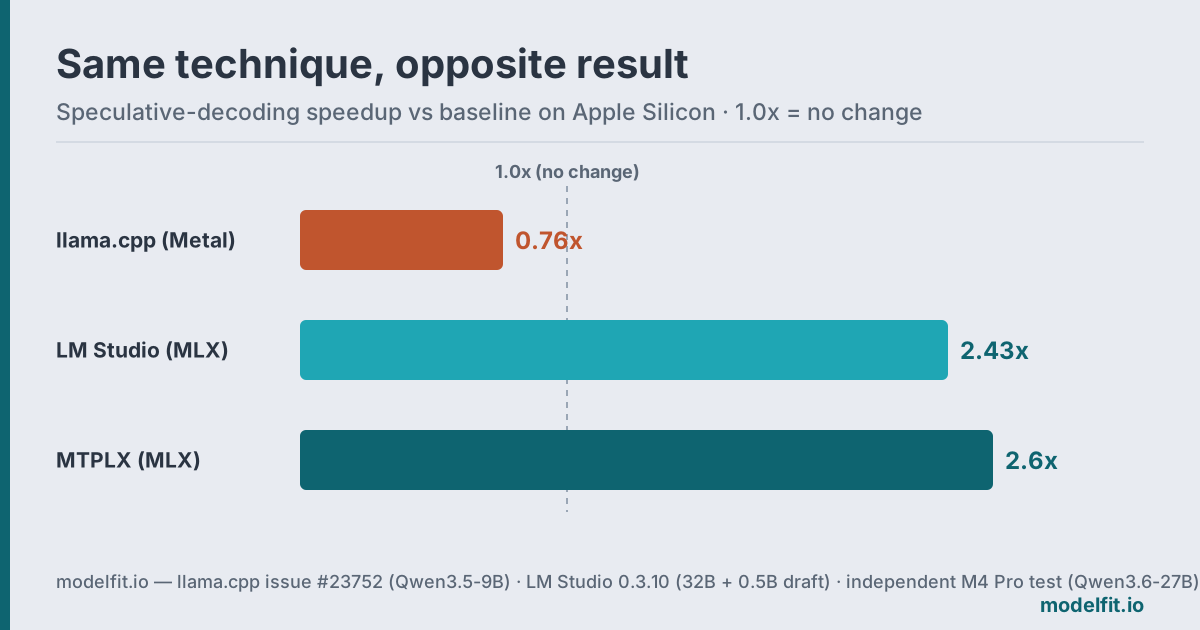
On Apple Silicon's Metal backend, llama.cpp's MTP speculative decoding is a net loss at every setting. A documented test (llama.cpp issue #23752) on an M1 Max running Qwen3.5-9B measured a ~25.3 tok/s baseline, and every speculative configuration came in below it, from −11% to −24%. The conclusion in the thread is blunt: "the draft evaluation overhead on Metal exceeds the speculative gain."
The reason is dispatch overhead. Each draft-verify step launches a separate Metal GPU kernel, and on Apple Silicon that cost is larger than the time the speculation saves. So the same technique that delivers 2-3x on an NVIDIA card goes backward on a Mac if you run it through llama.cpp.
Why does MLX win, and what does MTPLX do differently?
MLX avoids the kernel-dispatch tax, and MTPLX pushes the idea further by using no separate draft model at all. Apple's MLX framework fuses verification into the same compute graph as the main forward pass, so there is no per-token kernel-dispatch penalty. Run the identical speculative idea through MLX instead of llama.cpp and it flips from a loss to a large win.
MTPLX (open-source, Apache-2.0, GitHub) is the sharpest example. Instead of loading a second "draft" model, which eats RAM, it uses the multi-token-prediction (MTP) heads that ship inside models like Qwen 3.6 and Gemma 4. The model drafts ahead of itself. On Qwen 3.6 27B it reports 2.24x faster decode at coding temperatures and 1.6x on a 16 GB M4 Mac mini, using exact Leviathan-Chen rejection sampling so the output is unchanged.
An independent test backs the claim. On an M4 Pro (48 GB), a reviewer measured Qwen 3.6 27B going from about 7 tok/s to 18.3 tok/s with MTPLX at draft depth 3, a 2.6x gain, while the same machine on llama.cpp's MTP managed only 10.5 tok/s. Memory stayed modest at ~16.2 GB active and 18.6 GB peak, and even served over a LAN it held 14.3 tok/s (independent M4 Pro test). The honest caveat: acceptance falls with depth, roughly 73%, then 48%, then 32% across the first three drafted positions, and memory bandwidth (~120 GB/s on an M4 Pro) remains the ceiling.
MTPLX vs DFlash vs DDTree vs LM Studio
MTPLX is not alone, but its native-MTP-head approach is the cleanest. Several MLX projects now do exact speculative decoding on Apple Silicon, and one mainstream GUI ships it too.
| Tool | Drafter | Exact? | Headline speedup |
|---|---|---|---|
| MTPLX | Model's own MTP heads | Yes | 2.24x on Qwen 3.6 27B |
| DFlash-MLX | Block-diffusion drafter | Yes | ~4x on Qwen 3.5 9B |
| DDTree-MLX | Draft tree | Yes | ~1.5x over autoregressive |
| LM Studio | Separate draft model | Yes | 2.43x with a 0.5B draft |
| Apple ReDrafter | Recurrent drafter | Yes | up to 2.3x |
A few notes the table can't hold:
- DFlash-MLX (repo) posts the highest multiplier, but its ~4x is on a smaller 9B model. Multipliers do not compare across model sizes.
- DDTree-MLX (repo) uses a draft tree plus custom Metal kernels.
- LM Studio 0.3.10 (release notes) is the no-terminal option, reaching 2.43x on a 32B model with a 0.5B draft and 1.71x on Llama 8B, but it loads a separate draft model, costing extra RAM.
- Apple ReDrafter (arXiv 2403.09919) reaches up to 2.3x on Metal.
The trend underneath all of this: native MTP heads are becoming standard. DeepSeek V3 ships an MTP module and notes you can "repurpose" it for speculative decoding (about 1.8x on server GPUs, per SGLang docs); Qwen 3.6 and Gemma 4 carry them too. That is exactly what MTPLX and DFlash exploit on a Mac.
Does speculative decoding actually help your Mac?
It helps if you run a larger model through MLX, and hurts if you run a small one through llama.cpp. The quick decision:
- Runtime: Use an MLX tool (MTPLX, DFlash, or LM Studio's MLX backend). On llama.cpp's Metal path, leave MTP off. It is currently a net loss.
- Model size: Bigger dense models (27B and up) gain the most. For small, already-fast quantized models, draft overhead can erase the benefit.
- Model choice: Pick one with native MTP heads (Qwen 3.6, Gemma 4) so you need no separate draft model and no extra RAM.
- Hardware: More memory bandwidth means more headroom. An M4 Pro at ~120 GB/s is bandwidth-bound, so do not expect NVIDIA-class multipliers.
Choosing a model to pair with this? Check how much RAM it needs and where it lands on the benchmark page, or run the ModelFit wizard for a pick matched to your chip. For why Apple Silicon is bandwidth-bound in the first place, our GPU tok/s pages show how VRAM bandwidth compares.
FAQ
Does speculative decoding work with llama.cpp on a Mac?
For MTP, no. It is currently a net loss. GitHub issue #23752 documents an 11% to 24% throughput drop on Metal at every setting tested. Classic draft-model speculative decoding through an MLX backend, such as LM Studio, does work and reaches 2.43x.
What is MTPLX, and why does it need no separate draft model?
MTPLX uses the multi-token-prediction heads built into models like Qwen 3.6 and Gemma 4 as the drafter, so it needs no second model and no extra RAM. It reports 2.24x on an M5 Max and 1.6x on a 16 GB M4 Mac mini.
Does speculative decoding change the model's output?
Not when exact rejection sampling is used. MTPLX applies the Leviathan-Chen probability-ratio method with residual correction, so at temperature 0.6 it behaves like normal decoding, just faster. Greedy shortcuts that skip this can subtly change the output.
How much RAM do I need to run Qwen 3.6 27B with MTPLX?
An independent M4 Pro test measured about 16.2 GB active and 18.6 GB peak at 4-bit. A 24 GB or 32 GB Mac is comfortable; 16 GB is tight.
Which models have native MTP heads in 2026?
Qwen 3.5, Qwen 3.6, Gemma 4, and DeepSeek V3 ship native MTP heads. On Apple Silicon, MTPLX and DFlash-MLX turn those heads into 1.6-2.6x decode speedups; on servers, DeepSeek's module gives about 1.8x.
Match this model to a machine that can run it: by RAM tier for Apple Silicon, or by VRAM for an NVIDIA GPU.
The weekly local-AI refresh
New open-weight models, real Apple Silicon benchmarks, and the one model worth running on your Mac this week. Free, one email a week, unsubscribe anytime.
By subscribing you agree to our Privacy Policy and to receive the weekly email. Unsubscribe anytime.
Have questions? Reach out on X/Twitter