TL;DR: On Apple Silicon, MLX-based runtimes now beat the old llama.cpp path by roughly 1.4x on dense models and up to 3x on mixture-of-experts models. Ollama 0.19 (March 2026) switched to MLX itself and posted a +93% decode gain on an M5 Max. But peak tokens per second is the wrong metric for coding agents. oMLX's SSD-backed cache cuts time-to-first-token from 30-90 seconds to 1-3. Pick your runtime by workload, not by leaderboard.
 Two runtimes, one chip: MLX and llama.cpp now diverge sharply on Apple Silicon.
For two years, "run a local model on a Mac" meant one thing: Ollama wrapping llama.cpp. That default broke in 2026. Apple's MLX framework matured, every serious Apple Silicon benchmark started showing it ahead, and in March Ollama itself rebuilt its Mac engine on top of MLX. A new server, oMLX, then crossed 18,000 GitHub stars by reframing the problem entirely: not "how fast is one token" but "why does my coding agent stall for a minute before it answers." This guide maps the 2026 runtime landscape: what changed, how big the MLX-versus-llama.cpp gap really is, and which of the five main runtimes fits your workload. Every number here traces to a primary source.
What changed: Ollama now runs on MLX
The biggest 2026 shift is that the easy-mode runtime got fast. Ollama 0.19, released March 30, 2026, replaced its Apple Silicon inference path with MLX. On an M5 Max running Qwen3.5-35B-A3B, Ollama's own numbers show prefill rising from 1,154 to 1,810 tokens per second (+57%) and decode from 58 to 112 (+93%), per the Ollama blog.
Two caveats keep this honest. The MLX backend is a preview that requires a Mac with more than 32 GB of unified memory and, at launch, accelerates only the Qwen3.5 architecture. And the gains are model-conditional: one independent May 2026 test found standard Qwen3.6 saw almost no change with MLX enabled, while Qwen3.5-9B reliably gained around 65% (note.com benchmark). The headline is real, but it is not universal.
MLX vs llama.cpp: how big is the gap, really?
MLX wins on Apple Silicon, but the margin depends entirely on the model. MLX is Apple's array framework, tuned for the unified-memory GPU. llama.cpp, the engine Ollama historically wrapped, uses the GGUF format and a Metal backend.
On dense models the real advantage is roughly 1.4x to 1.8x. On mixture-of-experts models it stretches toward 3x, because MoE inference is more memory-bound and MLX moves weights more efficiently (independent analysis). An academic comparison of five runtimes (arXiv 2511.05502) concluded that MLX "achieves the highest sustained generation throughput," while Ollama "emphasizes developer ergonomics but lags in throughput and TTFT."
There is one important exception. Above roughly 30,000 tokens of context, llama.cpp's FlashAttention can overtake MLX on prefill, so very long-context RAG can still favor the older engine.
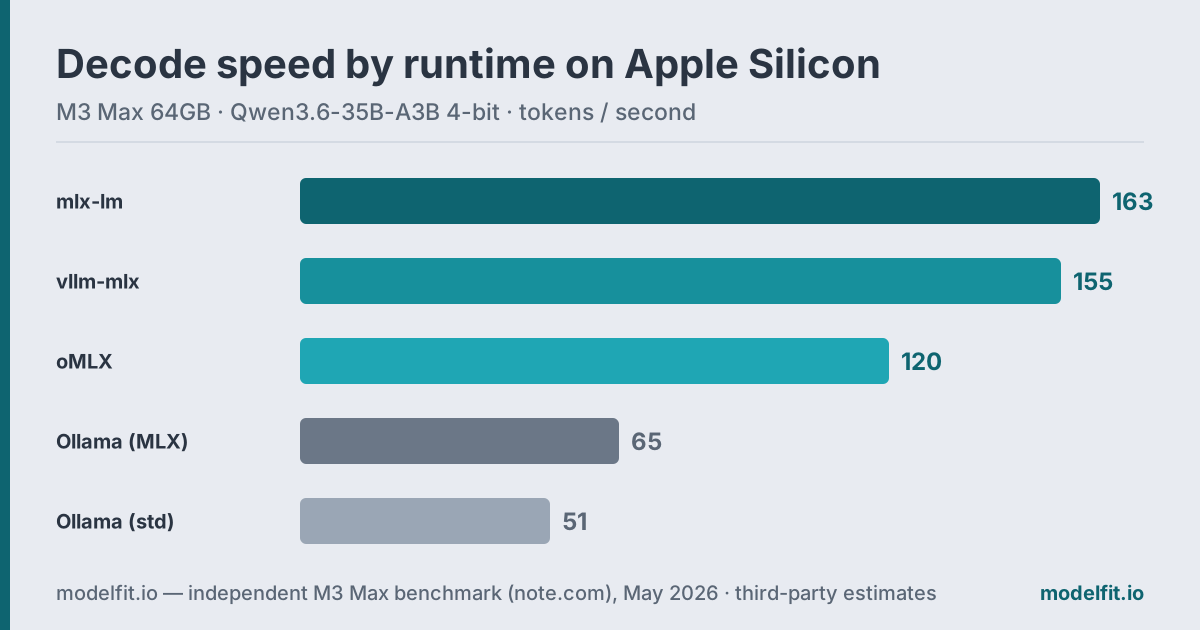
Here is how the runtimes stack up on the same machine, an M3 Max (64 GB) running Qwen3.6-35B-A3B at 4-bit, measured independently in May 2026:
| Runtime | Decode tok/s | Best for |
|---|---|---|
| mlx-lm (raw) | 163 | Maximum single-user speed |
| vllm-mlx | 155 | Many concurrent users |
| oMLX | 120 | Coding agents, long context |
| Ollama 0.19 (MLX) | 65 | Easiest setup, 32GB+ Macs |
| Ollama (standard) | 51 | Older or 16GB Macs |
The five runtimes, by job
No single runtime wins every workload. Here is the short version of who each one is for.
- Ollama: the default. CLI and daemon, one-line model pulls, now MLX-accelerated on 32GB+ Macs. Start here unless you have a reason not to.
- mlx-lm: Apple's official Python package and the layer the others build on. Fastest raw tok/s, but you live in the terminal (GitHub).
- LM Studio: the GUI. Pick MLX or llama.cpp per model, browse and download in a click. Best for no-terminal users. See our LM Studio no-terminal guide.
- oMLX: the agent server (more below). SSD-backed KV cache, OpenAI and Anthropic APIs, native menu-bar app (GitHub).
- vllm-mlx / macMLX: niche picks: vllm-mlx for heavy concurrency, macMLX for a dependency-free native app.
Why oMLX is the coding-agent pick
oMLX wins a different race: time to first token on long, repeated context. A coding agent resends a large shared context (your files, the system prompt) every single turn. Most servers throw away the KV cache after each response, forcing a full re-prefill. On 50,000 to 100,000 tokens, that is 30 to 90 seconds of waiting before the model says anything (oMLX author, Hacker News).
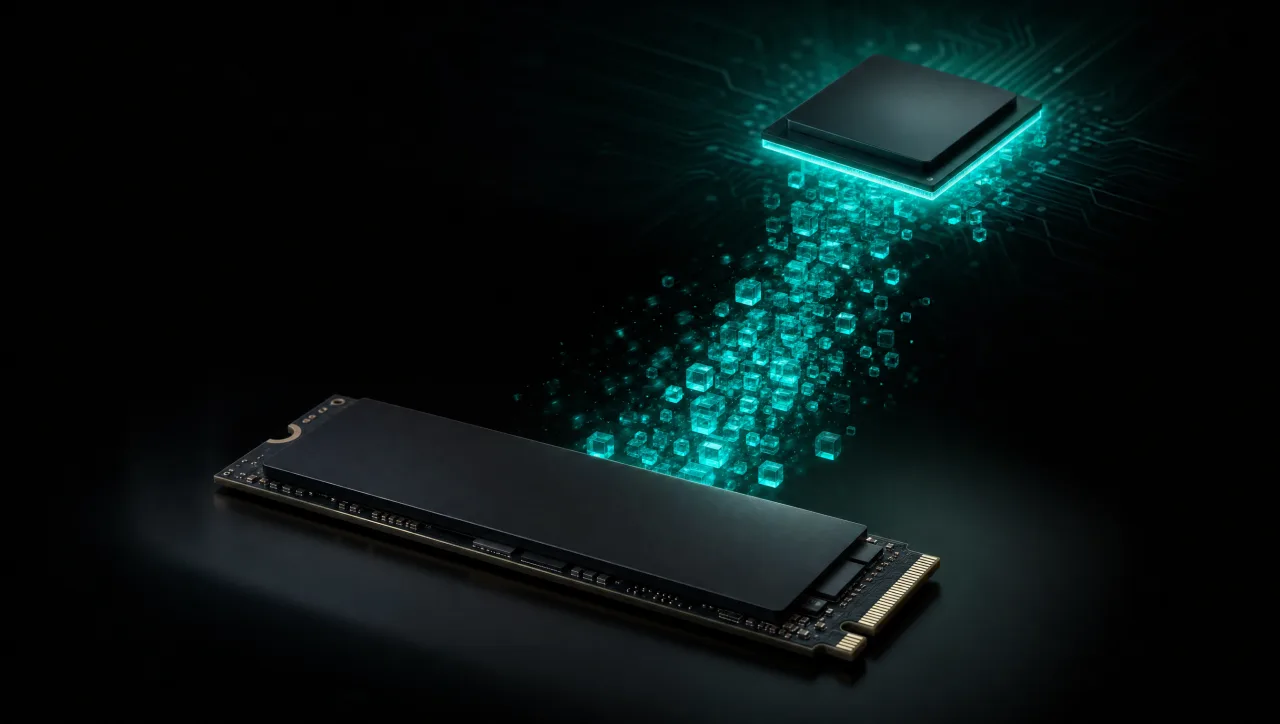
oMLX fixes this with a two-tier KV cache: a hot tier in RAM backed by a cold tier written to SSD in safetensors format. On a matching prefix it restores the cache from disk instead of recomputing it, and the cache survives a server restart. That drops repeat-prefix time-to-first-token from 30-90 seconds to 1-3. Add continuous batching through mlx-lm's BatchGenerator (eight concurrent requests by default, configurable), OpenAI and Anthropic-compatible endpoints, and a native menu-bar app, and you get a server built for Claude Code and Cursor rather than for benchmarks. It is Apache-2.0 licensed and has passed 18,000 GitHub stars.
One clarification, because the names collide. oMLX persists the KV cache, the computed attention state. That is different from projects like ssd-llm, which stream model weights from SSD to fit a 70B model into small RAM. One trades disk for instant context; the other trades speed for capacity.
Which runtime should you use?
The honest answer is that it depends on what you are doing, so match the runtime to the job:
- You just want it to work: Ollama. On a 32GB+ M5 it is now genuinely fast, and nothing else is this easy.
- You want maximum tok/s: mlx-lm, or LM Studio if you prefer a GUI over the terminal.
- You run a coding agent on large context: oMLX. Its SSD cache is the only thing here that fixes agent stalls.
- You serve many users at once: vllm-mlx.
Match the model to your machine first. A 35B model wants real headroom. See how much RAM you need for a local LLM, then run the ModelFit wizard to get a pick for your exact chip, or compare numbers on the benchmark page.
FAQ
Does Ollama 0.19 use MLX on every Mac?
No. The MLX backend is a preview that needs more than 32 GB of unified memory and, at launch, accelerates only the Qwen3.5 architecture. Macs with 8 or 16 GB keep using the previous Metal path until support widens.
Is MLX always faster than llama.cpp on Apple Silicon?
Usually, but not always. MLX leads by about 1.4x on dense models and up to 3x on mixture-of-experts models at normal context lengths. Above roughly 30,000 tokens, llama.cpp's FlashAttention can win on prefill.
What makes oMLX different from running mlx-lm directly?
oMLX adds a two-tier KV cache (RAM plus SSD) that persists attention across requests and restarts. For agents that resend a big shared prefix, it cuts time-to-first-token from 30-90 seconds to 1-3. It also adds continuous batching and a native menu-bar app.
Can I use these runtimes with Claude Code or Cursor?
Yes. oMLX exposes both OpenAI and Anthropic-compatible endpoints and auto-configures Claude Code, Codex, and OpenClaw. Ollama and LM Studio also expose OpenAI-compatible APIs that these tools accept.
Which Apple Silicon chip benefits most from MLX?
M5-class chips see the largest jump. Apple's own research shows up to a 4x time-to-first-token speedup over M4, driven by 28% more memory bandwidth (153 versus 120 GB/s). M3 Max and M4 Max still deliver strong MLX performance.
Match this model to a machine that can run it: by RAM tier for Apple Silicon, or by VRAM for an NVIDIA GPU.
The weekly local-AI refresh
New open-weight models, real Apple Silicon benchmarks, and the one model worth running on your Mac this week. Free, one email a week, unsubscribe anytime.
By subscribing you agree to our Privacy Policy and to receive the weekly email. Unsubscribe anytime.
Have questions? Reach out on X/Twitter