TL;DR: A base Mac Mini M4 with 16 GB RAM can run Qwen3.5-35B-A3B at 17.3 tok/s with zero swap, per one documented independent test using llama.cpp's --mmap flag (source). The model is a Mixture-of-Experts (35B total, only 3B active per token), and memory-mapping lets macOS page expert weights from the NVMe SSD on demand. Pair it with Gemma 4 E2B/E4B for a free 3-tier local AI stack that offloads 30-40% of cloud calls.
Everyone told you that a 35-billion-parameter model needs 32 GB of RAM minimum. They were wrong. At least for MoE models on Apple Silicon. In April 2026, a growing number of developers are running Qwen3.5-35B-A3B on the base Mac Mini M4 with 16 GB of unified memory, hitting 17+ tokens per second and keeping 81% of RAM free. The trick is one llama.cpp flag and a model architecture that activates only a fraction of its weights per token.
This guide breaks down exactly how it works, why it doesn't crash the system, and how to pair the 35B heavy tier with smaller Gemma 4 models for a complete local AI stack that genuinely replaces cloud inference for routine work.
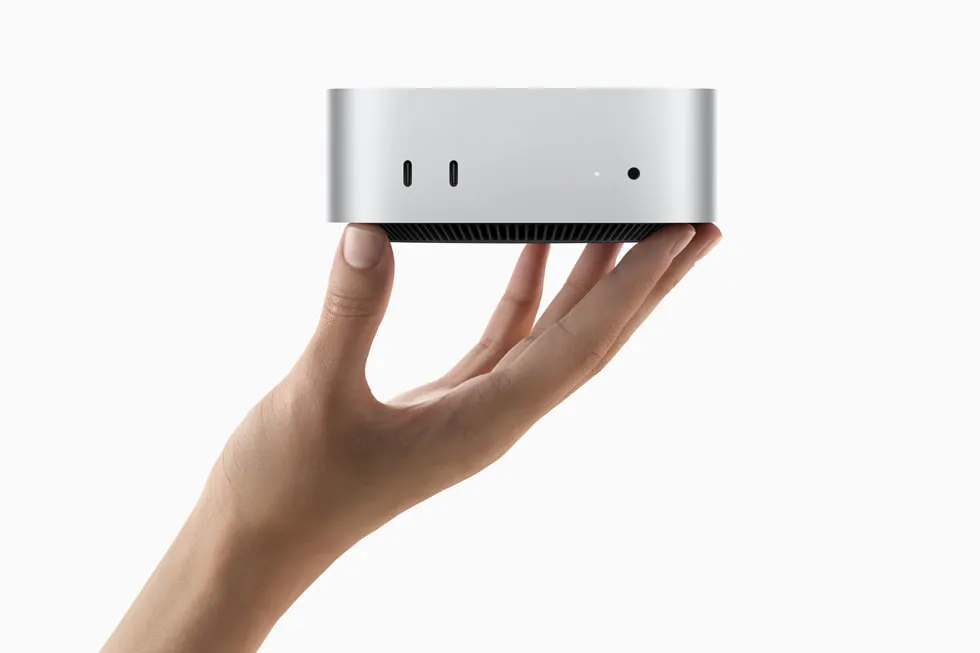
How Does a 35B Model Fit in 16 GB of RAM?
A 35B Mixture-of-Experts model fits in 16 GB by memory-mapping the weight file to the SSD and letting macOS page in only the experts needed for each token. Two things make it possible: the MoE architecture itself, and how mmap interacts with Apple Silicon's unified memory.
Qwen3.5-35B-A3B has 35 billion total parameters but only 3 billion are active per forward pass (Unsloth documentation). A router network inside the model picks a small subset of expert sub-networks for each token. The other 90% of the weights sit idle.
When llama.cpp is launched with --mmap, it does not load the whole GGUF file into RAM. Instead:
- Shared layers (attention, embeddings, normalization) stay resident in RAM, roughly 4-6 GB
- Expert weights are paged in from the NVMe SSD only when that expert is activated
- The macOS page cache keeps recently touched experts hot, so repeated patterns speed up over time
- The rest of the 13 GB quantized file lives on disk, touched occasionally
None of this is theoretical. Apple published the foundational research, **"LLM in a Flash: Efficient Large Language Model Inference with Limited Memory"**, in December 2023, and presented it at ICLR in January 2026. The paper shows flash-paged inference can run models up to 2x the available DRAM with a 4-5x speedup on CPU and 20-25x on GPU compared to naive loading. The M1 Max test bed hit 6 GiB/s linear read speeds from SSD, which is more than enough to keep MoE inference unblocked.
The M4 Mac Mini has two advantages that push this further:
1. Unified memory: no PCIe bottleneck between CPU and GPU. "GPU layers" and "CPU layers" read from the same pool.
2. Fast NVMe SSD: paging latency is low enough that MoE inference doesn't stall waiting for weights.
Qwen3.5-35B-A3B on Mac Mini M4: One Independent Test's Numbers
Here are the numbers one independent test reported for running Qwen3.5-35B-A3B on a base Mac Mini M4 with 16 GB RAM, using the Unsloth UD-IQ3_XXS quantization (13 GB on disk):
| Metric | Ollama (default load) | llama.cpp + --mmap |
|---|---|---|
| Decode speed | Timed out at 10 min | 17.3 tok/s |
| Swapouts | 4.3 million | 0 |
| Memory used | 26 GB attempted | ~4-6 GB resident |
| Memory free | System froze | 81% |
| Tokens produced | 0 | Normal generation |
Get told when a better model fits your Mac Mini M6 16 GB
One email when a new open-weight model beats these picks on your machine, plus the Thursday weekly.
For: Mac Mini M6 16 GB
Source: local-llm-35b-mac-mini-gemma-swap post and walter-grace/mac-code GitHub repo documenting the setup.
The counter-intuitive finding, per that same source: the 35B model runs faster than a dense 9B model on the same hardware (17.3 vs 12.6 tok/s decode). Four times the total parameters, but each token still only routes through 3 B of active weights, giving less compute per token and better quality per compute dollar.
Three Tiers, One Mac Mini: The Local AI Stack
Not every task needs 35B reasoning. A smart local setup runs three tiers on the same machine, routing each request to the smallest model that can handle it.
| Tier | Model | Params (active) | Job | Typical latency |
|---|---|---|---|---|
| Fast | Gemma 4 E2B | 2.3B (of 5.1B total) | Message triage, classification, urgency scoring | <2 sec |
| Primary | Gemma 4 E4B | 4.5B (of 8B total) | Context compression, summarization, email preprocessing | 3-6 sec |
| Heavy | Qwen3.5-35B-A3B | 3B active (of 35B) | Daily signal compression, Claude fallback, complex preprocessing | 15-30 sec |
The fast tier runs on every incoming message. It classifies message type (question, request, idea, greeting, FYI) and estimates urgency. If the message is a greeting or pure FYI, the agent skips the cloud call entirely. When it runs on every single message all day, the difference between 2 seconds and 8 seconds is the difference between background noise and user-visible friction.
The primary tier handles actual language understanding, condensing a 500-word message to 30 words before a cloud model sees it, generating fallback summaries, writing email preprocessing headers. The 4.5B effective parameters of Gemma 4 E4B sit in the sweet spot: too big for the 2.3B model to replace, too small a job to justify the 35B.
The heavy tier does two things. First, it compresses an entire day of automation signals (errors, metrics, task outcomes) into a dense planning brief before the nightly cloud call, saving roughly 15x in token cost on long-context reasoning calls. Second, it sits in the resilience chain as a fallback when the cloud API is rate-limited or offline.
Gemma 4 vs Qwen 3.5: Why Google's New Model Changed the Stack
Google released **Gemma 4** on April 2, 2026 under the Apache 2.0 license, a meaningful change from prior Gemma versions, which had commercial usage restrictions and MAU caps (VentureBeat coverage). For production infrastructure running 24/7, the license change matters as much as the benchmark gains.
The benchmark gains are substantial. The Gemma 4 31B scores 89.2% on AIME 2026 with no tools, compared to Gemma 3 27B's 20.8% on the same benchmark. The edge models also clear a respectable bar:
| Model | AIME 2026 | LiveCodeBench | Context | Multimodal |
|---|---|---|---|---|
| Gemma 4 E2B (2.3B) | 37.5% | 44.0% | 128K | Text + image + audio |
| Gemma 4 E4B (4.5B) | 42.5% | 52.0% | 128K | Text + image + audio |
| Gemma 4 31B (dense) | 89.2% | - | 256K | Text + image |
| Gemma 4 26B (A4B MoE) | - | - | 256K | Text + image |
In a head-to-head 10-prompt classification benchmark and 3-text summarization benchmark on the same Mac Mini:
| Task | Qwen 3.5 (9B / 4B) | Gemma 4 (E4B / E2B) | Speedup |
|---|---|---|---|
| Classification (fast tier) | 8.5 sec | 1.9 sec | 4.4x |
| Summarization (primary tier) | 50 sec | 28 sec | 1.8x |
The accuracy gap (~70% Gemma vs ~80% Qwen on a small test set) was mostly gray-area classifications where either answer was defensible. For a system that runs triage on every incoming message, the 4x speed win is the decisive factor.
The other capability gap closed: multimodal on small models. Gemma 4 E2B and E4B handle image and audio input natively. A triage layer that previously had to skip voice messages and screenshots now processes them in the same pipeline.
The mmap Setup: Step-by-Step
Here is the exact setup that runs on a base Mac Mini M4 with 16 GB RAM. Total disk footprint for all three tiers: about 22 GB.
Step 1: Install Ollama for the Fast + Primary Tiers
brew install ollama

ollama pull gemma4:e2b        # Fast tier: 7.2 GB, 2.3B effective
ollama pull gemma4:e4b        # Primary tier: 9.6 GB, 4.5B effective

export OLLAMA_FLASH_ATTENTION=1
export OLLAMA_KV_CACHE_TYPE=q8_0
export OLLAMA_KEEP_ALIVE=10m
export OLLAMA_MAX_LOADED_MODELS=1   # critical on 16 GB
OLLAMA_MAX_LOADED_MODELS=1 is mandatory on a 16 GB system. Without it, Ollama will try to keep the fast and primary models resident simultaneously, and the memory pressure will freeze the machine. One model at a time, idle-unload after 10 minutes.
Step 2: Install llama.cpp for the Heavy Tier
brew install llama.cpp

pip3 install huggingface-hub
python3 -c "from huggingface_hub import hf_hub_download; \
  hf_hub_download('unsloth/Qwen3.5-35B-A3B-GGUF', \
  'Qwen3.5-35B-A3B-UD-IQ3_XXS.gguf', \
  local_dir='~/.local/share/llama-models')"
The Unsloth UD-IQ3_XXS quant weighs in at 13 GB on disk: aggressive enough to fit the mmap budget, high enough quality that classification, summarization, and fallback reasoning still work.
Step 3: Launch llama-server with the mmap Flag
llama-server \
  --model ~/.local/share/llama-models/Qwen3.5-35B-A3B-UD-IQ3_XXS.gguf \
  --port 8081 \
  --ctx-size 16384 \
  --n-gpu-layers 0 \
  --mmap \
  --flash-attn on \
  --threads 8
Two flags look wrong at first glance:
--n-gpu-layers 0: on Apple Silicon you'd normally offload all layers to the Metal GPU. With--mmap, you want the OS to manage paging, not the GPU driver. Unified memory means CPU and GPU read from the same pool anyway, so compute still uses the GPU cores regardless.--ctx-size 16384: 16K context is enough for daily signal compression or a long fallback conversation. The mmap trick handles model weights, but the KV cache still lives in RAM. Push it too high and you eat into the 4-6 GB shared-layer budget.
Ollama (ports 11434) and llama.cpp (port 8081) coexist on the same machine without conflict. The heavy tier is started on demand; the fast + primary tiers run as a LaunchAgent, always on.
The Thinking Mode Trap
Both Qwen 3.5 and Gemma 4 ship with a "thinking mode" that generates chain-of-thought reasoning before the final answer. For complex analysis, thinking mode is a real capability. For classification, it is catastrophic.
With thinking enabled, a one-word classification task ("is this a question or a request?") takes 30+ seconds while the model generates 500 tokens of internal reasoning before emitting request. Disable thinking with one parameter and the same task runs in under 1 second.
# Gemma 4 classification, thinking disabled
curl localhost:11434/api/chat -d '{
  "model": "gemma4:e2b",
  "messages": [{"role": "user", "content": "Classify: question/request/greeting"}],
  "think": false,
  "options": {"num_ctx": 4096}
}'
Same think: false parameter works for both Qwen and Gemma through Ollama. For the heavy tier on llama.cpp, thinking is controlled via the system prompt: same principle, different surface.
The Resilience Chain: Local Models as Cloud Failover
Local tiers are not only about cost. They're about uptime. A sane chain looks like this:
Cloud (Sonnet) → retry → Cloud (Haiku) → Local 35B → Local Primary → External API → QueueThe system tracks cooldowns per model. If the cloud hits a rate limit, it records the retry-after window and skips directly to the next tier on subsequent requests, with no pointless retries against a known-cold endpoint. When a cloud OAuth token expires overnight, the system detects that all cloud tiers will fail with the same expired token and skips straight to local fallback. The agent keeps running. Degraded responses get marked [Local Fallback] so the operator can see the difference in the morning logs.
For an agent running nightly tasks while you sleep, this is the difference between waking up to a degraded output and waking up to a silent failure.
What This Costs vs Cloud-Only
On a Mac Mini M4 drawing roughly 40-65 W under inference load, 24/7 operation costs about $25/year in electricity (vminstall.com cost analysis). Against a typical cloud AI subscription of $70-$100/month, an entry Mac Mini M4 (now $799, up from $599 before Apple's May 2026 price rise, Bloomberg) breaks even in 8-11 months if it fully replaces that subscription, or in roughly two to three years if it only offloads the 30-40% of calls that are routine.
| Path | Upfront | Monthly | Year 1 total |
|---|---|---|---|
| Cloud only | $0 | $100 | $1,200 |
| Mac Mini M4 + cloud (hybrid) | $799 | $60 | $1,519 |
| Mac Mini M4 + cloud (year 2+) | $0 | $60 | $720 |
The break-even economics work only if the local tier actually handles meaningful volume. For message triage, context compression, and nightly signal summarization (the jobs the fast and primary tiers were designed for), the call volume is high enough that offloading even 30% noticeably extends a cloud subscription's useful life.
Frequently Asked Questions
Does this mmap trick work on M1, M2, or M3 Macs too?
Yes. The --mmap flag works on any Apple Silicon Mac. The M4 has a faster NVMe SSD (roughly 3.1 GB/s read) which reduces page-in latency, but the Apple "LLM in a Flash" research was done on an M1 Max. M1/M2/M3 Macs with 16 GB will run the same 35B MoE setup with slightly lower throughput.
Why doesn't this work for dense models like Llama 3 70B?
Because dense models activate every parameter for every token. With no MoE routing, the OS would have to page through the entire 40+ GB weight file for each forward pass, saturating the SSD bandwidth. MoE is the critical ingredient: when only 3 B of 35 B weights touch each token, the SSD has time to serve the few pages that matter.
Can I run Gemma 4 26B A4B as the heavy tier instead?
In theory, yes, but benchmark it before swapping. Gemma 4 ships a 26B A4B Mixture-of-Experts variant (26B total, 4B active) which is architecturally similar to Qwen3.5-35B-A3B. The GGUF support in llama.cpp is new as of April 2026, and mmap behavior for this specific variant has not been widely stress-tested on 16 GB. Keep Qwen 35B as the heavy tier until the Gemma 26B alternative has been measured under real load.
Why not use MLX instead of llama.cpp?
MLX doesn't support mmap-style flash paging out of the box. Apple's MLX is excellent for models that fit in RAM. It uses Metal directly and hits strong throughput on dense 7B-13B models. But the 35B-in-16GB trick relies on macOS-managed memory mapping of a file larger than RAM, which llama.cpp supports natively. Use MLX for the 8B-and-under tier, llama.cpp for the over-RAM tier.
What happens if the SSD fills up or thermally throttles?
Inference slows down but doesn't crash. Mmap-paged inference is bounded by SSD read bandwidth. The M4 Mac Mini's NVMe is not typically a thermal bottleneck during LLM workloads. The compute load on the GPU cores generates far more heat than the sequential reads from flash. Filesystem fragmentation or a 95%+ full SSD would hurt paging latency; keep at least 20% of the internal storage free.
Does the mmap approach work for fine-tuning too?
No. mmap is inference-only. Fine-tuning requires holding gradients, optimizer state, and forward activations simultaneously in RAM, which defeats the paging strategy. For LoRA fine-tuning on Apple Silicon, stick to models that fit cleanly in memory (7B-9B dense, or A3B MoE without the mmap stretch).
Where Local AI on $600 Hardware Is Going
A year ago, "useful local inference" meant a $3,000 GPU and a noisy desktop. In April 2026, a silent, fanless-adjacent entry Mac Mini M4 runs three production AI tiers simultaneously, including a 35 B parameter heavy-tier model that some cloud APIs charge dollars per million tokens to access.
The ingredients that made this possible converged in the last 18 months: MoE architectures that activate a fraction of their parameters per token, Apple's LLM-in-a-Flash research validating SSD-paged inference, unified memory on Apple Silicon that eliminates CPU-GPU copy overhead, and Apache 2.0 open weights from Google and Alibaba that make 24/7 commercial use legally safe.
If you're sizing an AI development setup in 2026, the spreadsheet argument for the base Mac Mini M4 has gotten hard to beat. Not for replacing frontier cloud models (they're still better at multi-step agentic work), but for the 30-40% of tasks that are really classification, compression, or fallback. On those, local is free, fast, and always online.
See the related best LLM on Mac Mini M4 16GB guide for Ollama-only setups, the Claude Code local LLM setup for agentic coding workflows, and the Qwen 3.5 35B vs DeepSeek V3 Mac comparison for heavy-tier alternatives.
---
Sources and further reading:- Apple: LLM in a Flash (arXiv 2312.11514)
- Apple Machine Learning Research: Efficient Large Language Model Inference
- Google: Gemma 4 announcement
- VentureBeat: Gemma 4 Apache 2.0 licensing analysis
- Unsloth: Qwen 3.5 local setup documentation
- walter-grace/mac-code: reference implementation on GitHub
- Ante Kapetanovic: Ollama vs llama.cpp vs MLX with Qwen3.5 35B benchmarks
- Hugging Face: unsloth/gemma-4-E2B-it-GGUF model card
Don't miss the next one for your Mac Mini M6 16 GB
This article covers one moment. Get one email when a newer open-weight model fits your machine better, plus the Thursday weekly with what changed.
For: Mac Mini M6 16 GB
Where to Buy for Local AI
best configsArchive your model library off the internal drive. Quantized models run 5 to 40GB each, so 2TB holds dozens with room to spare.
Check price on Amazon40Gbps external storage fast enough to run models from. Pair it with an M.2 drive for a portable model vault.
Check price on AmazonMore ports for the external drives, displays and peripherals around a local-AI workstation.
Check price on AmazonCheapest way into the 24GB sweet spot: runs 14B models comfortably and 30B MoE via mmap.
Check price at AppleMore headroomLoads 70B-class models and leaves room for a multi-model local stack.
Check price at AppleModelFit may earn a commission on purchases through these links, at no extra cost to you.
Have questions? Reach out on X/Twitter