TL;DR: The Mac Mini M4 Pro with 64GB ($1,999–$2,499) is the best value local AI machine in 2026. It runs 30B-class models at 12–18 tok/s, costs ~$25/year in electricity, and gives every gigabyte of RAM directly to your GPU. The 16GB base model works for 8B models only. Skip the 24GB — it's a trap.
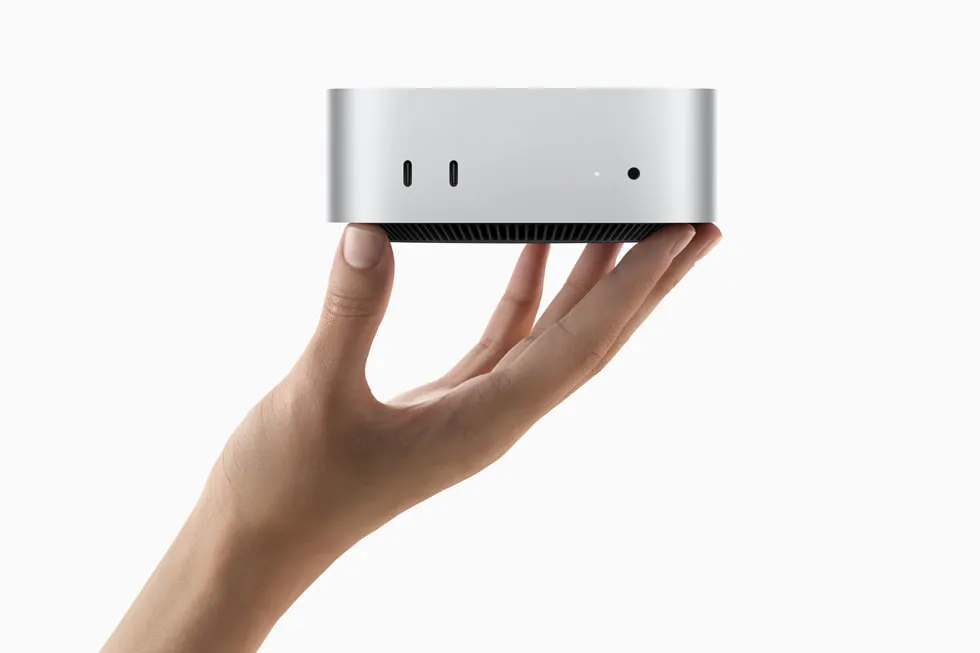
The Mac Mini has become the default recommendation on r/LocalLLaMA for anyone building a local AI setup. The reasons are simple: unified memory means no VRAM ceiling, Apple Silicon gets real performance per watt, and the form factor is smaller than most external hard drives. Starting at $599 for the M4 base, no other machine offers this combination of price, silence, and AI capability.
But which configuration should you actually buy? The answer depends on what models you want to run — and the gap between tiers is bigger than Apple's marketing suggests. This guide breaks down the three configurations that matter, with real benchmarks, real power numbers, and honest recommendations.
Why the Mac Mini Beats a GPU Rig for Local AI
The Mac Mini's killer advantage isn't raw speed — it's the unified memory architecture. On a PC with an RTX 4070, you might have 64GB of system RAM but only 12GB of VRAM. Your model tops out at 7B on the GPU (vminstall.com). Anything larger spills into system RAM across the PCIe bus, and performance craters.
On a Mac Mini with 64GB, the GPU can address all 64GB with no PCIe copy penalty. A 32B model runs fully on-GPU. That's the entire advantage in one sentence.
| Feature | Mac Mini M4 Pro 64GB | PC + RTX 4090 |
|---|---|---|
| Usable AI memory | 64 GB (unified) | 24 GB VRAM |
| Memory bandwidth | 273 GB/s | ~1 TB/s (VRAM only) |
| Max model on GPU | 32B Q4 comfortably | 14B Q4 max |
| Power draw (AI load) | ~40W | ~450W |
| Idle power | Under 5W | ~80W |
| Noise | Silent (fanless base) | Loud under load |
| Price | $1,999–$2,499 | $2,500+ (GPU + system) |
The RTX 4090 has ~1 TB/s VRAM bandwidth, which is faster per-byte than Apple Silicon's 273 GB/s. But 24GB of VRAM is a hard wall. Once you need more than 24GB for a model, the Mac Mini wins outright.
Power matters too. The Mac Mini M4 idles under 5W and peaks around 40–65W during inference (xda-developers, insiderllm.com). Running 24/7, that costs about $25/year in electricity. An RTX 4090 system pulling 450W under load costs 10x that.
Benchmark Results: What Actually Runs on Each Configuration
Here's the part that matters. Real-world token generation speeds using Ollama and MLX on each Mac Mini tier:
M4 Base — 16GB ($599)
| Model | Quantization | Speed | Verdict |
|---|---|---|---|
| Llama 3.2 8B | Q4 | 18–22 tok/s | Usable chat speed |
| 8B models (optimized MLX) | Q4 | 28–35 tok/s | Fast with MLX |
| 14B+ models | Any | Swaps to disk | Don't try |
The $599 base model is a legitimate local AI machine for 8B models. At 28–35 tok/s with optimized MLX, it feels real-time for chat and coding tasks (like2byte.com). But 16GB means ~9–11GB available after macOS overhead — so 14B+ models will swap and become unusable.
Buy this if: You want to experiment with local AI on a budget and 8B models meet your needs.M4 Pro — 24GB ($1,399)
| Model | Quantization | Speed | Verdict |
|---|---|---|---|
| Mistral 7B | Q4 | 20+ tok/s | Fast |
| DeepSeek R1 14B | Q4 | ~10 tok/s | Technically runs |
| 14B with context | Q4 | Degrades fast | KV cache eats RAM |
The 24GB configuration is the trap tier. A 14B model loads and generates at ~10 tok/s, which sounds fine — until you add context. KV cache grows with conversation length, and on 24GB there's almost no headroom. The r/LocalLLaMA community consensus is blunt: 24GB is "unusable for real work" with meaningful context windows on 14B+ models.
At $1,399, you're paying $800 more than the base model for marginal gains. That $800 is better saved toward the 64GB configuration.
Buy this if: You specifically need the M4 Pro's extra CPU/GPU cores for non-AI tasks and 8B models are sufficient for your AI use case.M4 Pro — 64GB ($1,999–$2,499)
| Model | Quantization | Speed | Verdict |
|---|---|---|---|
| Qwen 2.5 32B | Q4 | 10–15 tok/s | Production quality |
| DeepSeek R1 32B | 4-bit | 11–14 tok/s | Strong reasoning |
| 30B general | Q4–Q5 | 12–18 tok/s | Sweet spot |
| Qwen3.5 35B-A3B | 4-bit | 60–106 tok/s | MoE speed demon |
This is the sweet spot. The M4 Pro's 273 GB/s memory bandwidth combined with 64GB of unified memory makes it a "legit 30B-class local machine" according to r/LocalLLaMA users. You can run production-quality models with real context windows and still have RAM left for macOS and development tools.
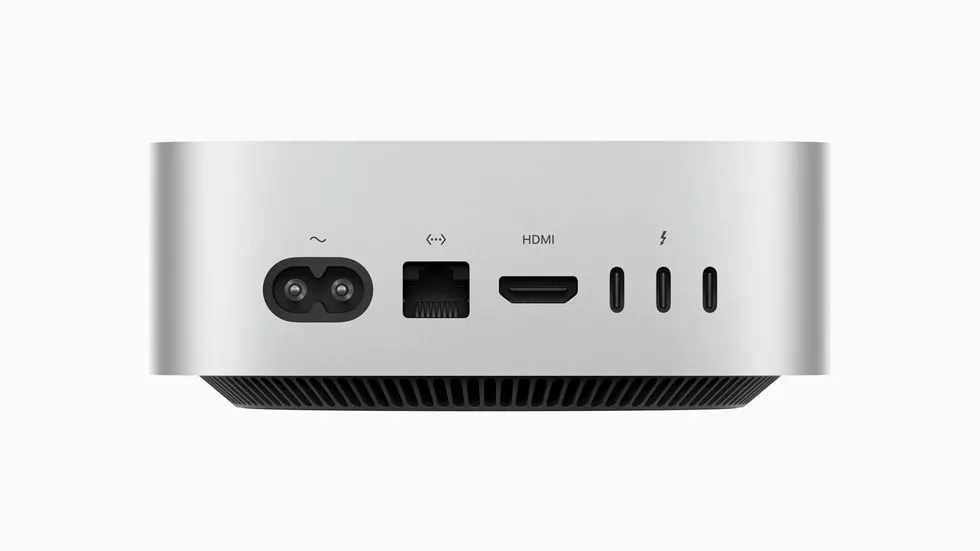
At Q4 quantization, a 32B model uses roughly 18–20GB. That leaves 40+ GB for KV cache, macOS, and your browser. You can hold long conversations without performance degradation.
Buy this if: You want a serious local AI workstation. This is the configuration we recommend for most readers.The ROI Math: Mac Mini vs. Cloud
Cloud GPU pricing makes the Mac Mini pay for itself fast. An H100 instance costs roughly $2.39/hour. Running local inference on a Mac Mini costs about $3/month in electricity.
| Mac Mini M4 Pro 64GB | Cloud H100 | |
|---|---|---|
| Upfront cost | $1,999–$2,499 | $0 |
| Monthly cost | ~$3 (electricity) | $200–$400+ |
| Break-even | ~1,000 inference hours | — |
| Privacy | 100% local | Data leaves your network |
| Availability | Always on | Depends on provider |
If you run inference for more than ~4 hours per day, the Mac Mini pays for itself within 6–12 months. After that, every hour of inference is essentially free. For developers running agentic coding workflows, that threshold is easy to hit.
Software Stack: Getting Started in 5 Minutes
The local AI software ecosystem on macOS is mature. Here's the stack most people use:
Ollama is the default choice. One command to install, Metal acceleration out of the box, and it exposes an OpenAI-compatible API on port 11434.# Install Ollama
curl -fsSL https://ollama.com/install.sh | sh
# Pull and run a model
ollama run qwen2.5:32b
# Or for the MoE speed demon
ollama run qwen3.5:35b-a3b
What the Mac Mini Can't Do
Being honest about limitations saves you money and frustration:
- 40B+ dense models: You need 96GB+ RAM (Mac Studio territory) for models like Llama 3.1 70B. On 64GB, they either don't load or swap to disk.
- FP16 inference on 64GB: Not realistic for large models. Stick to Q4 or Q5 quantization — the quality difference is minimal for chat and coding tasks.
- Multi-user heavy serving: KV cache grows per user. A 32B model serving 3+ concurrent users with long contexts will degrade on 64GB. For that, you need a Mac Studio or a dedicated GPU server.
- Training or fine-tuning: The Mac Mini can handle LoRA fine-tuning on small models, but serious training needs more compute. This is an inference machine.
- Agentic coding at scale: Running Qwen3-Coder-Next at 4-bit needs ~46GB, leaving only ~15GB for KV cache. That's tight for complex multi-file coding sessions.
Should You Wait for M5?
The M5 chips are expected later in 2026. Reddit users report Apple is targeting roughly 3x prompt processing speed over M4. If prompt processing speed is your bottleneck (batch jobs, RAG pipelines), waiting could make sense.
But token generation speed is memory-bandwidth-bound, and M5 bandwidth improvements are expected to be incremental (~15–20%). If you need a machine now and your workload is primarily interactive chat and coding, the M4 Pro 64GB is already excellent.
The Recommendation
Here's the short version:
| Budget | Buy This | Why |
|---|---|---|
| Under $700 | M4 16GB ($599) | 8B models at 28–35 tok/s. Great starter. |
| $1,500–$2,500 | M4 Pro 64GB ($1,999+) | 30B models, production quality. Best value. |
| $2,500+ | M4 Max 64GB | 273+ GB/s bandwidth, 106 tok/s on MoE models. |
| Any budget | Skip the 24GB | $800 premium for marginal AI gains. |
The 64GB M4 Pro Mac Mini is the machine we recommend most. It runs models that match GPT-3.5 quality at 12–18 tok/s, costs $25/year to operate, fits on your desk, and keeps your data completely private. No other hardware at this price point comes close.
FAQ
How much does it cost to run a Mac Mini for AI 24/7?
About $25 per year. The Mac Mini M4 idles under 5W and peaks at 40–65W during inference. At average US electricity rates ($0.16/kWh), continuous operation costs roughly $2–3 per month. Compare that to an RTX 4090 system at 450W, which costs $50+/month under constant load.
Can the Mac Mini M4 16GB run DeepSeek or Llama 3?
Yes, but only 7–8B parameter variants. The base 16GB model runs Llama 3.2 8B at 18–22 tok/s and optimized 8B models at 28–35 tok/s via MLX. Models above 14B parameters will swap to disk and become too slow for interactive use. For DeepSeek R1, you need the 14B distill at minimum, which requires 24GB+.
Is 24GB enough for local AI on Mac Mini?
For 7–8B models, yes. For anything larger, no. The r/LocalLLaMA community widely considers 24GB "unusable for real work" with 14B+ models because KV cache consumes the remaining headroom during longer conversations. The jump from 24GB to 64GB is where local AI becomes genuinely useful for production-quality models.
Mac Mini or Mac Studio for local AI?
Mac Mini M4 Pro 64GB handles everything up to 32B models. Choose the Mac Studio only if you need 96GB+ RAM for 40B–70B models, or if you want the M4 Max/Ultra chips for higher memory bandwidth. For most local AI use cases — chat, coding, RAG — the Mac Mini is the better value.
What's the best model to run on Mac Mini 64GB?
For general use, Qwen 2.5 32B Q4 delivers the best balance of quality and speed at 10–15 tok/s. For reasoning tasks, DeepSeek R1 32B at 11–14 tok/s is excellent. For raw speed, Qwen3.5 35B-A3B (a Mixture-of-Experts model) hits 60–106 tok/s because it only activates 3B parameters per token while maintaining 35B-class quality.
Related Model Families:- Qwen Models — Best all-rounders for Mac Mini
- DeepSeek Models — Reasoning-focused models
- Llama Models — Most popular open-weight family
Where to Buy for Local AI
best configsCheapest way into the 24GB sweet spot — runs 14B models comfortably and 30B MoE via mmap.
Loads 70B-class models and leaves room for a multi-model local stack.
ModelFit may earn a commission on purchases made through these links, at no extra cost to you. Recommendations are based on local-AI performance, not commissions.
The weekly local-AI refresh
New open-weight models, real Apple Silicon benchmarks, and the one model worth running on your Mac this week. Free, one email a week, unsubscribe anytime.
Have questions? Reach out on X/Twitter