TL;DR: The MacBook Pro M4 Pro with 24GB RAM is one of the best local AI machines you can buy. Qwen3.5 9B is the clear all-rounder — near-frontier quality, native multimodal, ~7GB loaded at interactive speed. Qwen3 14B adds deliberate reasoning depth. And with 24GB, you can push up to Qwen3.5 27B — quality that would have required a workstation two years ago.
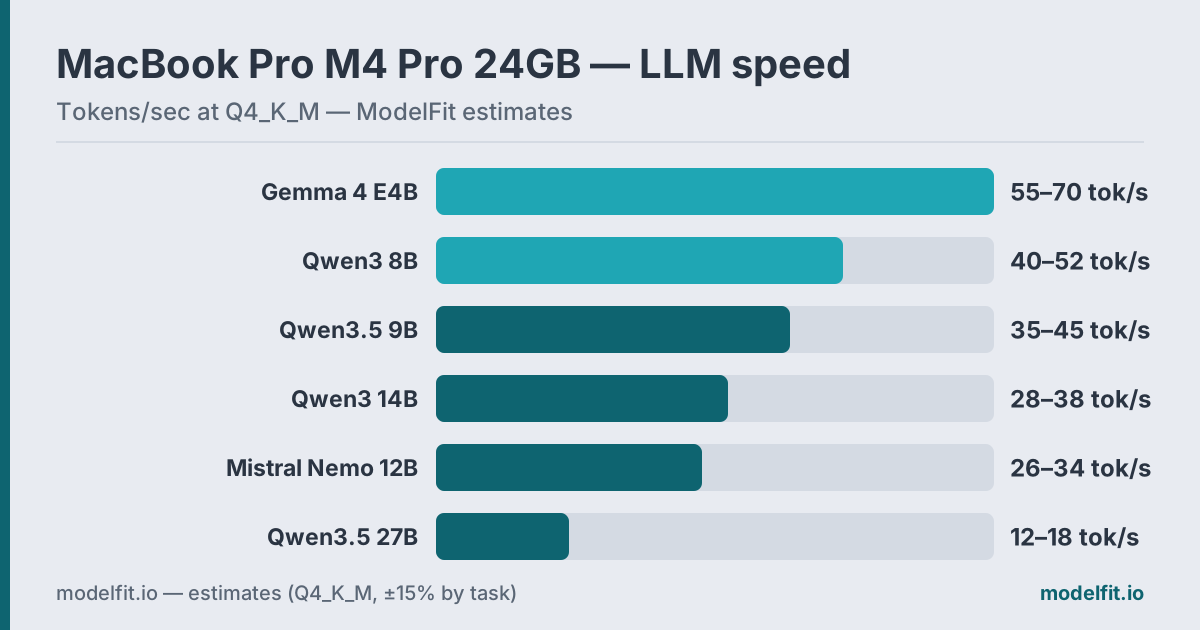 Estimated token generation on the MacBook Pro M4 Pro 24GB (273 GB/s) at Q4_K_M. ModelFit estimates.
The MacBook Pro M4 Pro is where local AI gets serious. The M4 Pro's 273 GB/s memory bandwidth — more than double the base M4's 120 GB/s — translates directly to faster token generation. Combined with 24GB of unified memory, active cooling that prevents thermal throttling, and Apple's tight CPU/GPU integration, this machine handles models that the Air can only dream about.
This guide covers which models work best on 24GB M4 Pro hardware, how fast they actually run, and what you should skip. For chip variants and other memory tiers, see the MacBook Pro device page.
How Much RAM Do You Actually Have for Models?
Same question, same honest answer.
On a 24GB MacBook Pro M4 Pro, your real budget breaks down like this:
| Allocation | Typical Size |
|---|---|
| macOS kernel + services | ~2–3 GB |
| Active apps (browser, editor) | ~2–4 GB |
| Available for LLM | ~17–20 GB |
With nothing else open, you can push a model up to ~20GB. With a browser and a few apps running, plan on ~17GB. The math is simple: Q4_K_M quantization costs roughly 0.55 GB per billion parameters. A 9B model needs ~7GB. A 14B model needs ~9.5GB. A 27B model like qwen3.5:27b needs ~16GB — tight but real.
That extra 8GB over the M4 Air's 16GB base changes what's possible. Models that swapped and crawled at 16GB now load cleanly and run at full GPU speed. The 24GB tier is where local AI stops feeling like a compromise.
The M4 Pro Bandwidth Advantage
The M4 Pro's 273 GB/s unified memory bandwidth is the key spec for LLM inference. Token generation speed is directly proportional to how fast you can stream model weights from memory to the compute units — and 273 GB/s is 2.27x faster than the base M4, and 75% faster than the M3 Pro (Apple).
What that means in practice: a 14B model that runs at ~17 tok/s on an M4 Air will hit 28–38 tok/s on M4 Pro. Same model, same quantization, faster output — because bandwidth is the bottleneck, not compute.
The MacBook Pro also adds active cooling. Unlike the fanless Air, the Pro sustains peak performance indefinitely under continuous inference load. No thermal throttling on long generation tasks.
Performance Expectations
On M4 Pro 24GB, here's what realistic token generation looks like with Ollama at Q4_K_M:
| Model | VRAM Used | Tokens/sec | Best For |
|---|---|---|---|
| Qwen3.5 9B Q4_K_M | ~7.0 GB | 35–45 tok/s est. | All-purpose |
| Qwen3 14B Q4_K_M | ~9.5 GB | 28–38 tok/s | Deliberate quality |
| Qwen3.5 27B Q4_K_M | ~16.0 GB | 12–18 tok/s est. | High-quality writing |
| Gemma 4 E4B Q4_K_M | ~4.0 GB | 55–70 tok/s est. | Max speed, multimodal |
| Mistral Nemo 12B Q4_K_M | ~9.5 GB | 26–34 tok/s est. | Multilingual writing |
| Llama 3.3 70B Q4_K_M | ~43.0 GB | ✗ doesn't fit | — |
| Qwen3 8B Q4_K_M | ~5.5 GB | 40–52 tok/s | Speed fallback |
70B models at Q4 require ~43GB — they don't fit in 24GB. Don't try to force it. On 48GB machines, they run at 8–12 tok/s and feel real; on 24GB, they either fail to load or swap to CPU memory and crawl at under 2 tok/s.
The Top Picks
1. Qwen3.5 9B — Best All-Rounder
Qwen3.5 9B is the model that makes the M4 Pro feel like a cloud API. At ~7GB loaded, it leaves 13GB of headroom, takes text and images natively, and carries a 262K context window. Its quality competes with previous-generation 30B-class models — while the 273 GB/s bus pushes it to an estimated 35–45 tok/s.
ollama run qwen3.5:9bOne model now covers chat, analysis, coding, and image questions at interactive speed. On 24GB you can keep it loaded permanently and still run a second model beside it.
2. Qwen3 14B — Best Deliberate Reasoning
Qwen3 14B remains the structured-work specialist. It uses ~9.5GB at Q4_K_M and runs at 28–38 tok/s on M4 Pro — fast enough that its extra reasoning depth costs you nothing in patience.
ollama run qwen3:14bWhat keeps it on the list is the hybrid thinking mode — toggle chain-of-thought on demand with /think and /no_think in the prompt. For multi-step analysis, debugging sessions, and careful writing, the explicit reasoning is worth the slot.
3. Qwen3.5 27B — Best Quality at 24GB
This is the headline capability of having 24GB. Qwen3.5 27B at Q4_K_M loads in ~16GB — tight, but workable when you close your browser. The quality jump is real: more coherent long-form writing, stronger instruction following on complex prompts, and the same 262K context as its smaller siblings.
ollama run qwen3.5:27bAt an estimated 12–18 tok/s, it's slower than the 9B and 14B. But for tasks where you're writing one long document or running a deep analysis conversation, the speed is acceptable and the output is the best this machine can produce. The previous-generation ollama run gemma3:27b is a same-footprint alternative if you prefer Gemma's style.
4. Gemma 4 E4B — Maximum Speed, Multimodal
Google's Gemma 4 E4B uses Per-Layer Embeddings to act bigger than its ~4GB footprint. On the M4 Pro's bandwidth it flies — an estimated 55–70 tok/s — while reading screenshots, charts, and photos alongside text.
ollama run gemma4:e4bThis is the instant-response lane: quick questions, summaries, image lookups. It barely dents the 24GB budget, so it pairs naturally with the 27B for a fast-plus-deep setup.
5. Mistral Nemo 12B — Best Multilingual Writing
Mistral Nemo 12B earns its slot on prose. At ~9.5GB and an estimated 26–34 tok/s on M4 Pro, it produces natural, fluent text across languages — a different flavor from the Qwen family that many writers prefer for reader-facing work.
ollama run mistral-nemo:12bWhere this shines: translations, drafts, emails, and anything where tone matters more than raw reasoning. For code and analysis, stay with the Qwen picks — our coding on MacBook Pro tier list ranks the options for development work.
What to Avoid
70B models — At Q4_K_M, they require ~43GB. On 24GB they either refuse to load or swap catastrophically. Wait until you have 48GB. 32B models at Q4 — A Q4_K_M 32B model needs ~21GB. Technically possible on 24GB with nothing else running, but practically unreliable. Under any real OS load it will start swapping. The quality gain over qwen3.5:27b is marginal; the instability is real. Q8 quantization above 14B — Q8_0 of a 14B model occupies ~15GB. That's workable. But Q8 of a 27B model blows past your entire budget with no OS headroom. Stick to Q4_K_M or QAT for anything above 14B. Old-generation 13B models — Llama 2 13B, Mistral 7B, Vicuna 13B. These were the standard in 2023–2024. On M4 Pro with 24GB, Qwen3.5 9B runs faster and scores far higher on modern benchmarks. There's no reason to run older architectures when modern alternatives are better in every metric.Why the MacBook Pro M4 Pro Beats the Air for AI
Two hardware differences make a genuine impact:
Memory bandwidth. The M4 Pro's 273 GB/s is 2.27x the M4's 120 GB/s. Since token generation speed scales linearly with bandwidth for memory-bound workloads (all LLMs are memory-bound), you get roughly 2x the tokens per second at identical model sizes. Active cooling. The MacBook Pro's fan means it sustains peak GPU throughput indefinitely. The Air throttles after ~20–30 minutes of continuous heavy inference. For batch processing, long document generation, or running an AI coding session for hours, the Pro maintains consistent speed that the Air cannot.For occasional use, the Air works fine. For sustained, heavy workloads, the Pro's advantages are tangible.
Quick Reference
| Use Case | Recommended Model | Command |
|---|---|---|
| General assistant | Qwen3.5 9B | ollama run qwen3.5:9b |
| Deliberate reasoning | Qwen3 14B | ollama run qwen3:14b |
| Best quality | Qwen3.5 27B | ollama run qwen3.5:27b |
| Maximum speed | Gemma 4 E4B | ollama run gemma4:e4b |
| Multilingual writing | Mistral Nemo 12B | ollama run mistral-nemo:12b |
| Proven fallback | Qwen3 8B | ollama run qwen3:8b |
Getting started from zero? The Ollama setup guide covers install to first prompt, and the best LLM for MacBook overview compares every configuration.
FAQ
What is the best LLM for MacBook Pro M4 Pro 24GB?
Qwen3.5 9B is the best all-rounder. It fits in ~7GB, handles text and images natively, and runs at an estimated 35–45 tok/s on M4 Pro. For deliberate reasoning, Qwen3 14B adds explicit chain-of-thought. For maximum quality when speed matters less, Qwen3.5 27B is achievable on 24GB.Can you run 27B models on 24GB RAM?
Yes, but carefully. Qwen3.5 27B at Q4_K_M uses ~16GB. That works on 24GB if you close memory-heavy apps. With a browser, Slack, and your IDE open, you may be borderline. Close what you can, then run Ollama — it loads the model in a single contiguous block.
Is 24GB enough for serious local AI work?
For most developers and power users, yes. 24GB handles every practical model size below 32B parameters, and current 9B-class models deliver quality that needed 30B+ a generation ago. The gap to 48GB matters mostly if you want 32B+ models or need to run multiple large models simultaneously.
How fast is the M4 Pro for LLMs compared to the M4?
Roughly 2x faster for token generation, because LLM inference speed scales with memory bandwidth. M4 Pro has 273 GB/s vs M4's 120 GB/s. A 14B model that runs at ~17 tok/s on base M4 will hit 28–38 tok/s on M4 Pro — the same model running at interactive speed.
Does the MacBook Pro M4 Pro thermal throttle during AI inference?
No, not under normal conditions. The active cooling fan maintains chip temperature within operating range indefinitely. Unlike the fanless MacBook Air (which throttles after 20–30 minutes of sustained inference), the Pro sustains full GPU throughput for hours. This makes a real difference for batch processing and coding sessions. Considering an upgrade? Our Apple M5 Pro & M5 Max local LLM guide breaks down the next-gen bandwidth and RAM gains.
Should I use Ollama or MLX for M4 Pro?
For most users, Ollama is simpler to set up and works with all models via GGUF format. MLX (via mlx-lm or LM Studio's MLX backend) can be 10–20% faster on Apple Silicon for specific model architectures because it's optimized at a lower level. Try Ollama first; switch to MLX if you want to squeeze extra performance from a specific model you use daily.
Can I run two models simultaneously on 24GB?
Yes, within reason. Qwen3.5 9B plus Gemma 4 E4B together use ~11GB — comfortable. Qwen3.5 9B plus Qwen3 14B need ~16.5GB — possible with light app load. Running the 27B alongside anything else is borderline. In practice, most people load one model at a time; Ollama's model caching makes switching fast (~2–5 seconds from the second load onward).
Related Model Families:- Qwen Models — Best all-rounders for 24GB MacBook Pro
- Mistral Models — Efficient models with great performance-per-parameter
- Gemma Models — Google's efficient multimodal family
Where to Buy for Local AI
best configsRuns 30B models with headroom; active cooling sustains long inference without throttling.
Loads 70B models locally — the most capable AI laptop config.
ModelFit may earn a commission on purchases made through these links, at no extra cost to you. Recommendations are based on local-AI performance, not commissions.
The weekly local-AI refresh
New open-weight models, real Apple Silicon benchmarks, and the one model worth running on your Mac this week. Free, one email a week, unsubscribe anytime.
Have questions? Reach out on X/Twitter