TL;DR: The MacBook Air M4 with 16GB RAM can comfortably run models up to ~14B parameters at Q4 quantization. Qwen3.5 9B is the best all-rounder — it fits in ~7GB, ships native multimodal support, and rivals 30B-class models from a year ago. For speed, Qwen3.5 4B is the pick. Gemma 4 E4B covers fast multimodal chat, and Qwen3 8B remains a proven runner-up.
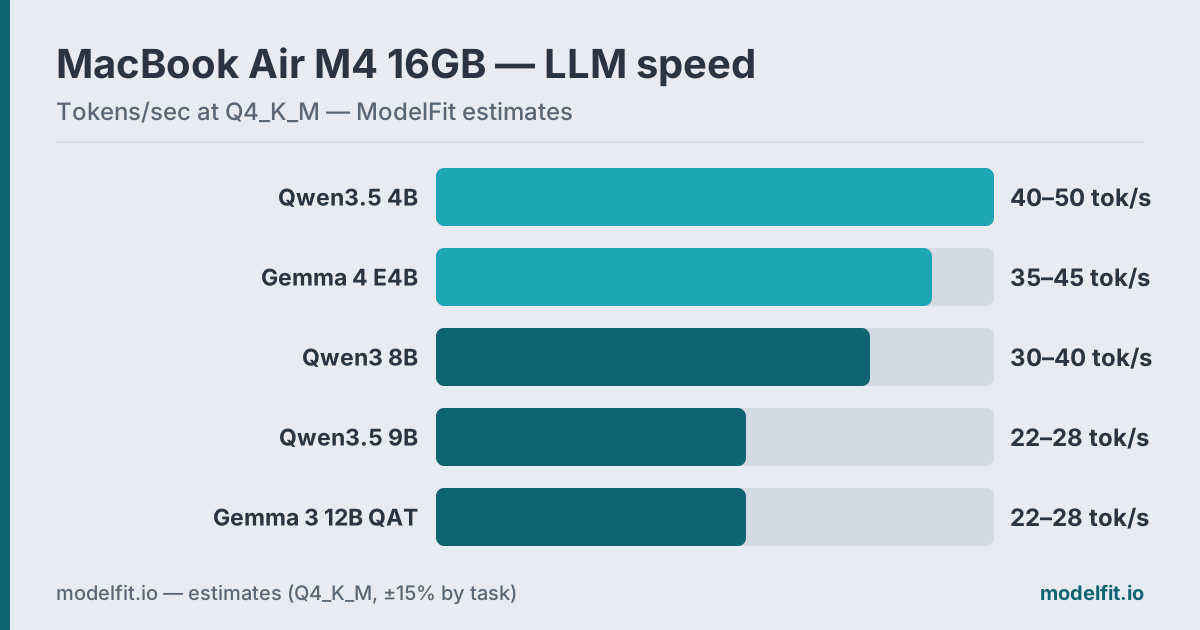 Estimated token generation on the MacBook Air M4 16GB at Q4_K_M. ModelFit estimates.
The MacBook Air M4 is the most popular laptop among local AI hobbyists in 2026 — and for good reason. Apple's unified memory architecture means you're not fighting separate CPU and GPU VRAM pools. Every gigabyte works for inference. With 16GB and a 120 GB/s memory bus, you have a legitimate local AI machine in a fanless chassis.
This guide covers exactly which models work, which ones to skip, and how fast each one runs on the M4's base configuration. For the full spec rundown and chip variants, see the MacBook Air device page.
How Much RAM Do You Actually Have for Models?
This is the question nobody answers honestly. macOS reserves memory aggressively.
On a 16GB MacBook Air M4, your real budget looks like this:
| Allocation | Typical Size |
|---|---|
| macOS kernel + services | ~2–3 GB |
| Active apps (browser, editor) | ~2–4 GB |
| Available for LLM | ~9–12 GB |
With nothing else open, you can push a model up to ~12GB. With a browser and a couple of tabs open, plan for ~9GB max. The rule of thumb: Q4_K_M quantization costs roughly 0.55 GB per billion parameters. A 4B model needs ~3.5GB. A 9B model needs ~7GB. A 14B model needs ~9.5GB — doable, but tight.
The M4 chip's 120 GB/s LPDDR5X bandwidth (confirmed by Apple, Wikipedia) is roughly 20% faster than the M3 (100 GB/s). Since LLM token generation is memory-bandwidth-bound, that directly translates to faster token output — no other hardware change matters more for inference speed.
Performance Expectations
On M4 with 16GB, here's what realistic token generation looks like with Ollama at Q4_K_M:
| Model | VRAM Used | Tokens/sec | Best For |
|---|---|---|---|
| Qwen3.5 9B Q4_K_M | ~7.0 GB | 22–28 tok/s | Quality all-rounder |
| Qwen3.5 4B Q4_K_M | ~3.5 GB | 40–50 tok/s | Speed, coding |
| Gemma 4 E4B Q4_K_M | ~4.0 GB | 35–45 tok/s | Multimodal chat |
| Qwen3 8B Q4_K_M | ~5.5 GB | 30–40 tok/s | Proven runner-up |
| Gemma 3 12B QAT | ~8.0 GB | 22–28 tok/s | Quality writing |
Models above ~14B parameters are a gamble at 16GB — they technically load but swap into CPU memory under load, tanking speed to under 5 tok/s. Skip them until you have 24GB.
The Top Picks
1. Qwen3.5 9B — Best All-Rounder
Qwen3.5 9B is the model the 16GB Air was waiting for. At ~7GB loaded, it fits with your browser open, and its output quality competes with 30B-class models from the previous generation. It handles text and images natively — no separate vision model needed — and its 262K context window swallows long documents whole.
ollama run qwen3.5:9b2. Qwen3.5 4B — Best Speed
When responsiveness matters more than depth, Qwen3.5 4B delivers the best quality-per-gigabyte in its class. At ~3.5GB loaded and 40–50 tok/s, it answers faster than you can read — and it punches well above its size on coding and agent tasks. Pair it with an editor through our coding on MacBook Air guide for a fast local autocomplete setup.
ollama run qwen3.5:4bIt shares the 9B's multimodal input and 262K context. For quick chat, summaries, and inline code suggestions, this is the model you keep loaded all day.
3. Gemma 4 E4B — Best Efficient Multimodal
Google's Gemma 4 E4B uses Per-Layer Embeddings to act like a larger model while loading only ~4GB. It handles text and image input, runs at 35–45 tok/s on the M4, and is the same model that powers on-device AI on high-end phones — which means it is tuned hard for efficiency.
ollama run gemma4:e4b4. Qwen3 8B — Proven Runner-Up
The previous-generation favorite still earns a slot. Qwen3 8B is battle-tested, widely documented, and runs at 30–40 tok/s in ~5.5GB. Its hybrid thinking mode handles reasoning chains on-device with no extra memory cost.
ollama run qwen3:8bTrained on 36 trillion tokens, it beats older 13B models on reasoning. If you already use it and it covers your needs, there is no urgency to switch — but new installs should start with Qwen3.5 9B, which is sharper at a similar speed class.
5. Gemma 3 12B QAT — Quality Writing Fallback
Google's QAT (Quantization-Aware Training) variant of Gemma 3 12B survives aggressive quantization with minimal quality loss. At ~8GB loaded, it remains a solid choice for creative writing and nuanced instructions, though Qwen3.5 9B now matches or beats it in less memory.
ollama run gemma3:12bIt earned its reputation on 16GB machines (r/LocalLLaMA), and it still writes beautifully. Pick it if you prefer Gemma's prose style.
What to Avoid
70B models — They load but swap to RAM-backed CPU inference. Expect 2–4 tok/s. Not usable. 32B models at Q4 — Technically ~20GB, which exceeds the 16GB ceiling. Some people try extreme quantization (Q2_K, IQ2_XS) to squeeze them in, but quality degrades badly. Not worth it. Q8_0 of 12B+ models — At Q8, a 12B model occupies ~13GB. That's your entire addressable budget with no room for macOS. The model will swap and crawl. Use Q4_K_M or QAT instead.The M4's Secret Weapon: Neural Engine
The M4 includes a 16-core Neural Engine rated at 38 TOPS — more than double the M3's capability (PCMag). Ollama and llama.cpp currently use the GPU cores for inference, not the Neural Engine directly. But MLX (Apple's machine learning framework) can tap the Neural Engine for certain operations.
For MLX-format models via the mlx-lm package, M4 shows a 15–20% speed boost over M3 on the same model sizes — mostly from bandwidth improvements and better GPU scheduling.
Cooling Reality Check
The MacBook Air M4 is fanless. That's fine for 95% of use cases. But under continuous LLM load — say, generating a 2,000-word document or a long reasoning chain — the chip will throttle after 20–30 minutes of sustained inference.
Practical impact: For interactive chat (short exchanges), you'll never notice. For batch processing or long-context generation, performance can drop 15–25% during thermal throttling.If you run AI tasks for hours at a stretch, the MacBook Pro M4 or Mac Mini M4 (with active cooling) maintain consistent throughput. For a bigger jump in sustained speed and model size, our Apple M5 Pro & M5 Max local LLM guide covers the next-gen leap. For the average user, the Air handles the job well.
Quick Comparison Table
| Use Case | Recommended Model | Command |
|---|---|---|
| General assistant | Qwen3.5 9B | ollama run qwen3.5:9b |
| Maximum speed | Qwen3.5 4B | ollama run qwen3.5:4b |
| Multimodal chat | Gemma 4 E4B | ollama run gemma4:e4b |
| Proven fallback | Qwen3 8B | ollama run qwen3:8b |
| Quality writing | Gemma 3 12B QAT | ollama run gemma3:12b |
New to Ollama? Our Ollama setup guide walks through installation in under five minutes, and the best LLM for MacBook overview compares picks across every configuration.
FAQ
Can a MacBook Air M4 with 16GB really run LLMs?
Yes, effectively. The M4's unified memory means all 16GB is available to the GPU for inference — unlike PC setups where you're limited to discrete VRAM (typically 8–12GB on mid-range cards). Models up to 13–14B parameters run smoothly at Q4 quantization.
What's the maximum model size for 16GB?
Practically, a 13B model at Q4_K_M (~9GB) is your sweet spot. A 14B model fits but is tight. Anything above 14B risks swapping to CPU memory, which drops speed below 5 tok/s — unusable for interactive chat.
Is 16GB enough, or should I get 24GB?
16GB handles 95% of local AI use cases comfortably. 24GB unlocks 14–20B models cleanly and is worth it if you plan to run models for extended sessions or experiment with larger architectures. If you're buying new, 24GB is the better investment for longevity.
Does the MacBook Air M4 throttle during AI tasks?
Yes, but only during sustained inference (20+ minutes continuous). For normal chat sessions — even 1–2 hour conversations — throttling rarely triggers because inference is bursty, not constant. Batch generation or processing long documents may see 15–25% slowdown.
Which format is better: GGUF (Ollama) or MLX?
For most users, GGUF via Ollama is simpler and well-supported. MLX format (used via mlx-lm or LM Studio's MLX backend) can be 10–20% faster on M4 for certain models because it's optimized for Apple Silicon at a lower level. Both formats run the same models — pick based on your tooling preference.
Is Qwen3.5 9B better than Qwen3 8B?
Yes, in nearly every way that matters. Qwen3.5 9B adds native multimodal input, a 262K context window, and a clear quality lift on reasoning and instruction following — in only ~1.5GB more memory. Qwen3 8B is a touch faster and remains well-supported, but for new installs the 9B is the better starting point.
Related Model Families:- Qwen Models — All Qwen variants, RAM requirements, and benchmarks
- Gemma Models — Google's efficient models from E2B to 31B
- Phi Models — Microsoft's small-but-mighty models for low-RAM devices
Where to Buy for Local AI
best configs24GB unified memory is the practical floor for 14B models with room for everyday apps.
ModelFit may earn a commission on purchases made through these links, at no extra cost to you. Recommendations are based on local-AI performance, not commissions.
The weekly local-AI refresh
New open-weight models, real Apple Silicon benchmarks, and the one model worth running on your Mac this week. Free, one email a week, unsubscribe anytime.
Have questions? Reach out on X/Twitter